EasyManua.ls Logo

Sony FH-B411 - CD Player Operations; Playing a CD (Normal Playback)

Sony FH-B411
20 pages
Print Icon
To Next Page IconTo Next Page
To Previous Page IconTo Previous Page
Loading...
Playing
a
CD
(normal
play)
Playing
Tracks
in
Random
Order
(shuffle
play)
Playing
Tracks
in
the
Desired
Order
(programme
play)
Playing
Tracks
Repeatedly
(repeat
play)
6
Chapter
2:
the
CD
Player
Se
ee
Playing
a
CD
(normal
play)
You
can
play
CDs
in
four
modes:
normal,
shuffle,
programme
and
repeat.
The
mode
decides
which
tracks
(songs)
you
will
listen
to,
in
which
order
and
whether
or
not
they
will
repeat.
You
can
operate
the
stereo
system
on
the
unit
or
from
the
supplied
remote
commander.
Also,
the
CD
player
plays
12
cm
(5
inch)
and
8
cm
(3
inch)
CDs.
If
the
CD
is
supplied
with
an
adaptor,
remove
it
before
playing
the
CD.
Before
you
play
the
CD,
decrease
the
sound
level
by
turning
VOLUME
control
counterclockwise,
not
to
damage
the
speakers.
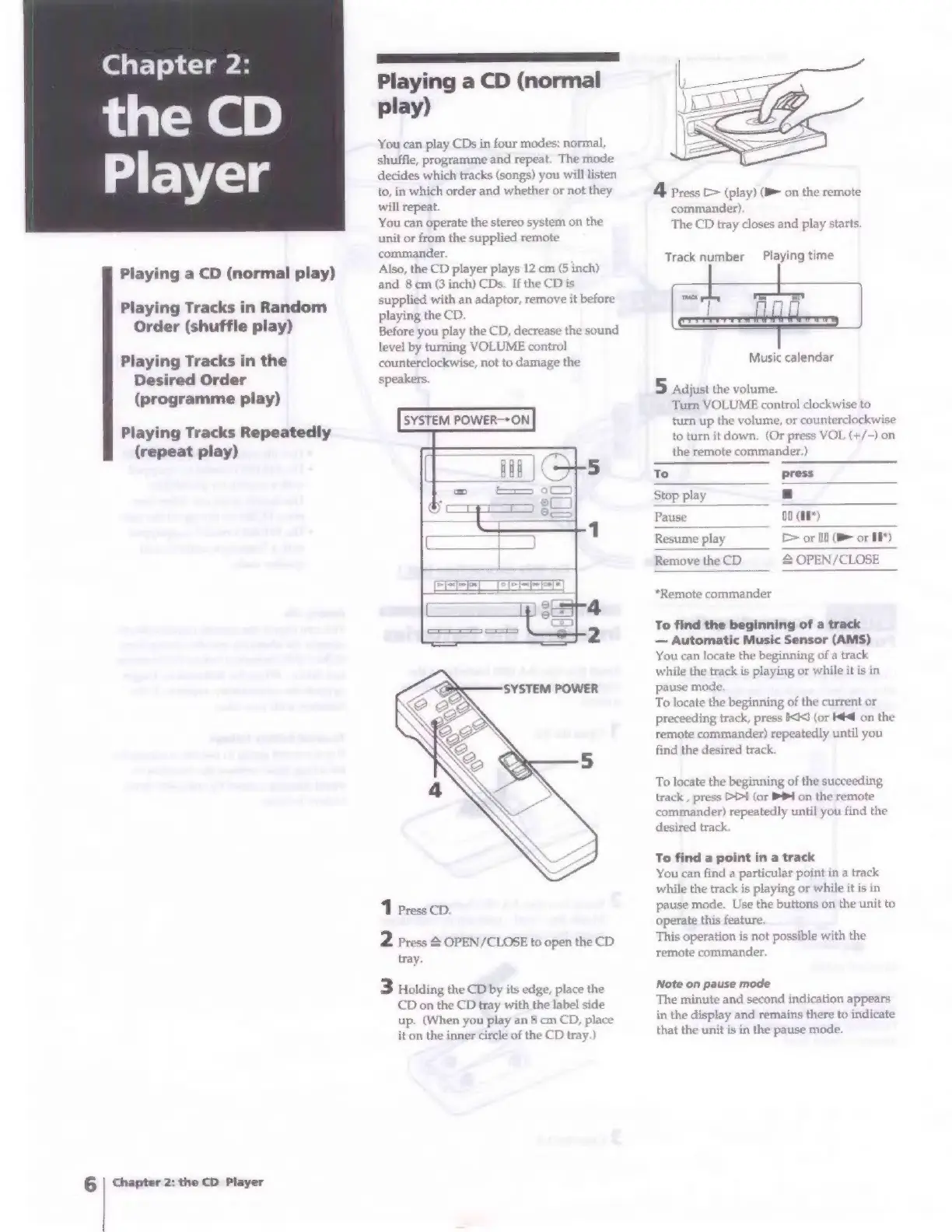
SYSTEM
POWER-*ON
SYSTEM
POWER
1
Press
CD.
2
Press
2
OPEN/CLOSE
to
open
the
CD
tray.
3
Holding
the
CD
by
its
edge,
place
the
CD
on
the
CD
tray
with
the
label
side
up.
(When
you
play
an
8
cm
CD,
place
it
on
the
inner
circle
of
the
CD
tray.)
4
Press
>
(play)
(B&
on
the
remote
commander)
The
CD
tray
closes
and
play
starts.
Track
number
Playing
time
air
Music
calendar
5
Adjust
the
volume.
Turn
VOLUME
control
clockwise
to
turn
up
the
volume,
or
counterclockwise
to
turn
it
down.
(Or
press
VOL
(+/-)
on
the
remote
commander.)
To
press
Stop
play
a
Pause
O0
(on)
Resume
play
>
or
00
(B
or
18")
Remove
the
CD
&
OPEN/CLOSE
“Remote
commander
To
find
the
beginning
of
a
track
Automatic
Music
Sensor
(AMS)
You
can
locate
the
beginning
of
a
track
while
the
track
is
playing
or
while
it
is
in
pause
mode.
To
locate
the
beginning
of
the
current
or
preceeding
track,
press
<<]
(or
K#4
on
the
remote
commander)
repeatedly
until
you
find
the
desired
track.
To
locate
the
beginning
of
the
succeeding
track
,
press
Dl
(or
PPI
on
the
remote
commander)
repeatedly
until
you
find
the
desired
track.
To
find
a
point
in
a
track
You
can
find
a
particular
point
in
a
track
while
the
track
is
playing
or
while
it
is
in
pause
mode.
Use
the
buttons
on
the
unit
to
operate
this
feature.
This
operation
is
not
possible
with
the
remote
commander.
Note
on
pause
mode
The
minute
and
second
indication
appears
in
the
display
and
remains
there
to
indicate
that
the
unit
is
in
the
pause
mode,

Related product manuals