EasyManua.ls Logo

Sony FH-B411 - Playing Tracks in Random Order (Shuffle Play); Playing Tracks in the Desired Order (Program Play)

Sony FH-B411
20 pages
Print Icon
To Next Page IconTo Next Page
To Previous Page IconTo Previous Page
Loading...
To
Do
this
Find
forward
Hold
down
Pi
and
quickly
ina
release
it
at
the
desired
track
point.
Go
backwards
Hold
down
IKK)
and
quickly
ina
release
it
at
the
desired
track
point.
Search
quickly
Press
0
and
hold
down
without
I<
or
DDI.
Press
>
or
listening
OU
again
at
the
desired
point.
To
check
the
remaining
or
total
playing
time
Use
the
TIME
button
on
the
player.
To
check
Press
Remaining
TIME
once
during
play.
time
in
a
track
=
ms
a:
aa
436
ae
Remaining
TIME
twice
during
play
time
inthe
CD
__
of
the
tracks
left.
Total
playing
TIME
in
stop
mode.
time
=
wud
43
ie
appears
for
a
few
seconds
Notes
*
You
can
check
the
remaining
time
during
normal,
shuffle
and
programme
play.
*
The
total
playing
time
and
number
of
tracks
also
appear
in
the
display
when
you
press
&
OPEN/CLOSE
to
close
the
CD
tray.
Notes
on
handling
discs
*To
keep
the
disc
clean,
handle
the
disc
by
its
edge.
Do
not
touch
the
surface.
*
Do
not
stick
paper
or
tape
onto
the
disc.
*
Do
not
expose
the
CD
to
direct
sunlight
or
heat
sources
such
as
hot
air
ducts,
nor
leave
it
in
a
car
parked
in
direct
sunlight
as
there
can
be
a
considerable
rise
in
temperature
inside
the
car.
If
there
is
no
CD
in
the
player
“no
dISC”
appears
in
the
display
when
you
press
>.
es
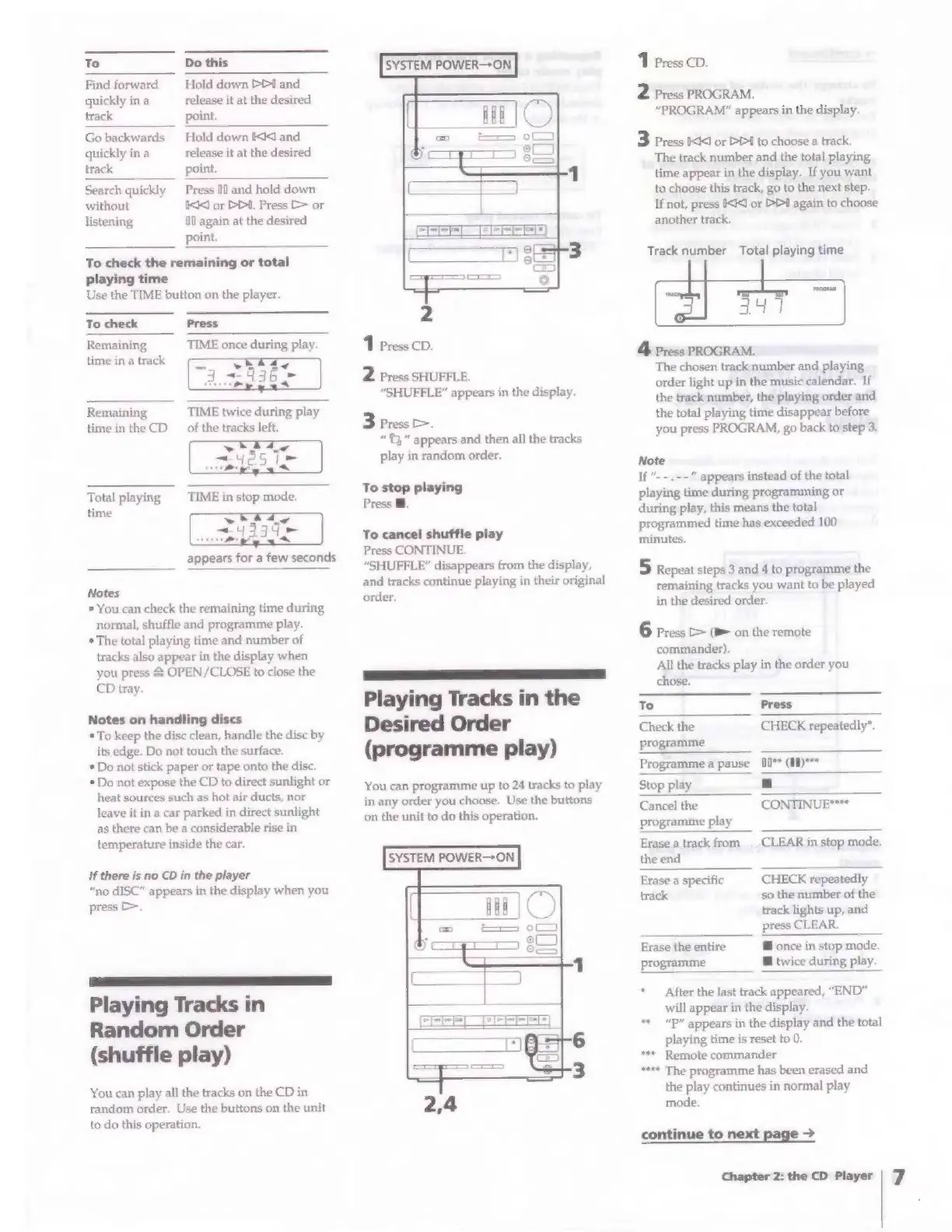
Playing
Tracks
in
Random
Order
(shuffle
play)
You
can
play
all
the
tracks
on
the
CD
in
random
order.
Use
the
buttons
on
the
unit
to
do
this
operation.
SYSTEM
POWER—-ON
2
Press
SHUFFLE.
“SHUFFLE”
appears
in
the
display.
3
Press
>,
“©”
appears
and
then
all
the
tracks
play
in
random
order.
To
stop
playing
Press
@.
To
cancel
shuffle
play
Press
CONTINUE.
“SHUFFLE”
disappears
from
the
display,
and
tracks
continue
playing
in
their
original
order,
_
Ee
eee
Playing
Tracks
in
the
Desired
Order
(programme
play)
You
can
programme
up
to
24
tracks
to
play
in
any
order
you
choose.
Use
the
buttons
on
the
unit
to
do
this
operation.
SYSTEM
POWER-+ON
1
Press
CD.
2
Press
PROGRAM.
“PROGRAM”
appears
in
the
display.
3
Press
IAC
or
DD!
to
choose
a
track.
The
track
number
and
the
total
playing
time
appear
in
the
display.
If
you
want
to
choose
this
track,
go
to
the
next
step.
If
not,
press
<I
or
D1
again
to
choose
another
track.
Track
number
Total
playing
time
ical
4
Press
PROGRAM.
The
chosen
track
number
and
playing
order
light
up
in
the
music
calendar.
If
the
track
number,
the
playing
order
and
the
total
playing
time
disappear
before
you
press
PROGRAM,
go
back
to
step
3.
Note
If
“--.--"
appears
instead
of
the
total
playing
time
during
programming
or
during
play,
this
means
the
total
programmed
time
has
exceeded
100
minutes.
5
Repeat
steps
3
and
4
to
programme
the
remaining
tracks
you
want
to
be
played
in
the
desired
order.
6
Press
>
(B
on
the
remote
commander).
All
the
tracks
play
in
the
order
you
chose.
To
Press
Check
the
CHECK
repeatedly*.
programme
Programme
a
pause
[0**
(#1)***
Stop
play
a
Cancel
the
CONTINUE****
programme
play
Erase
a
track
from
_
CLEAR
in
stop
mode.
the
end
Erase
a
specific
CHECK
repeatedly
track
so
the
number
of
the
track
lights
up,
and
press
CLEAR.
Erase
the
entire
@
once
in
stop
mode.
programme
@
twice
during
play.
*
After
the
last
track
appeared,
“END”
will
appear
in
the
display.
**
“P”
appears
in
the
display
and
the
total
playing
time
is
reset
to
0.
***
Remote
commander
****
The
programme
has
been
erased
and
the
play
continues
in
normal
play
mode.
continue
to
next
page
>
Chapter
2:
the
CD
Player
|
7

Related product manuals