HCD-EC599
9
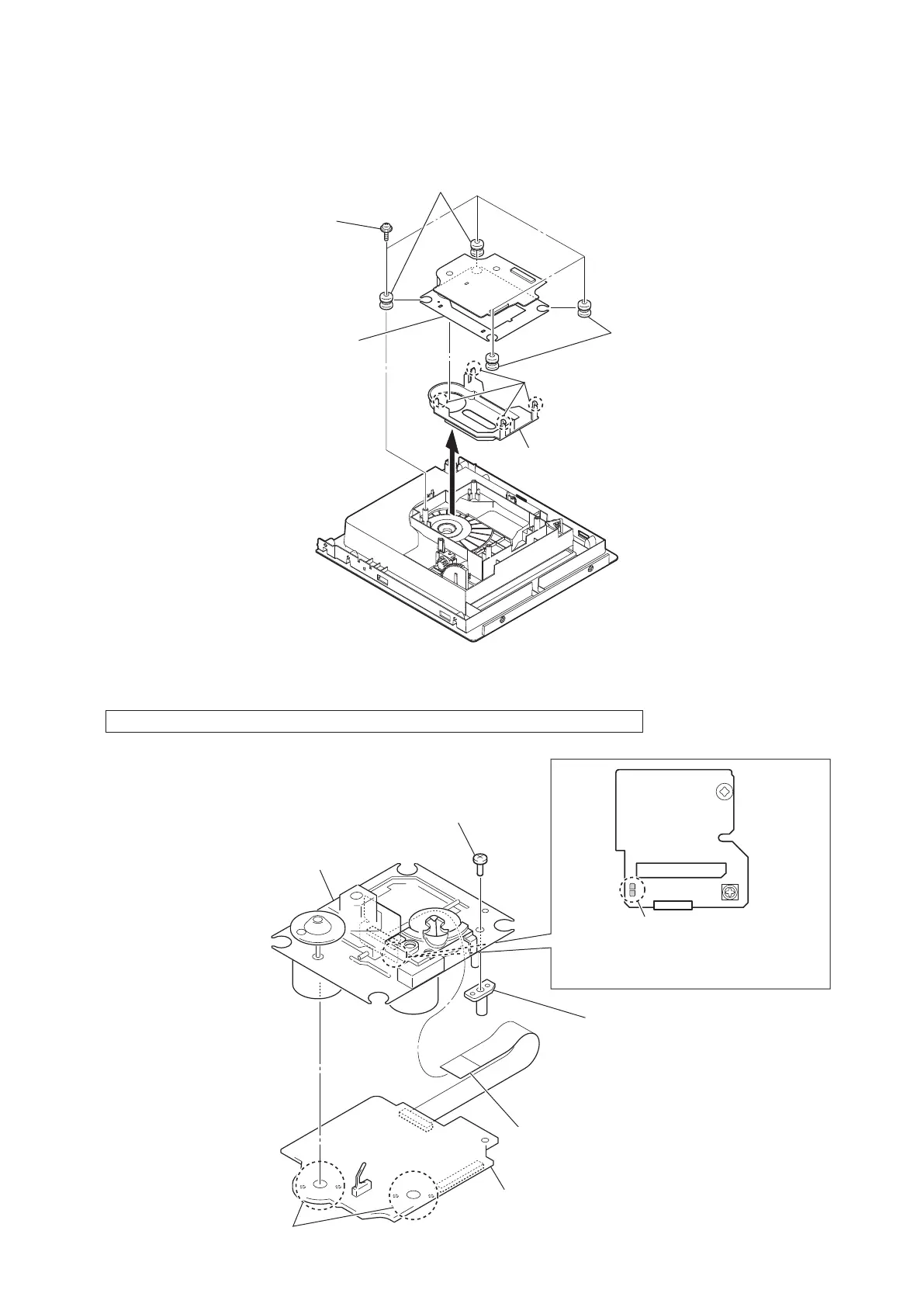
2-7. BASE UNIT (BU-D1BD76)
Note 1: This illustration sees the top panel assy from base unit side.
1
four floating screws
(+PTPWHM 2.6)
4
two insulators
(blue)
3
two insulators
(gray)
5
four claws
6
cover (D1)
7
base unit
(BU-D1BD76)
2
Note 2: Four claws might be fixed by bond.
Please fix four claws by the bond
when you replace the cover (D1).
2-8. OPTICAL PICK-UP BLOCK (DA11MMVGP)
Note 1: When disconnecting the wire (fl at type) (16 core) of optical pick-up block, solder the short-land.
3
wire (flat type) (16 core) (optical pick-up)
1
Remove four solders.
2
Solder the short-land.
4
BD76 board
7
optical pick-up block
(DA11MMVGP)
5
tapping screw (P2)
6
shaft (support)
Note 2: When assembling the optical pick-up block,
remove the solder of short-land after
connecting the wire (flat type) (16 core).


 To Next Page