– 11 –
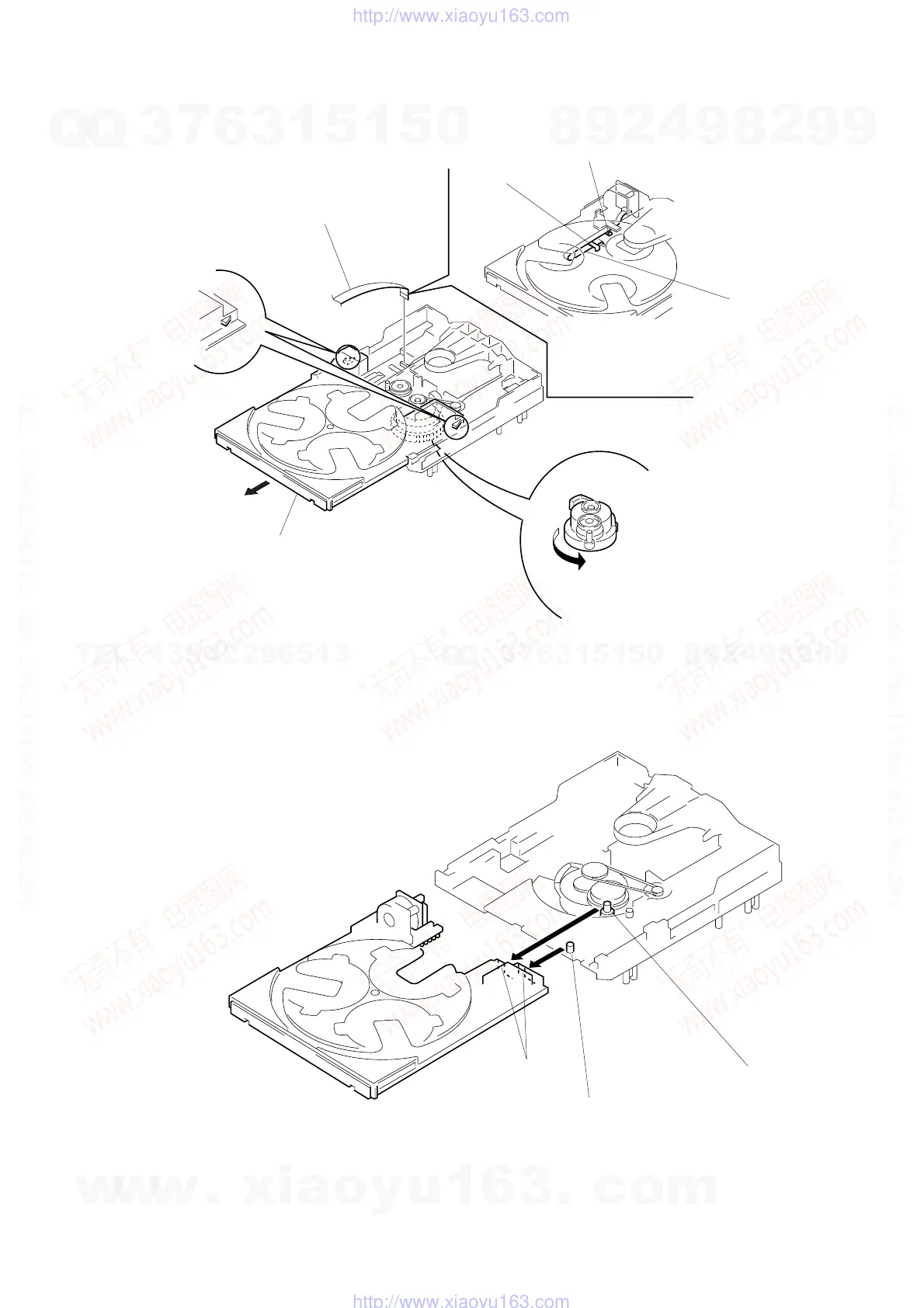
TRAY SECTION
1
Turn the cam to direction
of the arrow.
Note: When installing the tray, pull around the flat wire
to pass through the claw A and claw B, as
shown in the figure.
flat wire
3
flat wire (8 core)
(CN702)
claw
B
claw
A
2
Pull the tray.
5
Removal the tray.
4
two claws
Note: When installing the tray, take care so that the collars A and B
are properly inserted into the slots.
collar
A
collar
B
slots
w
w
w
.
x
i
a
o
y
u
1
6
3
.
c
o
m
Q
Q
3
7
6
3
1
5
1
5
0
9
9
2
8
9
4
2
9
8
T
E
L
1
3
9
4
2
2
9
6
5
1
3
9
9
2
8
9
4
2
9
8
0
5
1
5
1
3
6
7
3
Q
Q
TEL 13942296513 QQ 376315150 892498299
TEL 13942296513 QQ 376315150 892498299
http://www.xiaoyu163.com
http://www.xiaoyu163.com


 To Next Page