9
Operation panel
SY type: For JN/SY (USA, Canada, East Asia and other
countries) models (for NTSC areas)
For details on the differences among models, see “Overview”
on page 3.
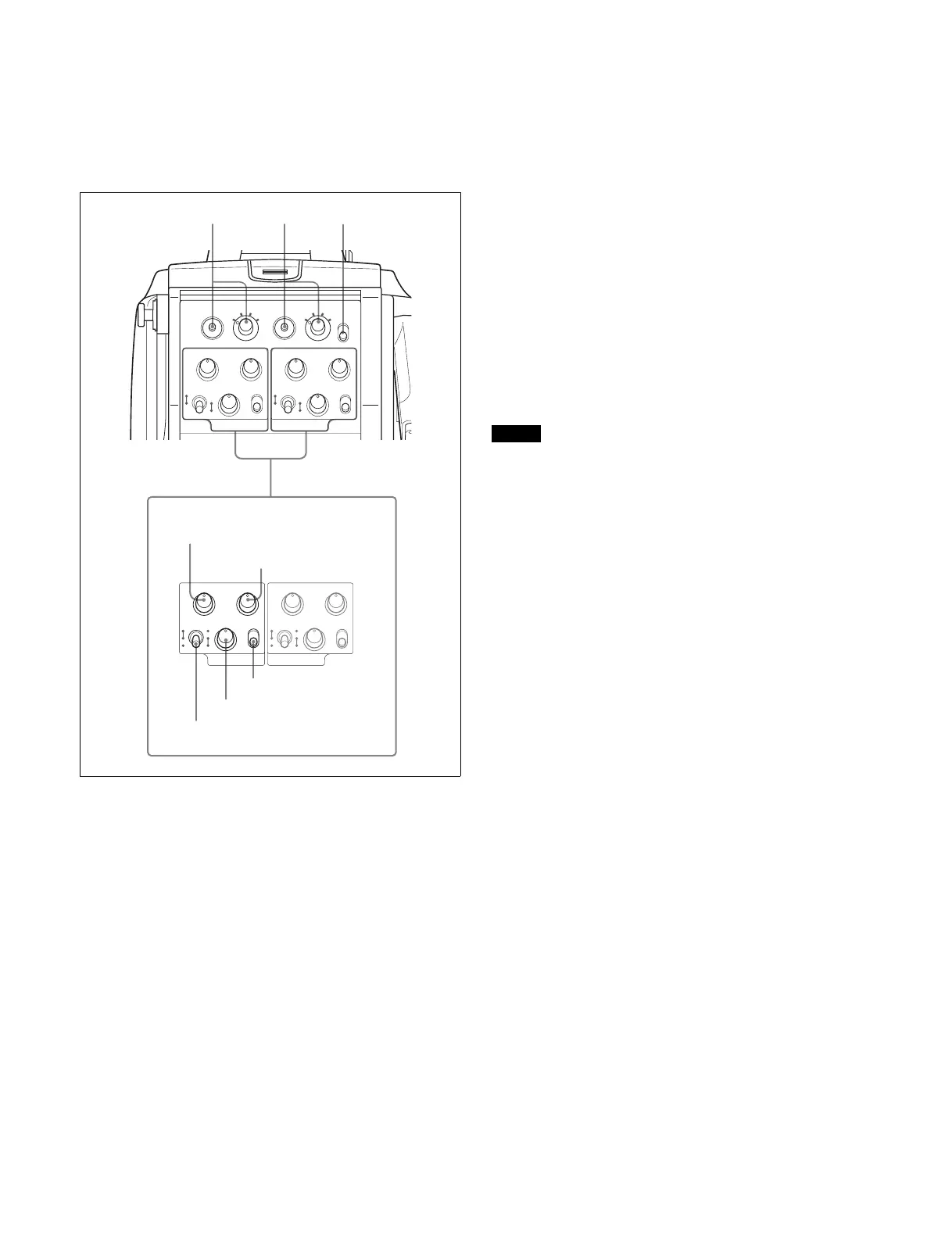
a INTERCOM1 and INTERCOM2 controls and switches
There are PGM1 and 2 controls incorporated with a line select
switch, a LEVEL/MIC switch, and INCOM level control each
for intercom line 1 and 2.
PGM1 (program 1) control
Adjust the audio listening level of program 1.
PGM2 (program 2) control
Adjust the audio listening level of program 2.
LEVEL/MIC switch
REAR/ON: The intercom headset microphone is turned on.
The intercom audio listening level is adjusted with the
INCOM level control.
REAR/OFF: The intercom headset microphone is turned off.
The intercom audio listening level is adjusted with the
INCOM level control.
FRONT/OFF: The intercom headset microphone is turned off.
The intercom audio listening level is adjusted with the
INCOM level control and the INTERCOM LEVEL control
on the front of the camera (page 8).
INCOM level control
Adjust the intercom audio listening level.
Line select switch
Select the intercom line.
PROD: Producer line
ENG: Engineer line
b RET 1 (return video 1) button and select switch
Press the button to display the return video signal selected
with the switch on the viewfinder screen.
c RET 2 (return video 2) button and select switch
If you use an additional return video system in addition to
return video 1, press the button to display the return video
signal selected with the switch on the viewfinder screen.
Note
The RET 1 button has priority over the RET 2 button if both
buttons are pressed.
If RET 1 and RET 2 buttons are pressed at the same time, the
two buttons function as the RET 3 button when setting
<RETURN> 12 of the OPERATION menu.
d LIGHT switch
Set to ON to illuminate the operation panel.
PGM1 PGM2
INCOM
INTERCOM 1
PROD
LEVEL
REAR
FRONT
MIC
ON
OFF ENG
PGM1 PGM2
INCOM
INTERCOM 2
PROD
LEVEL
REAR
FRONT
MIC
ON
OFF ENG
RET1
PGM1 PGM2
1
2 3
4
RET2
1
2 3
4
LIGHT
INCOM
INTERCOM 1
ON
OFF
PROD
LEVEL
REAR
FRONT
MIC
ON
OFF ENG
PGM1 PGM2
INCOM
INTERCOM 2
PROD
LEVEL
REAR
FRONT
MIC
ON
OFF ENG
a
PGM1 control
PGM2 control
INCOM level control
Line select switch
LEVEL/MIC switch
234



 To Next Page