51
GB
S-AIR Operations
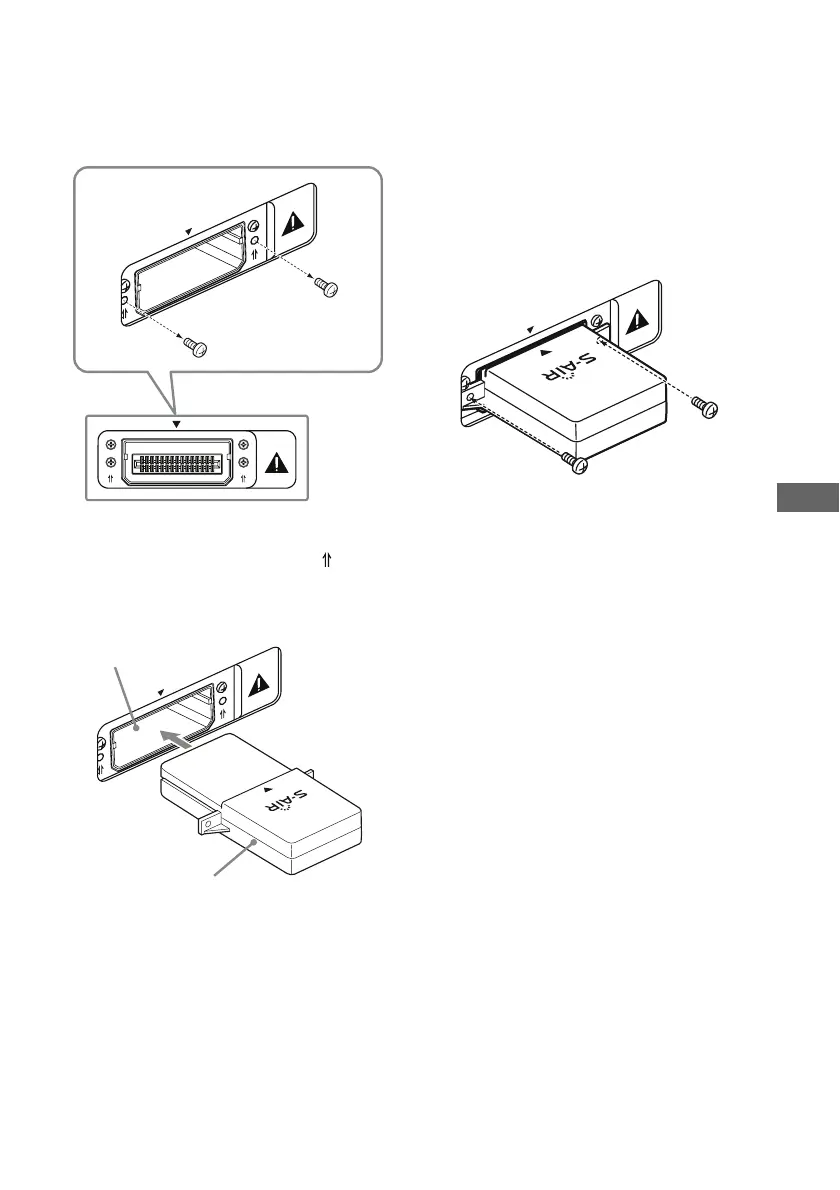
To insert the wireless
transmitter into the S-AIR main
unit
1
Remove the screws.
Note
Remove the screws pointed with the mark.
Do not remove other screws.
2 Insert the wireless transmitter.
Notes
• Insert the wireless transmitter with the S-AIR
logo facing up.
• Insert the wireless transmitter so that the V
marks are aligned.
• Do not insert other than the wireless
transmitter into the EZW-T100 slot.
3 Use the screws that you removed from
step 1 to fasten the wireless
transmitter.
Note
Do not use other screws to fasten the wireless
transmitter.
To insert the wireless
transceiver into the S-AIR sub
unit
Refer to the operating instructions of the
S-AIR sub unit.
EZW-T100
EZ
W
-T100
EZ
W
-T100
Wireless transmitter
EZW-T100 slot
EZ
W
-T100



 To Next Page