15
GB
Getting Started
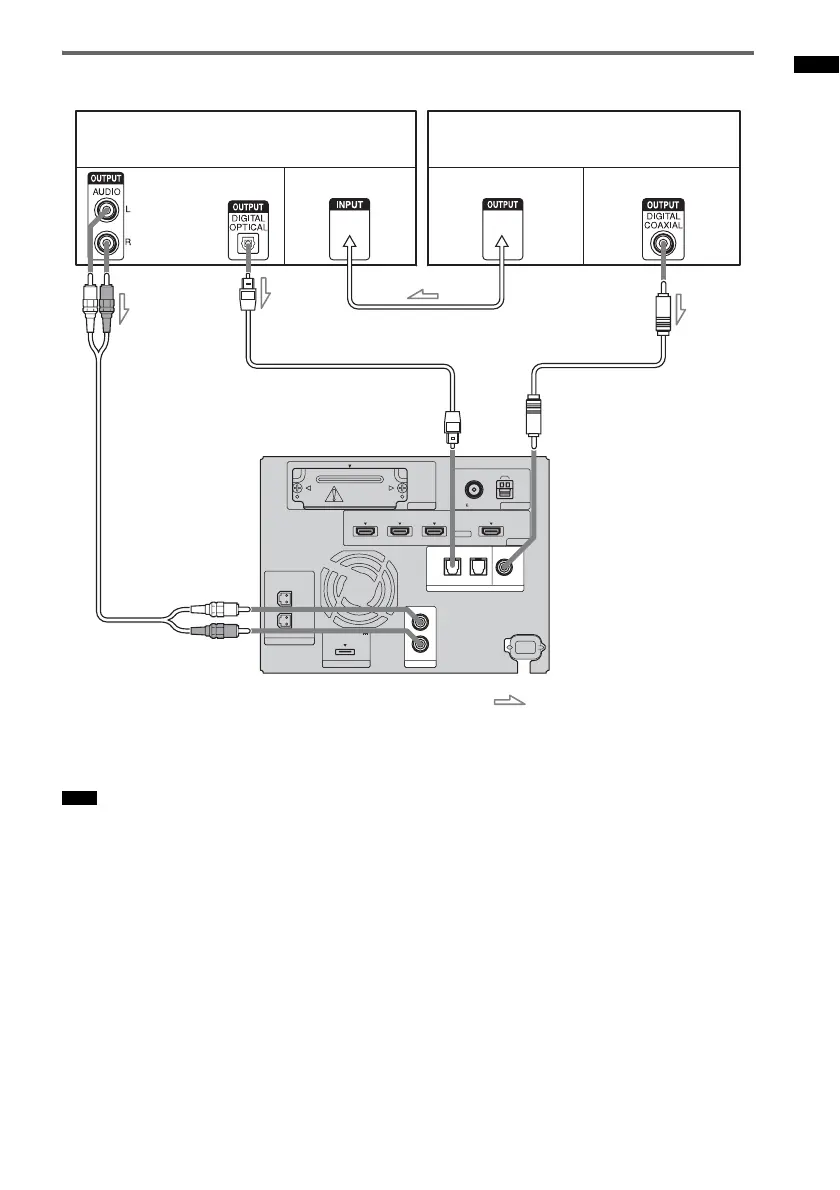
Connecting a component to the COAXIAL DIGITAL 2 IN jack
• The OPTICAL TV IN jack has priority when you connect both the audio output of the TV to the OPTICAL TV IN
and AUDIO IN jack of the system.
Note
ANTENNA
AM
FM
75 COAXIAL
HDMI
TV OUTSAT/CATV INDVD INBD IN
EZW-T100
SPEAKER
ONLY FOR SS-FS3
R
L
DMPORT
DC 5V
0.7A MAX
AUDI O IN
R
TV
L
OPTICAL
TV IN
COAXIAL
DIGITAL
DIGITAL 1 IN DIGITAL 2 IN
TV monitor, projector, etc.
A
A Audio cord (not supplied)
B Digital optical cord (supplied)
C Digital coaxial cord (not supplied)
Video signal
: Signal flow
CB
or
Audio signal Video signal Audio signal
DVD player (recorder),
satellite/cable television tuner, etc.
Video signal
Rear of the
subwoofer



 To Next Page