17
GB
Getting Started
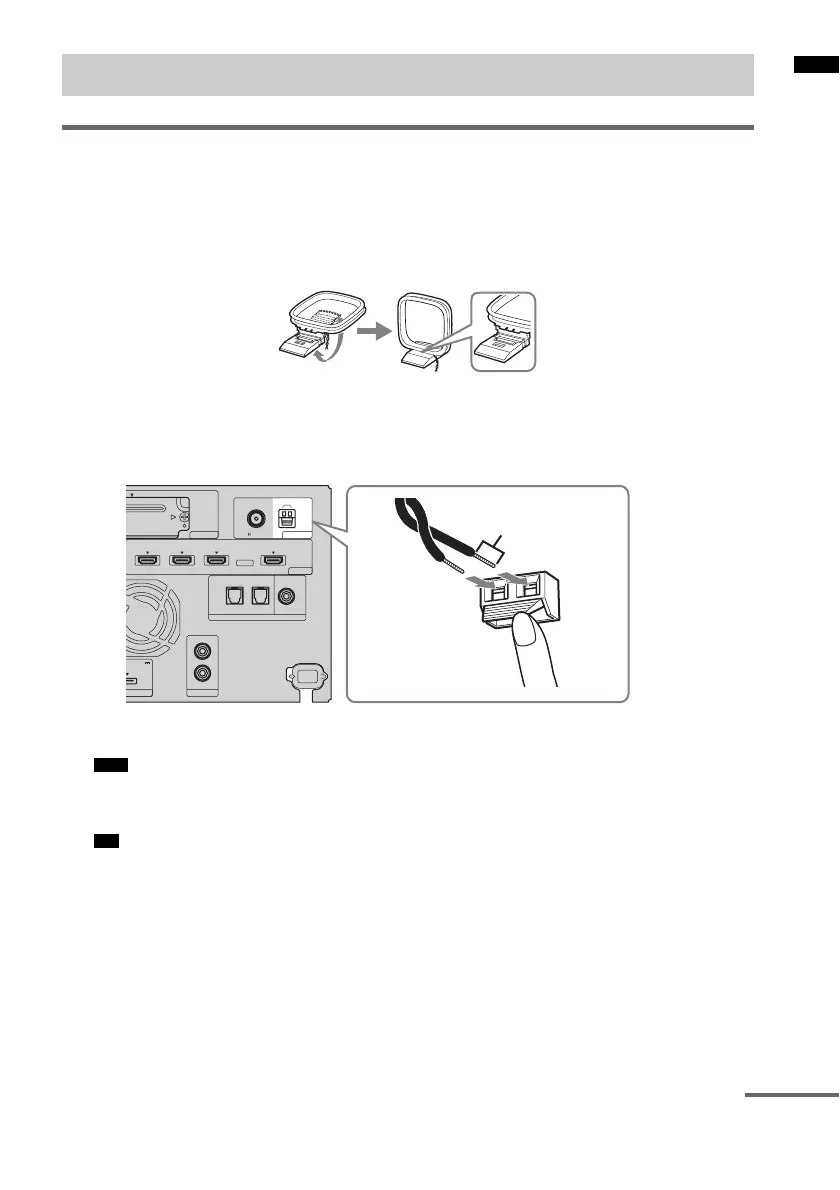
Connecting the AM loop antenna (aerial)
The shape and the length of the antenna (aerial) are designed to receive AM signals. Do not dismantle
or roll up the antenna (aerial).
1 Remove only the loop part from the plastic stand.
2 Set up the AM loop antenna (aerial).
3 Connect the cords to the AM antenna (aerial) terminals.
While pushing down the terminal clamp, insert the (*) part of the cords.
The cords can be connected to either terminal.
• Do not place the AM loop antenna (aerial) near the system or other AV component, as noise may
result.
• Adjust the direction of the AM loop antenna (aerial) for best AM broadcast sound.
4 Make sure the AM loop antenna (aerial) is connected firmly by pulling softly.
Connecting the antenna (aerial)
Note
Tip
HDMI
TV OUTSAT/CATV INDVD INBD IN
EZW-T100
ORT
DC 5V
0.7A MAX
AUDI O IN
R
TV
L
OPTICAL
TV IN
COAXIAL
DIGITAL
DIGITAL 1 IN DIGITAL 2 IN
FM
75 COAXIAL
ANTENNA
AM
*
Rear of the subwoofer
continued



 To Next Page