19
GB
Getting Started
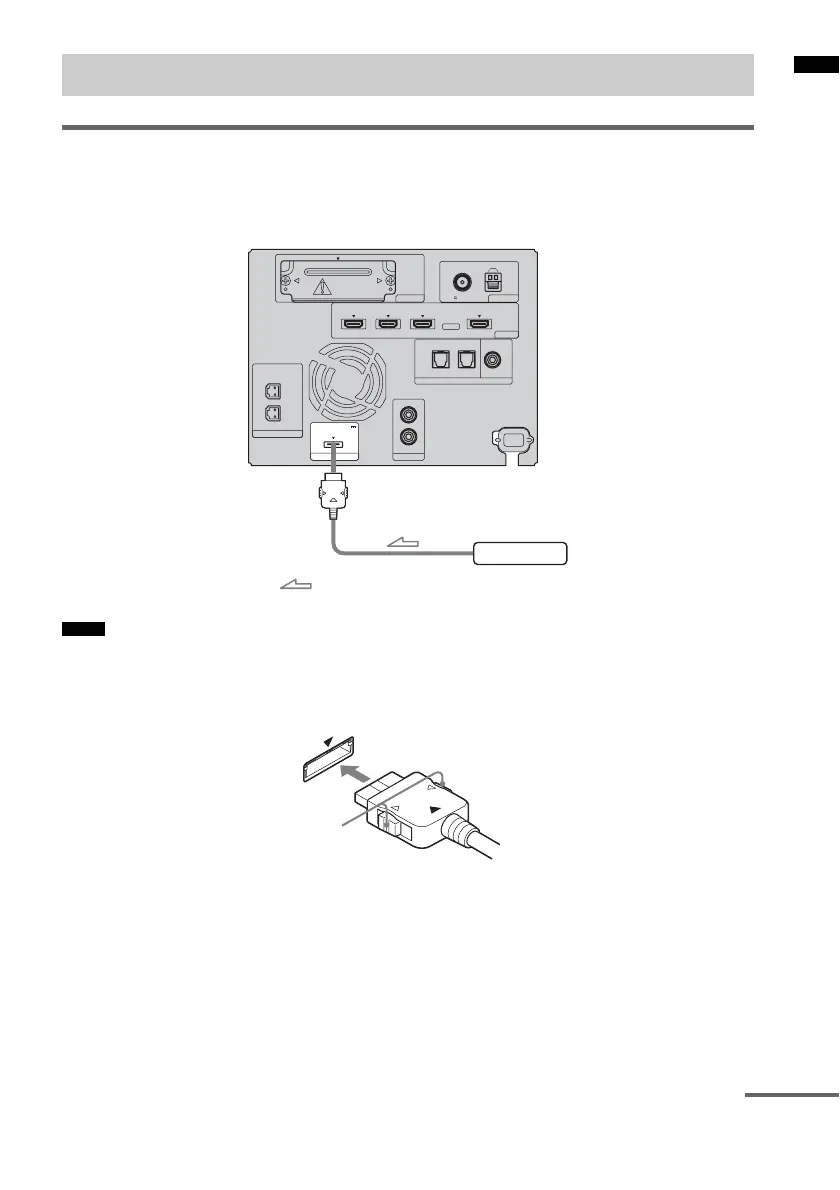
Connecting the DIGITAL MEDIA PORT adapter
You can enjoy sound from the connected component on the system by connecting the DIGITAL
MEDIA PORT adapter.
Connect the AC power cord (mains lead) last.
• Do not connect or disconnect the DIGITAL MEDIA PORT adapter while the system is turned on.
• When you connect the DIGITAL MEDIA PORT adapter, be sure the connector is inserted with the arrow mark
facing toward the arrow mark on the DMPORT jack. To detach the DIGITAL MEDIA PORT adapter, press and
hold
A and then pull out the connector.
Connecting the other components
Notes
ANTENNA
AM
FM
75 COAXIAL
HDMI
TV OUTSAT/CATV INDVD INBD IN
EZW-T100
SPEAKER
ONLY FOR SS-FS3
R
L
DMPORT
DC 5V
0.7A MAX
AUDI O IN
R
TV
L
OPTICAL
TV IN
COAXIAL
DIGITAL
DIGITAL 1 IN DIGITAL 2 IN
DIGITAL MEDIA PORT adapter
: Signal flow
Rear of the
subwoofer
A
continued



 To Next Page