58
GB
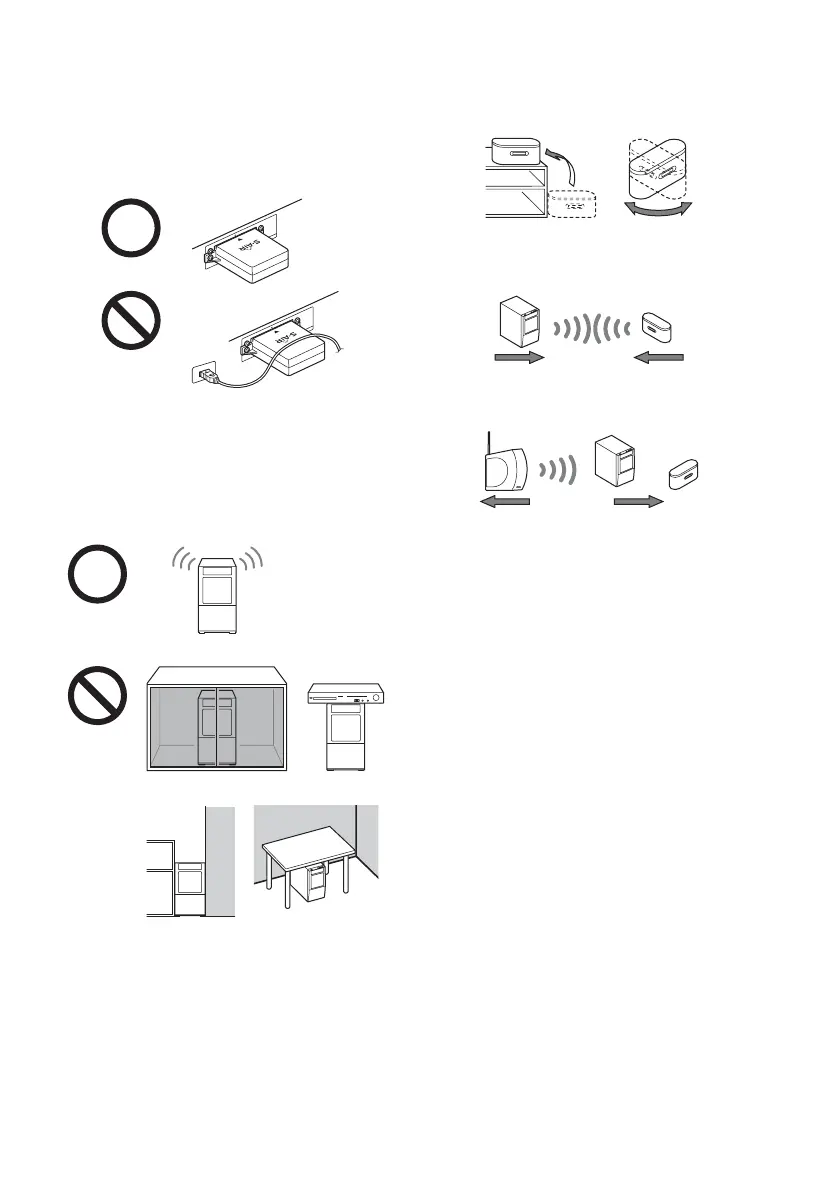
When S-AIR reception is poor
Check the following.
Keep cords that are connected to the S-AIR
product (AC power cord (mains lead),
speaker cords, or other cords) away from
the wireless adapter and slot.
Keep as much space as possible around
S-AIR products.
Avoid placing S-AIR products on top of, or
directly below, other electronic equipment.
Avoid placing S-AIR products in a closed rack,
metal rack, or under a table.
Adjust the location (height, orientation, and
place in the room) of S-AIR products until
reception is the most stable.
Place so that the wireless adapters of the S-AIR
main unit and sub unit are closer.
Place so that S-AIR products are separated from
other wireless devices.
Place so that S-AIR products are separated from
metal doors or tables.
If you cannot improve S-AIR reception, change
the “RF CHANGE” setting (page 56).
E
Z
W
-T1
00
E
Z
W
-T
100



 To Next Page