22
US
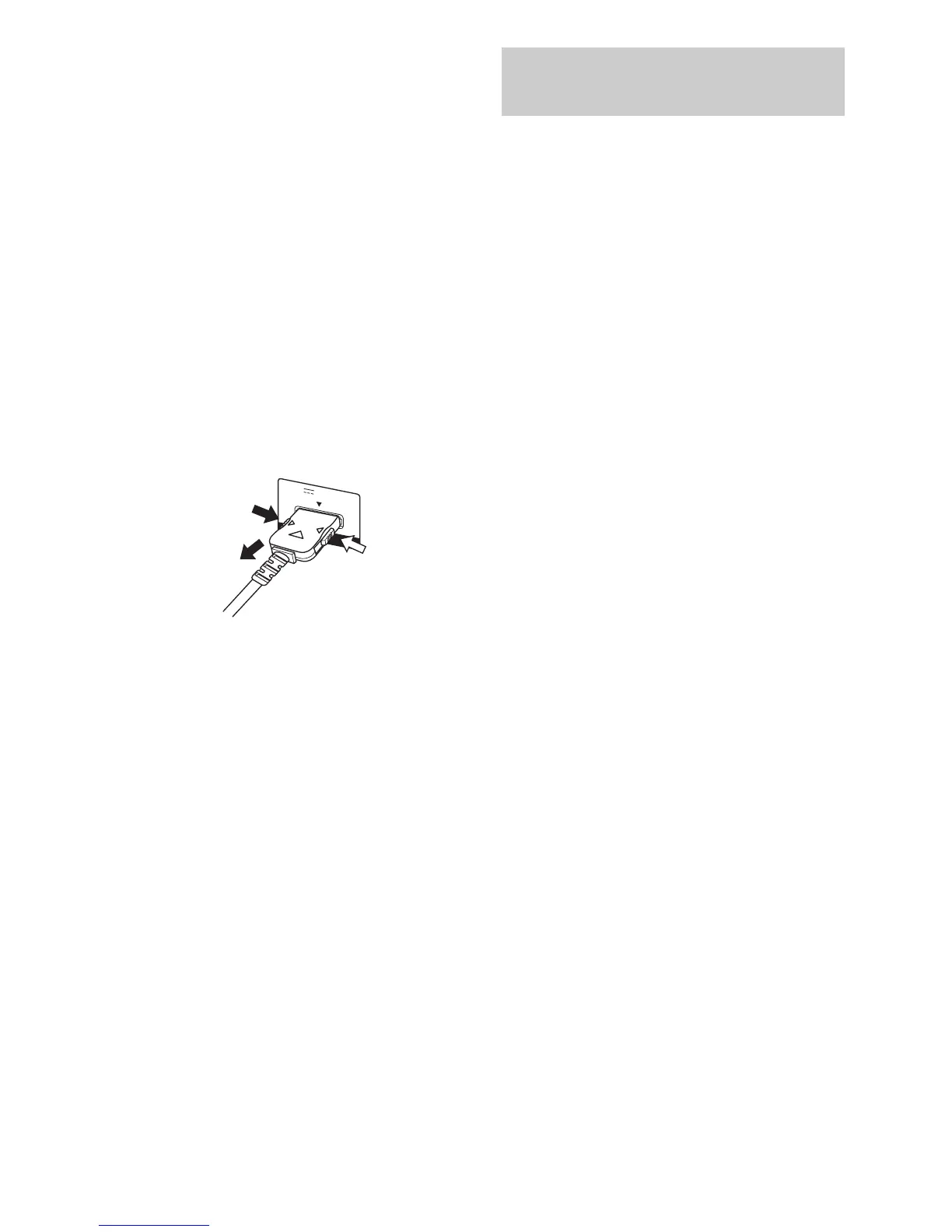
Notes on connecting DIGITAL
MEDIA PORT adapter
• Do not connect or disconnect the DIGITAL
MEDIA PORT adapter while the receiver is
turned on.
• Be sure to make DMPORT connections
firmly, insert the connector straight in.
• As the connector of the DIGITAL MEDIA
PORT adapter is fragile, be sure to handle
with care when placing or moving the
receiver.
• When connecting the DIGITAL MEDIA
PORT adapter, be sure the connector is
inserted with the arrow mark facing toward
the arrow mark on the DMPORT jack.
To detach the DIGITAL MEDIA PORT
adapter, press and holed both sided of the
connector and then pull out the connector.
HDMI is the abbreviated name for High-
Definition Multimedia Interface. It is an
interface which transmits video and audio
signals in digital format.
Sony recommends that you connect
components to the receiver using an HDMI
cable.
With HDMI, you can easily enjoy both high
quality sound and high quality images.
However, it is necessary to connect
the audio output of the TV to the
audio input of the receiver using an
optical cord to listen to the TV multi
channel surround sound
broadcasting from the receiver.
By connecting Sony “BRAVIA” Sync
compatible components using HDMI cables,
““BRAVIA” Sync Features” makes
operations simpler (page 47).
HDMI features
• A digital audio signals transmitted by HDMI
can be output from the speakers connected to
the receiver. This signal supports Dolby
Digital, DTS, Linear PCM and AAC.
• This receiver supports xvYCC transmission.
• This receiver supports the Control for HDMI
function. For details, see “Using “BRAVIA”
Link features” (page 47).
2
1
DMPORT
DC5V 700mA MAX
1
Connecting components with
HDMI jacks



 To Next Page