18
GB
4 Select [System Settings] - [HDMI
Settings] - [eARC] - [On].
The eARC function is enabled and it
works while connecting a TV
compatible with eARC.
The ARC function works while
connecting a TV compatible with
ARC (not compatible with eARC).
• If [eARC] does not appear on the setup
display in step 4, perform a software
update (page 54).
• When [eARC] is set to [On], make sure of
the eARC setting of the connected TV. For
details, refer to the operating instructions
of the TV.
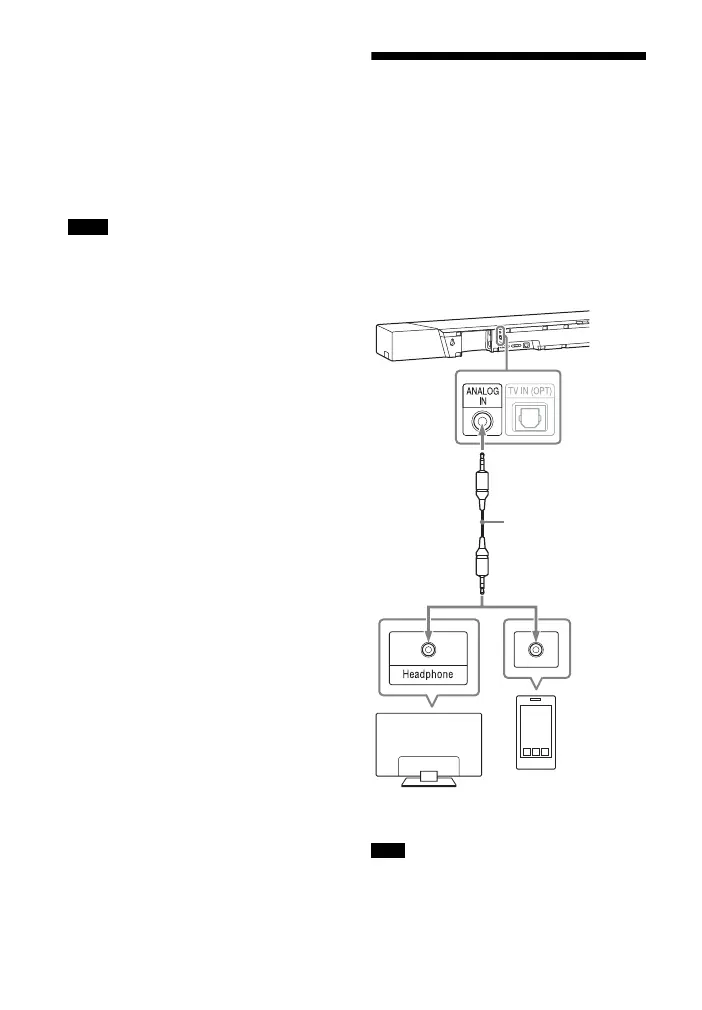
Connecting a TV or
Portable Audio Device
via the ANALOG IN Jack
To connect following devices to the
system, connect them via the ANALOG
IN jack on the system.
– TV that does not have an HDMI jack
and optical digital output jack
– Portable audio device such as a
smartphone, WALKMAN®
If the TV’s headphone jack also serves as
an audio output jack, check the audio
output settings of the TV. For details, refer
to the operating instructions of the TV.
Notes
Note
Smartphone,
WALKMAN®, other
audio devices etc.
TV
Analog
audio out
Analog audio cable
(not supplied)



 To Next Page