47
GB
Using the Various Functions/Settings
Enjoying Multiplex
Broadcast Sound (AUDIO)
You can enjoy multiplex broadcast
sound when the system receives a
Dolby Digital multiplex broadcast signal.
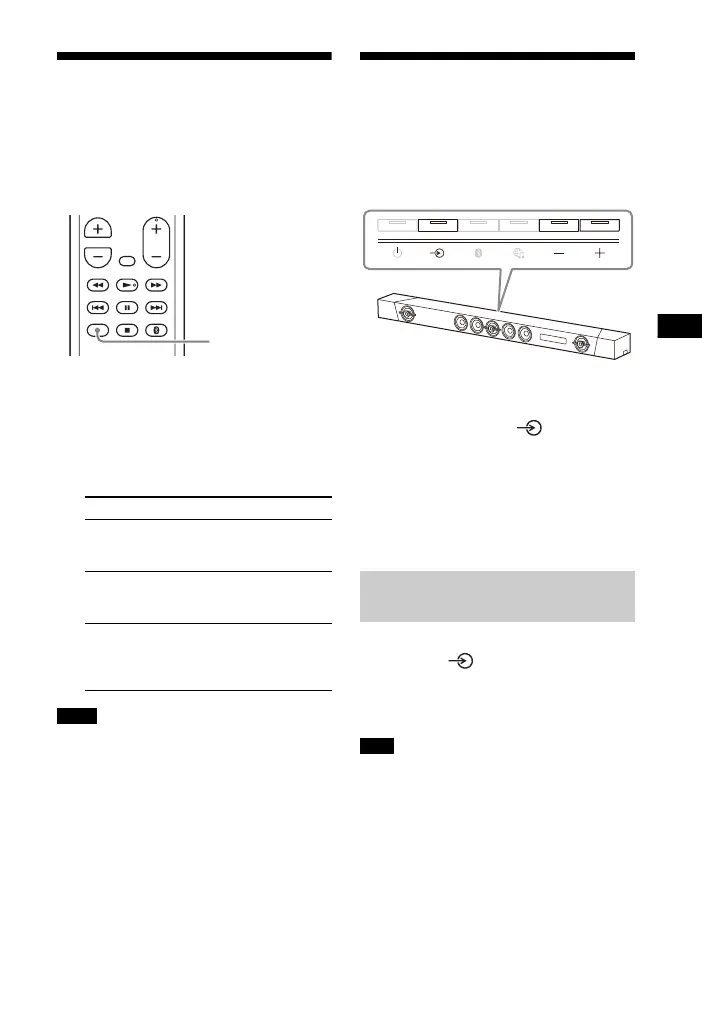
1 Press AUDIO.
The audio signal appears in the front
panel display.
2 Press the button repeatedly to
select the desired audio signal.
• To receive a Dolby Digital signal, you
need to connect a TV or other devices to
the TV IN (OPT) jack with the optical digital
cable (not supplied).
• If your TV’s HDMI IN jack is compatible
with the eARC or ARC function (page 50),
you can receive a Dolby Digital signal via
HDMI cable.
Deactivating Buttons on
the Main Unit
You can deactivate buttons on the main
unit for preventing misoperation, such
as child mischief (Child lock function).
Press –, +, and – in order while
pressing and holding on the main
unit.
“LOCK” appears in the front panel
display, and buttons on the main unit do
not work.
You can only operate the system by
using the remote control.
Press –, +, and – in order while pressing
and holding on the main unit.
“UNLCK” appears in the front panel
display, and the child lock function is
canceled.
(power) is not locked with the child lock
function.
Audio signal Explanation
“MAIN” Sound of the main
language will be
output.
“SUB” Sound of the sub
language will be
output.
“MN/SB” Mixed sound of both
the main and sub
languages will be
output.
Notes
Canceling the Child Lock
Function
Note



 To Next Page