23
GB
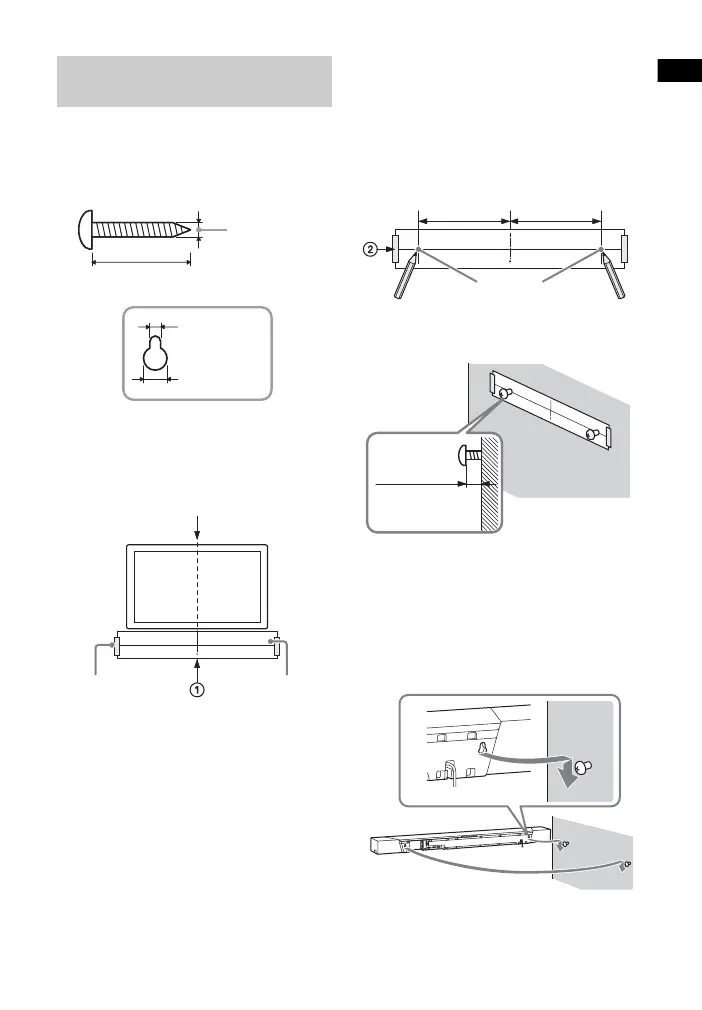
1 Prepare screws (not supplied) that
are suitable for the wall mount
holes on the rear of the main unit.
2 Stick WALL MOUNT TEMPLATE
(supplied) on a wall.
1 Align TV CENTER LINE () of
WALL MOUNT TEMPLATE with the
center line of your TV.
2 Decide on the height of WALL
MOUNT TEMPLATE by referring to
“About the Installation Location
of the Main Unit” (page 22), then
stick the WALL MOUNT
TEMPLATE on a wall by using a
commercially available adhesive
tape, etc.
3 Mark the screw positions
described as bellow on SCREW
LINE () of WALL MOUNT
TEMPLATE.
Measure the distance described
below with a scale, then mark using
a pencil, etc.
4 Fasten the screws into the mark.
5 Remove WALL MOUNT TEMPLATE.
6 Hang the main unit on the screws.
Align the holes of the rear of the
main unit with the screws, then
hang the main unit on the two
screws.
Mounting the Main Unit on a
Wall
Hole on the rear of the main unit
4mm
More than 30 mm
4.6 mm
10 mm
Center of the TV
WALL MOUNT
TEMPLATE
Adhesive tape,
etc.
Screw position
422 mm
422 mm



 To Next Page