5
CD > (AMS) s (TAPE B) button + DISC3 button
. (AMS) s (TAPE B) button + DISC1 button
M s (TAPE A) button + DISC3 button
m s (TAPE A) button + DISC1 button
TAPE A > (AMS) DISC SKIP button + H (TAPE B)
TAPE B . (AMS) DISC SKIP button + h (TAPE B)
M DISC SKIP button + H (TAPE A)
m DISC SKIP button + h (TAPE A)
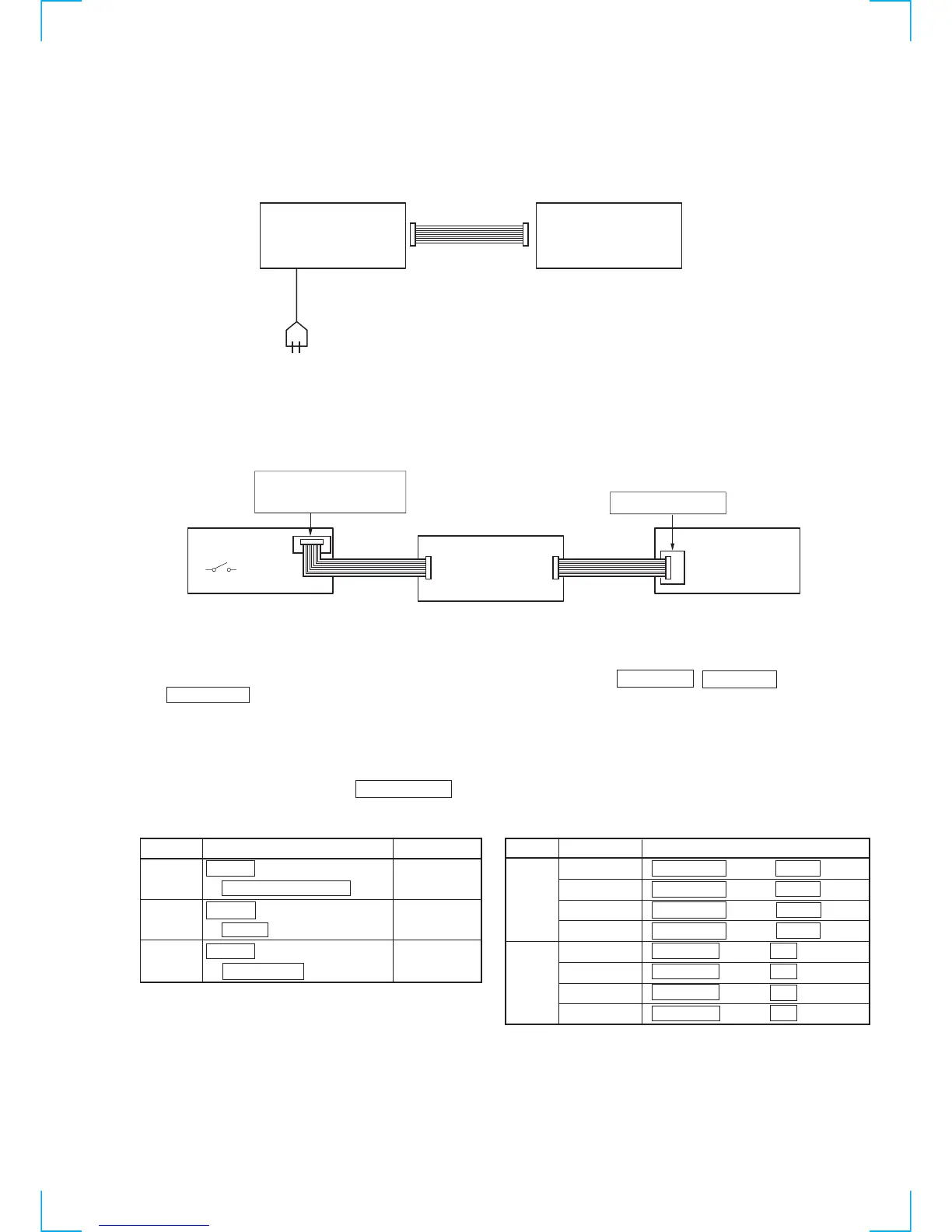
Connection and Operations of the Unit by Itself
This unit cannot be operated by itself as it does not come with a power supply.
Connect STR-VX500/VX700 as shown in “Connection 1” before beginning servicing.
Connection 1: If there is STR-VX500/VX700.
Use a power supply jig (PFJ-1) if the STR-VX500/VX700 is not available.
Connect the conversion jig for connection (J-2501-138-A) as shown in “Connection 2” before beginning servicing.
Connection 2: If there is not STR-VX500/VX700.
To operate the unit by itself, turn on the power of the conduction jig (PFJ-1), and press the s (TAPE A) , s (TAPE B) ,
and H (TAPE B) buttons together in this order.
As this unit is not equipped with fast forward and rewind buttons, buttons need to be combined and pressed together for different functions
when operating the unit by itself. (See Table-2.)
However, it will not operate properly if operations are performed without switching the functions.
Perform the following procedure to switch the functions before operating the unit.
The function selected is indicated by the DISC NUMBER indicator.
Table 1 Switching the Functions Table 2 Pressing Combination of Buttons When Operated by Itself
Function
CD x (CD) button 1< 2< 3
+ HI-SPEED DUBBING button
TAPE A x (CD) button 1< 2 3
+ z REC button
TAPE B x (CD) button 1 2< 3
+ h (TAPE A) button
Operation
The function can be differentiated by the lighting of this part of the indicator.
↓↓
1< 2< 3
Indicator Deck Function
Operation
STR-VX500/VX700
SYSTEM CABLE 17P
SET
AC IN
Set
Conversion
Jig
(J-2501-138-A)
Power SW
Service Box (PFJ-1)
Connector
cable 17P
(Supplied with PFJ-1)
Connector
cable 17P
(Supplied with
Conversion Jig or Set)
FH-E939,838,737
MHC-6600,5600,3600,2600
CDP/TC
SYSTEM CONTROL


 To Next Page