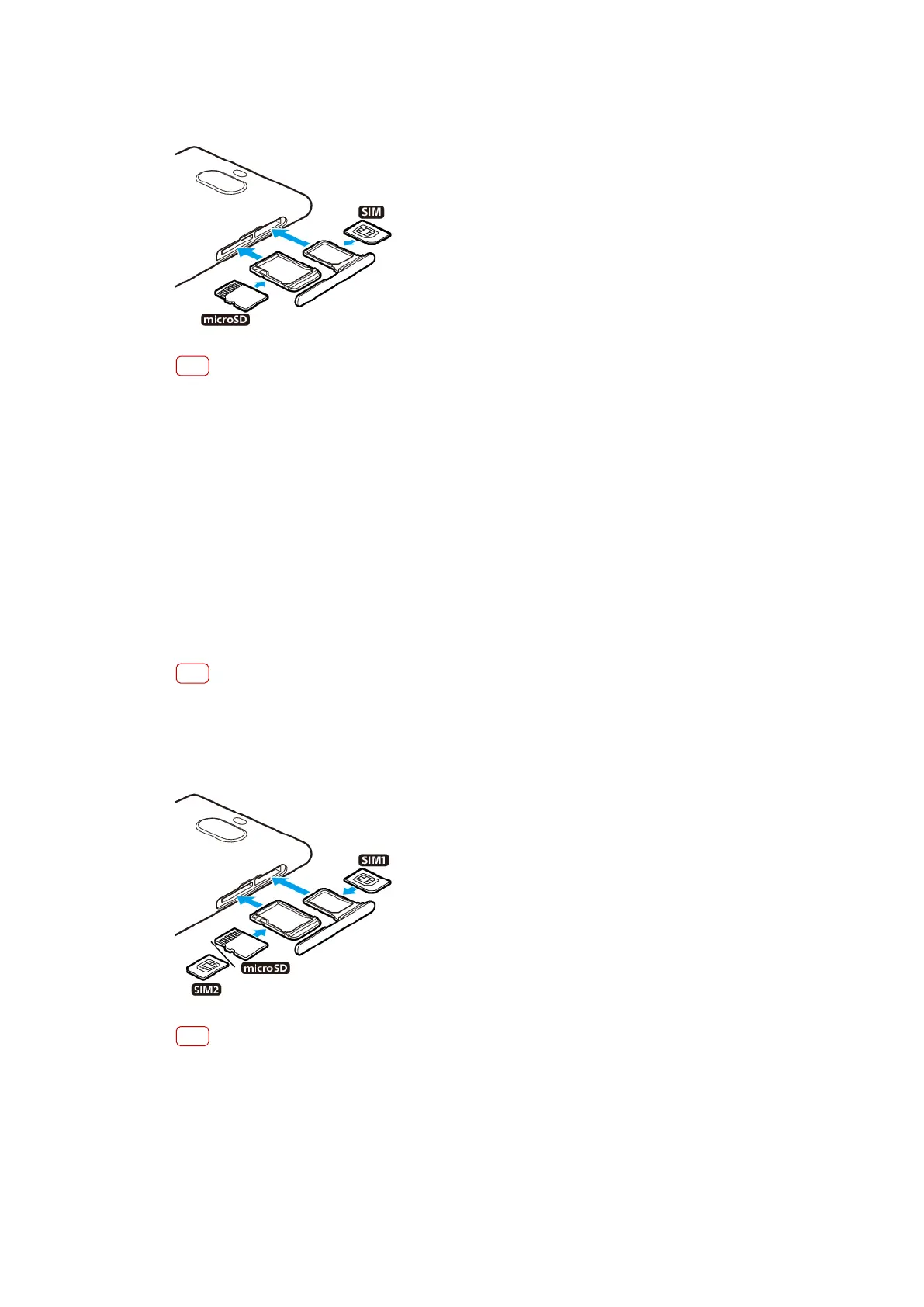
To insert a nano SIM card and a memory card
Note
Do not cut your SIM card, as this may damage your device.
1 Dr
ag out the SIM and memory card trays.
2 Place the SIM card securely in the SIM card tray.
3 Place the memory card securely in the memory card tray.
4 Gently push the trays back into the slots until they t into place.
Assembly - Dual SIM
Your device only supports nano SIM cards. Dual SIM devices support the use of
either two nano SIM cards or a nano SIM card and a memory card.
Dual SIM devices are not available in all markets or from all operators.
For information on how to check if your device is Single SIM or Dual SIM, see
Finding the IMEI number(s) of your device
on page 18.
Note
To prevent data loss, make sure you turn o your devic
e or unmount the memory card
before you drag out the holder to remove the nano SIM card (or cards) or memory card from
the device.
To insert either two nano SIM cards or a nano SIM card and a memory card
Note
Do not cut your SIM card, as this may damage your device.
1 Dr
ag out the SIM and memory card trays.
2 Place the main SIM card securely in position for SIM1.
3 Place either the second SIM card (SIM2) or the memory card securely in the tray, in
the correct orientation.
4 Gently push the trays back into the slots until they t into place.
12
Int
ernet version. For personal use only.















 To Next Page