Messaging and chat
Reading and sending mes
sages
The Messages application shows your messages as conversations, which means
that all messages to and from a particular person are grouped together.
Note
The number of characters that you can send in a single message varies depending on the
oper
ator and the language you use. The maximum size of a multimedia message, which
includes the size of added media les, is also operator dependent. Contact your network
operator for more information.
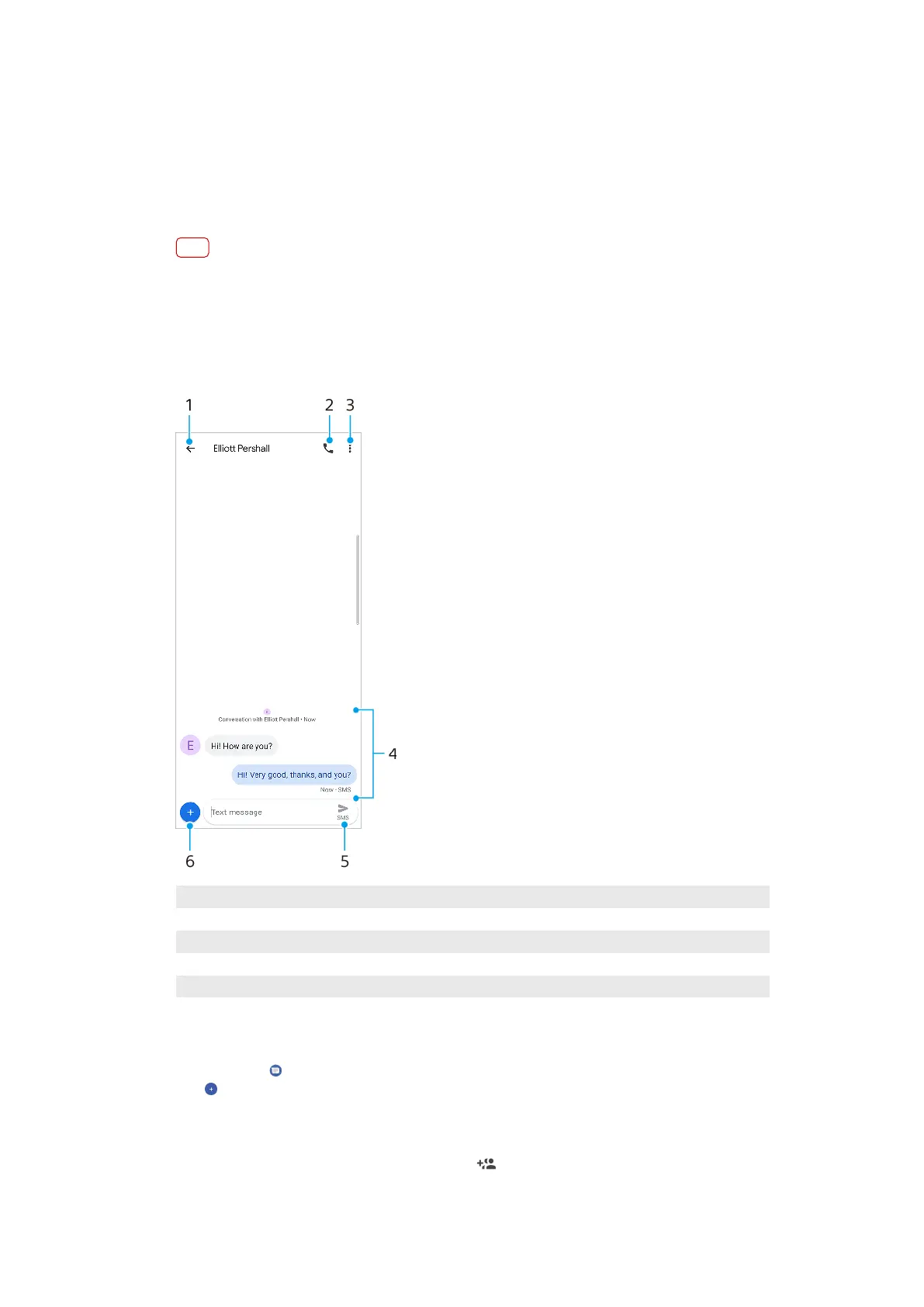
Messaging overview
1 Go back to the list of conversations
2 Call the message sender
3 View menu options
4 Sent and received messages
5 Send a completed message
6 Add attachments
To create and send a message
1 Find and t
ap
(Messages icon).
2 Tap (New message icon).
3 Enter the recipient’s name or phone number, then select from the suggestions that
appear. If the recipient is not listed as a contact, enter the recipient’s number
manually.
4 If you want to send a group message, tap (Add recipient icon) to add more
recipients.
73
Int
ernet version. For personal use only.















 To Next Page