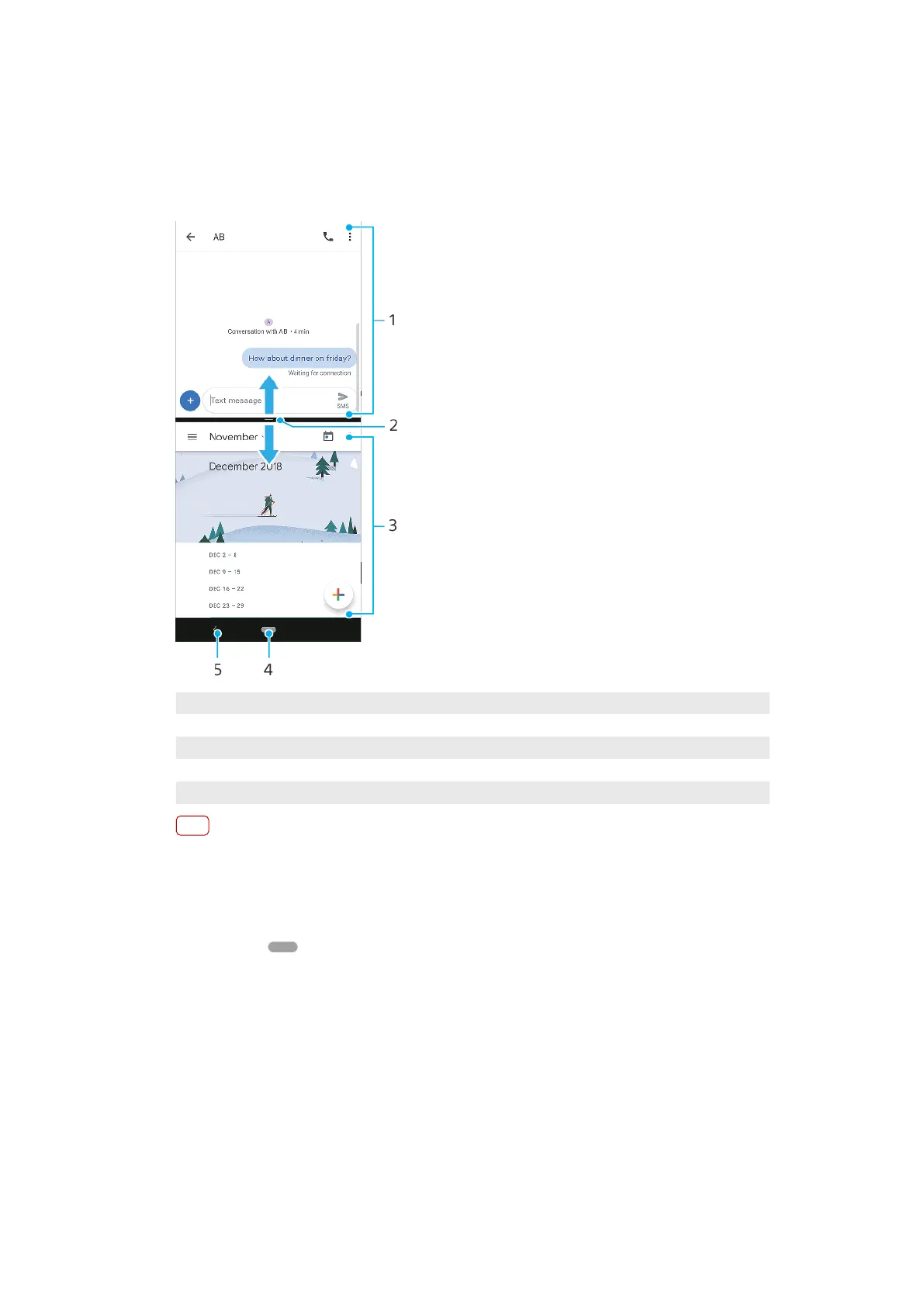
Split screen mode
Split scr
een mode enables you to view two applications at once, for example, if
you want to view your email inbox and a web browser at the same time.
Split screen overview
1 Application 1
2 Split screen border – Drag to resize windows
3 Application 2
4 Home button – Go back to the Home screen
5 Back button – Go back to the previous screen
Note
Not all applications support Split screen mode.
T
o use Split screen mode
1 Make sure that the two applications that you want to use in Split screen mode are
open and running in the background.
2 Swipe up on
(Home button) to open the recently used applications window.
3 S
wipe left or right to nd the application that you would like to use in Split screen
mode.
4 Tap the application icon at the top of the applications window, then tap Split
screen.
5 Select the second desired application. If you want to resize the split screen
windows, drag the split screen border in the center.
6 To exit Split screen mode, drag the split screen border to the top of the screen.
One-handed mode
Enable One-handed mode to adjust the display size so you can type with one hand
more easily.
29
Int
ernet version. For personal use only.















 To Next Page