EasyManua.ls Logo

Sony ICF-SW30 - Power Management and Troubleshooting; Battery Installation and Replacement; Resolving Common Radio Issues

Sony ICF-SW30
11 pages
Print Icon
To Next Page IconTo Next Page
To Previous Page IconTo Previous Page
Loading...
ere
ee
oe
ne
oe
Installing
Batteries
To
keep
good
time
and
preset
stations,
your
receiver
needs
three
R6
(size
AA)
batteries
(not
supplied).
Before
setting
the
time
and
preset
stations
on
your
receiver,
open
the
lid
at
the
rear
of
the
unit.
install
the
batteries
with
correct
polarity
and
then
close
the
lid.
After
installing
the
batteries,
“0:00”
flashes.
To
stop
flashing.
press
ENTER/TIME.
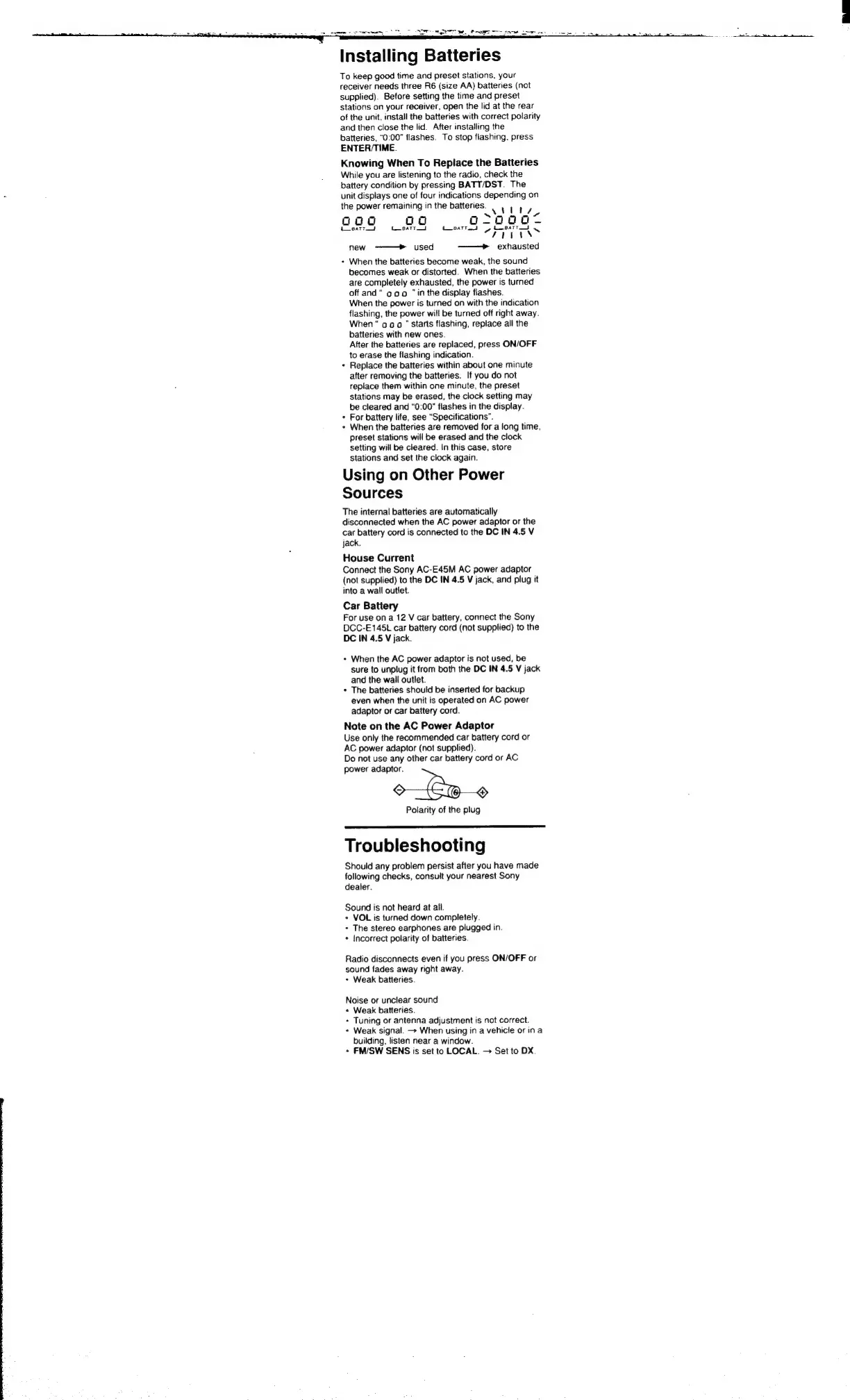
Knowing
When
To
Repiace
the
Batteries
While
you
are
listening
to
the
radio,
check
the
battery
condition
by
pressing
BATT/DST.
The
unit
displays
one
of
four
indications
depending
on
the
power
remaining
in
the
batteries.
vs)
tts,
oaag
aad
agcoooae,
L_eattod tueaTrid
tCusatro
ok
~N
7EEss
new
-———
>
used
—_——e
exhausted
When
the
batteries
become
weak,
the
sound
becomes
weak
or
distorted.
When
the
batteries
are
completely
exhausted,
the
power
is
turned
off
and“
ao
0
"in
the
display
flashes.
When
the
power
is
turned
on
with
the
indication
flashing,
the
power
will
be
turned
off
right
away.
When
00
0
"
Starts
flashing,
replace
all
the
batteries
with
new
ones.
After
the
batteries
are
replaced,
press
ON/OFF
to
erase
the
flashing
indication.
Replace
the
batteries
within
about
one
minute
after
removing
the
batteries.
If
you
do
not
replace
them
within
one
minute,
the
preset
stations
may
be
erased,
the
clock
setting
may
be
cleared
and
“0:00"
flashes
in
the
display.
For
battery
life,
see
“Specifications”.
When
the
batteries
are
removed
for
a
long
time,
preset
stations
will
be
erased
and
the
clock
setting
will
be
cleared.
In
this
case,
store
stations
and
set
the
clock
again.
Using
on
Other
Power
Sources
The
internal
batteries
are
automatically
disconnected
when
the
AC
power
adaptor
or
the
car
battery
cord
is
connected
to
the
DC
IN
4.5
V
jack.
House
Current
Connect
the
Sony
AC-E45M
AC
power
adaptor
(not
supplied)
to
the
DC
IN
4.5
V
jack,
and
plug
it
into
a
wail
outlet.
Car
Battery
For
use
ona
12
V
car
battery,
connect
the
Sony
DCC-E145t
car
battery
cord
(not
supplied)
to
the
DC
IN
4.5
V
jack.
+
When
the
AC
power
adaptor
is
not
used,
be
sure
to
unplug
it
from
both
the
DC
IN
4.5
V
jack
and
the
wail
outlet.
+
The
batteries
should
be
inserted
for
backup
even
when
the
unit
is
operated
on
AC
power
adaptor
or
car
battery
cord.
Note
on
the
AC
Power
Adaptor
Use
only
the
recommended
car
battery
cord
or
AC
power
adaptor
(not
supplied).
Do
not
use
any
other
car
battery
cord
or
AC
power
adaptor.
F
Polarity
of
the
plug
Troubleshooting
Should
any
problem
persist
after
you
have
made
following
checks,
consult
your
nearest
Sony
dealer.
Sound
is
not
heard
at
all.
+
VOL
is
turned
down
completely.
+
The
stereo
earphones
are
plugged
in.
+
Incorrect
polarity
of
batteries.
Radio
disconnects
even
if
you
press
ON/OFF
or
sound
fades
away
right
away.
+
Weak
batteries.
Noise
or
unclear
sound
+
Weak
batteries.
+
Tuning
or
antenna
adjustment
is
not
correct.
+
Weak
signal.
+
When
using
in
a
vehicle
or
ina
building,
listen
near
a
window.
+
FM/SW
SENS
is
set
to
LOCAL.
Set
to
DX

Related product manuals