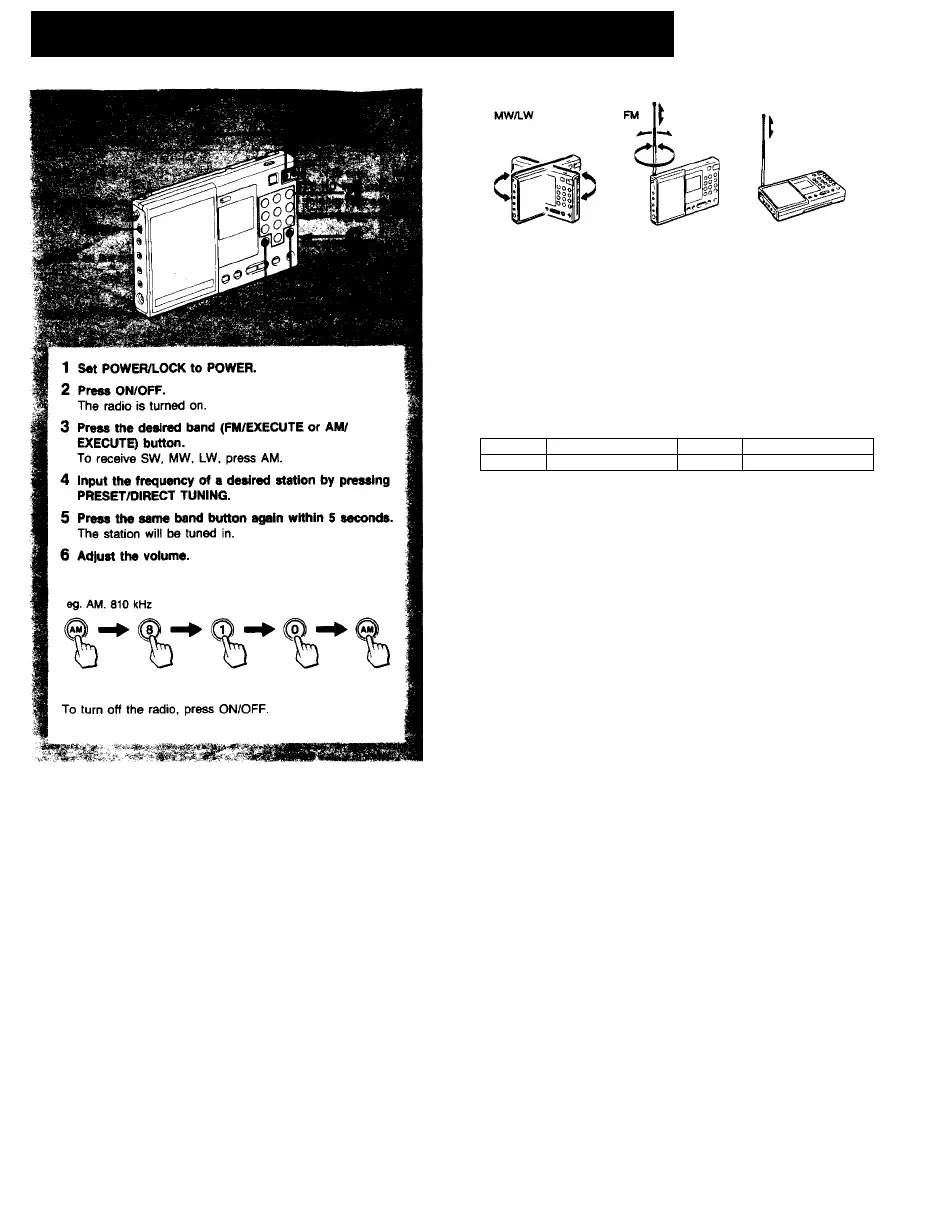
Direct Tuning —when you know the freq | ^
To improve receiving condition
if you input a wrong frequency
Press FM/EXECUTE or AM/EXECUTE again and input the correct frequency.
if you do not press RM or AM/EXECUTE within 5 seconds after
you Input a fr^uency
The frequency indicatitm turns to the previous one and you will hear the
station of its frequency.
When the frequency near the input frequency is displayed
The frequencies which this radio receives are allocated in the following
intervals depending on the broadcast band.
If you input a frequency that does not match these intervals, the frequency
just below the one that you input will be tuned in and will be displayed.
FM 0.05 or 0.1 MHz
SW 5 kHz
MW 10 kHz*
LW 3 kHz
* Possible to change to 9 kHz depending on the country where used (see.
page#).
H TRY AQAINI Indication appeata
If you input the frequency outside the frequency rar>ge. TRY AGAIN! blinks.
When you press FM/EXECUTE or AM/EXECUTE again, this indication will
disappear. If you do not press the button, it will disappear after 5 seconds
and the frequertcy of the previousiy tuned station will appear.
When the sound is distorted
Normally set SENS to DX, however, when the sound is distorted set it to
LOCAL.
When you are listening to the news
Set TONE to NEWS. Human voice will be heard more clearly. When you are
listening to music, set it to MUSIC.







 To Next Page