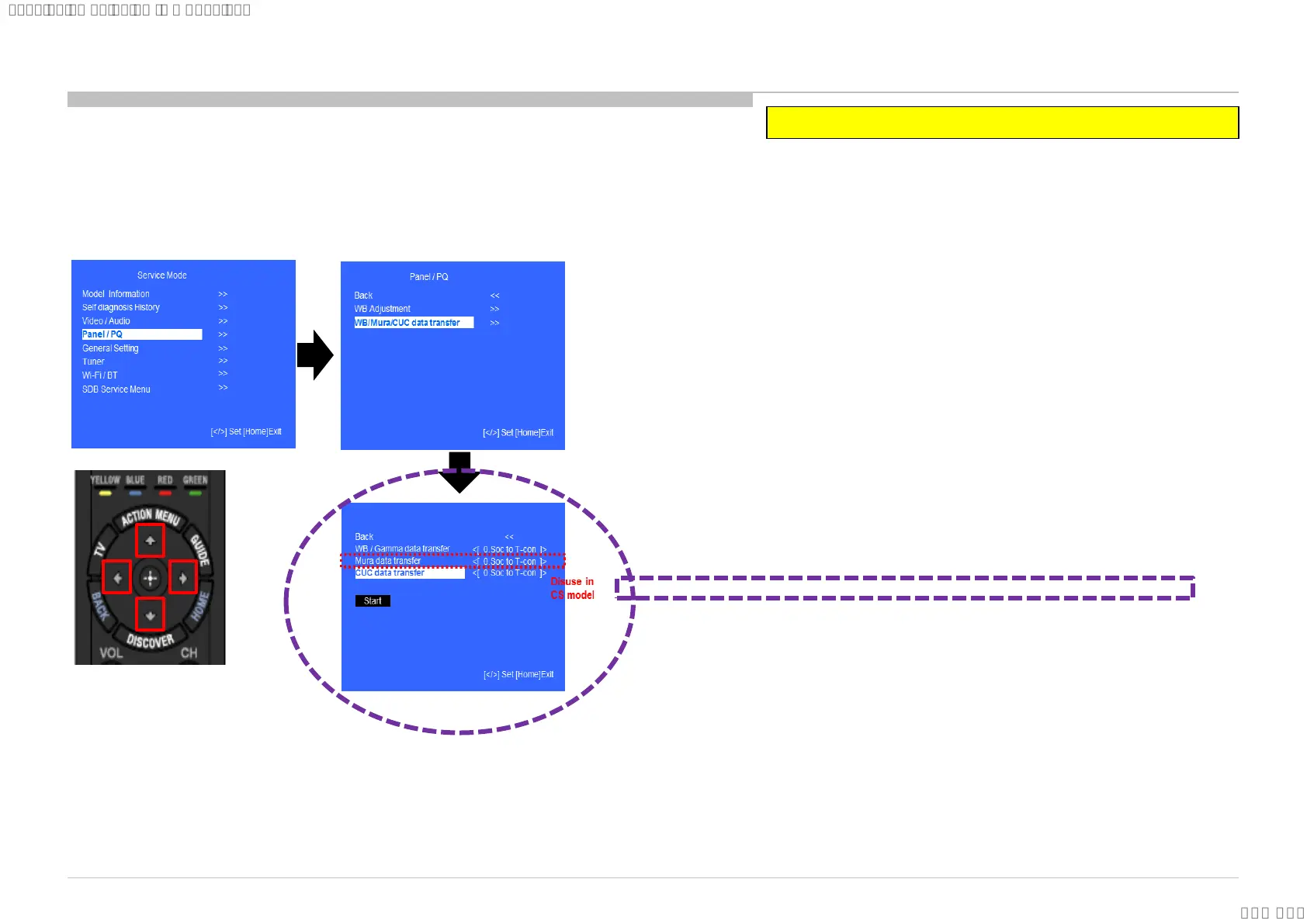
Please apply BM3 board or panel is replaced.
1. In “Panel/PQ” service mode
a. Go to “WB/Mura/CUC data transfer” category by “↑” or “↓”.
b. To select “WB/Mura/CUC data transfer”, press → button.
c. To change data , press “←” or “→” on remote commander.
2. In “WB/Mura/CUC data transfer”
a. Select “CUC data transfer” by pressing “↑” or “↓” on remote
commander .
b. To change the items, press “←” or “→” on remote commander and
press “Enter” button.
Choose
1. T-con to SoC
and press “Enter” button.
c. “Mura data transfer” is also displayed on the menu, but Mura
function does not work on CS model. Please skip this item by
pressing “↓” on remote commander .
d. Select “[start]” and press “Enter” button to start transfer.
4.7 CUC data transfer
82
SYSSET
2018/09/1904:47:37(GMT+09:00)




 To Next Page