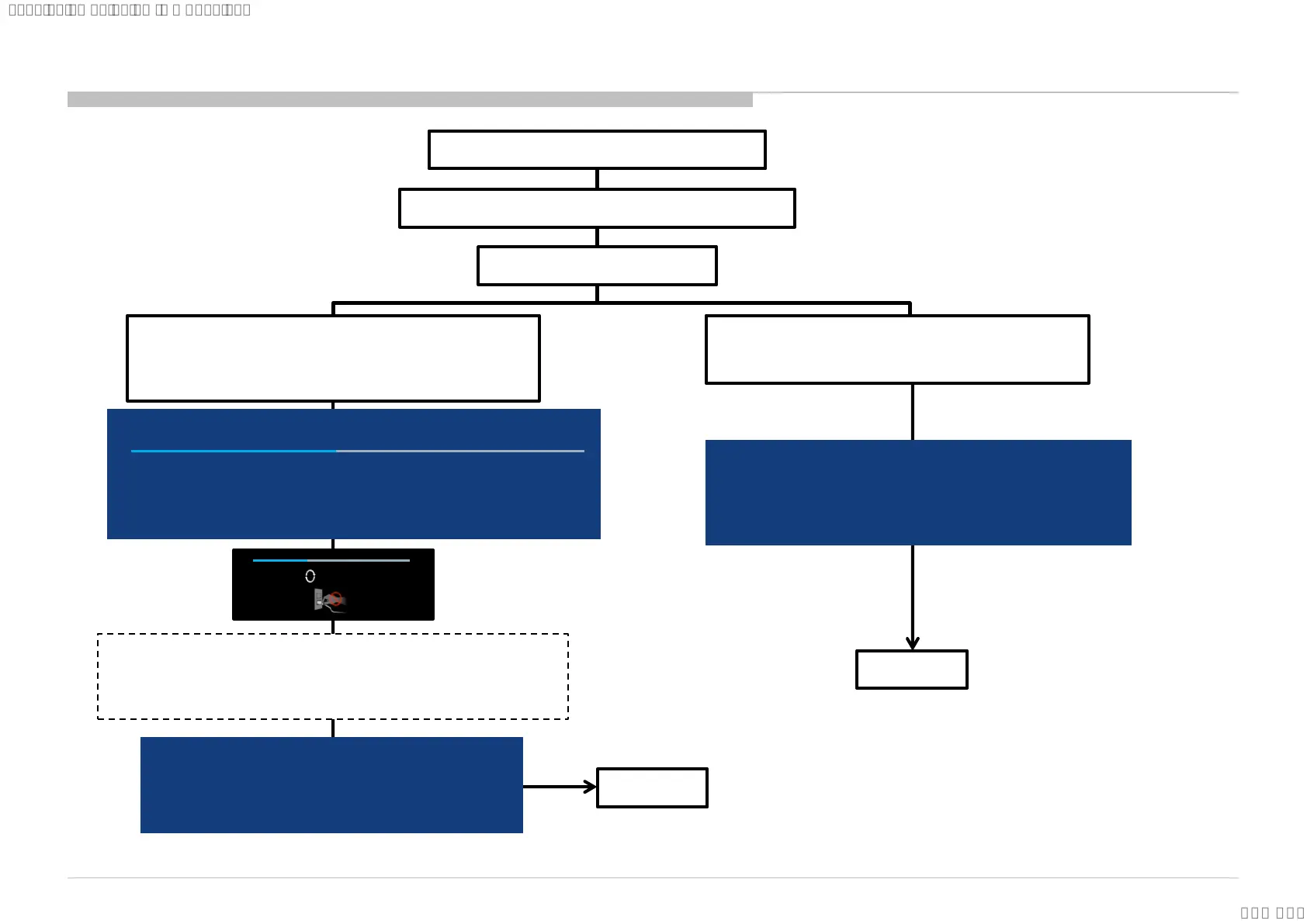
1:Download USB image and unzip file.
2: copy unzip file to USB memory root folder.
3: USB memory insert TV.
4-a:USB image is newer soft version.
Automatically show message and start update.
Please follow directions.
5: finished
System software update
Your software is up to date
Please remove the USB device and select [OK] to exit
OK
System software update
46%
Copying USB update file. Please wait…
Preparing for system software update. During the system software update, the TV will
automatically restart. Please do not remove the USB device until an update complete
message is displayed . The update may take up to 15 minutes to complete.
5: finished
Caution:
Do not power off while the update
is in progress.
*BR/CO/LA only
TV will reboot and enter STBY status.
Press "Power" key of remote commander to turn on TV.
OK
4-b:USB image is not newer soft version.
Automatically show message.
Please follow directions.
Updating…
System software update
The system software update is complete .
Some user settings may have changed during the update.
Please remove the USB device and select ”OK” to exit
85
USB Update
SYSSET
2018/09/1904:47:37(GMT+09:00)



 To Next Page