Help Guide
print.html[3/31/2021 7:15:59 AM]
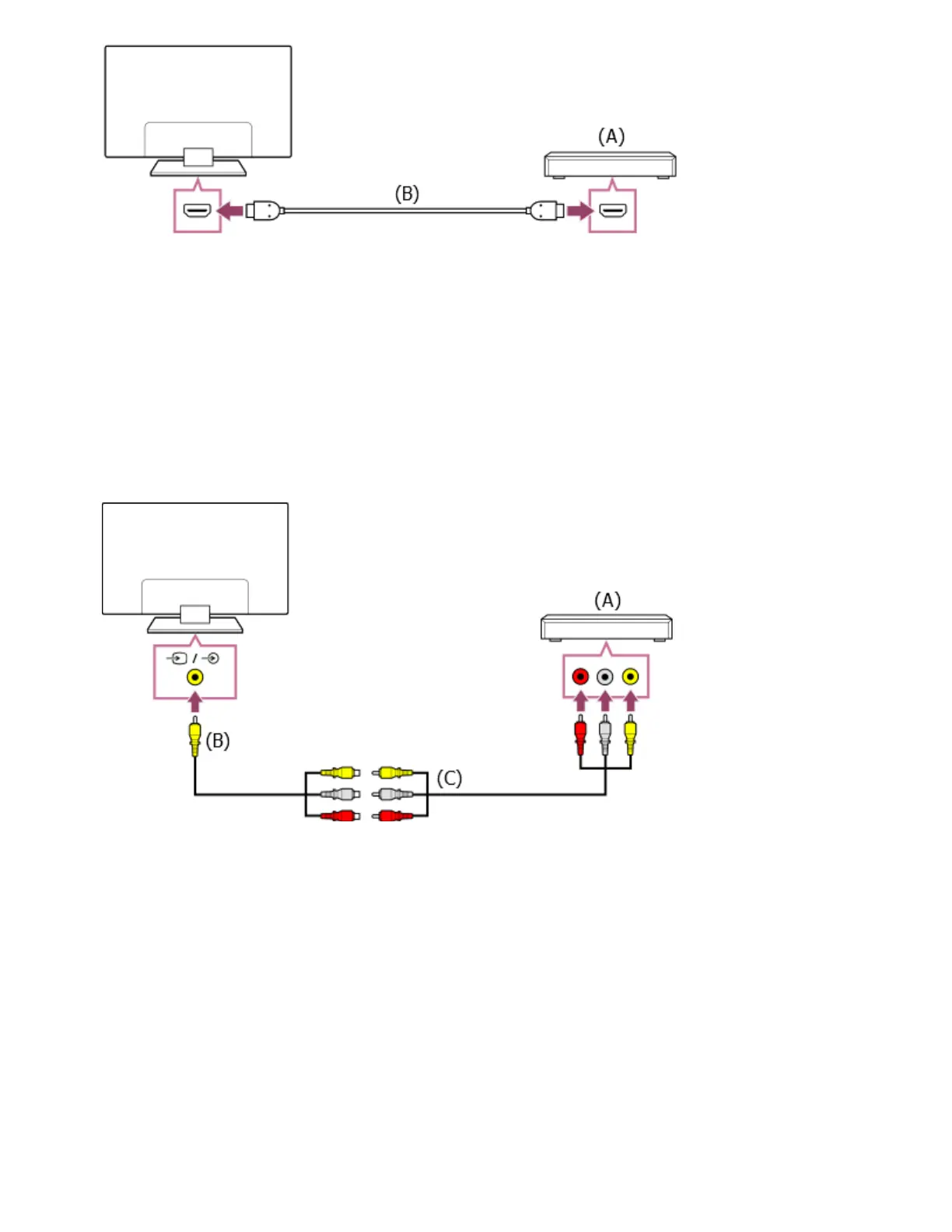
(A) Blu-ray/DVD player (same as connecting a cable/satellite box)
(B) HDMI cable (not supplied)
Be sure to use an authorized Premium High Speed HDMI Cable(s) bearing the HDMI logo.
Composite connection
If your Blu-ray/DVD player has composite jacks (sockets), connect them using a composite video/audio
cable.
(A) Blu-ray/DVD player (same as connecting a cable/satellite box)
(B) Analog Extension cable (supplied)
(C) RCA Cable (not supplied)
Whether the Analog Extension cable is supplied depends on your model/region/country.
Cable that connects to the video input jack
The 3.5 mm jack of the Analog Extension Cable has 4 poles.
*
* ™
*
*


 To Next Page
 Loading...