KF-42E200A/42E201A/50E200A/50E201A
KF-42E200A/42E201A/50E200A/50E201A
17
0
11
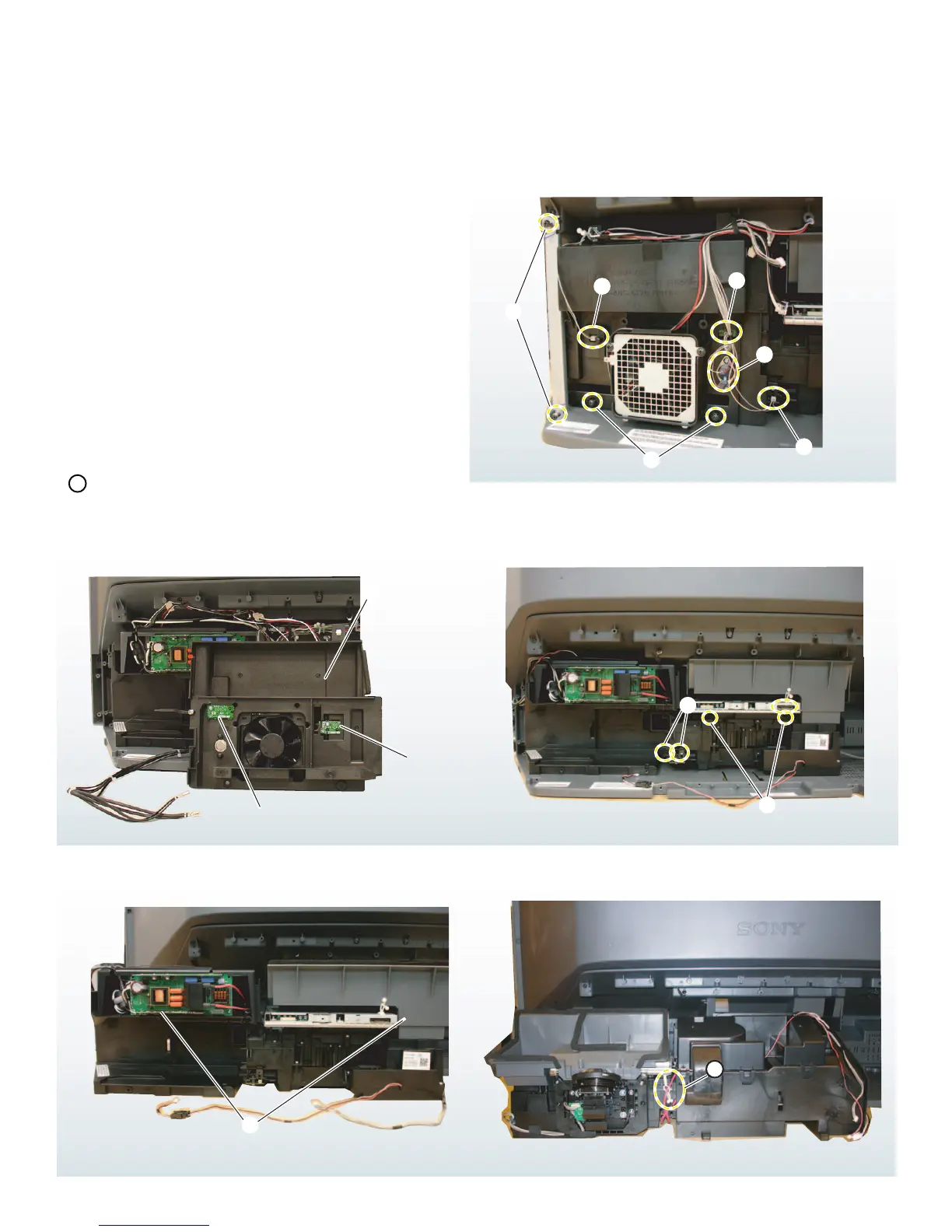
1-6. LAMP BLOCK ASSEMBLY AND OPTICAL BLOCK REMOVAL
8
9
5
6
2
3
4
1
Note: Remove the Lamp door and Lamp before removing the Lamp Block Assembly
(See “Replacing the Lamp” in the Appendix section of this service manual.)
S2 Board
T1Board
7
1
Remove 2 screws to release the Right Stay.
2
Disconnect CN150 T1 Board
3
Disconnect CN155 T2 Board
4
Disconnect the Termal Fuse connector.
5
Disconnect CN160 S2 Board
6
Remove 2 screws then pull out the fan cover.
7
Turn the fan cover over to remove the T1 Board and S2
Board.
8
Using caution remove the LVDS cable and 2 screws.
9
Remove 2 screws to release the Lamp Block Assembly and
the Optical Block assembly from the cabinet.
0
Gently pull the Lamp Block Assembly and the Optical Block
Assembly out of the cabinet.
11
Turn the assemblies around 180 degrees and release the
high voltage lead from the purse lock.


 To Next Page