29
Additional Information
Sony KV-DA29M90 Group E6 (GB, CT, CS)_2-515-454-11 (1)
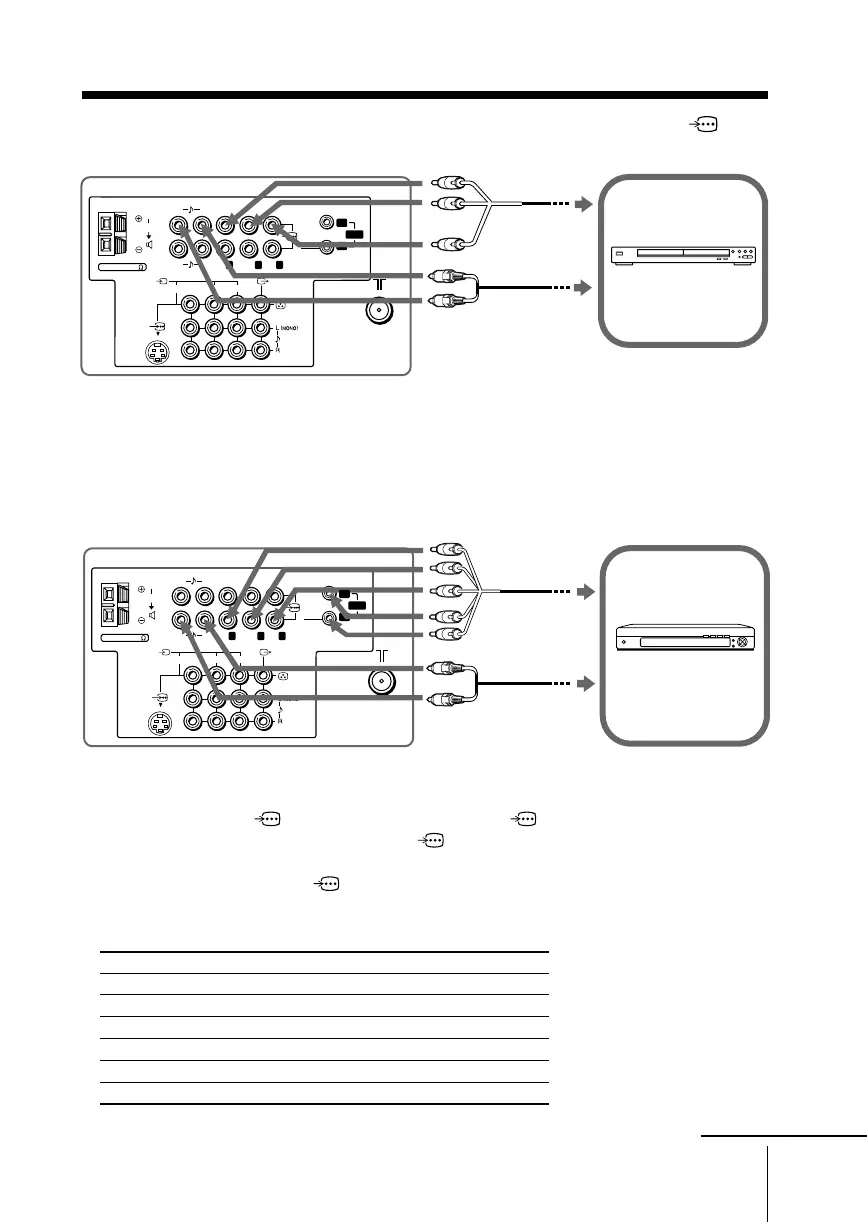
Connecting to the component video input terminal ( )
DVD player
TV rear panel
Component
video cable
(not supplied)
Audio cable
(not supplied)
1
1
23
C
R
P
R
/
C
B
Y
RL
P
B
/
P
R
/
RL
RG B
HD
SYNC
Y
C
R
C
B
P
B
/
2
VD
120W MAX 8
C
Note
• If your DTV receiver is equipped with the Y/PB/PR output terminals, connect it to the
Y/P
B/PR terminals of 1 (component video input 1) or 2 (component video input 2).
Connect nothing to the HD/VD terminals of
2 (component video input 2).
If your DTV receiver is not equipped with the Y/PB/PR output terminals, connect it to the
G/B/R/HD/VD terminals of
2 (component video input 2).
Tip
• The TV accepts the following signal formats:
Total scanning line Effective scanning line fV (Hz)
1125i 1080i 50/60
750p 720p 50/60
625p 576p 50
625i 576i 50
525p 480p 60
525i 480i 60
Notes
• The component video terminals on your DVD player are sometimes labeled Y/C
B/CR, Y/PB/
PR, Y/Cb/Cr or Y/B-Y/R-Y.
• If you select “HD/DVD 1” or “HD/DVD 2” on your TV screen, the signal from the T
(monitor output) terminals will not be output properly. This does not indicate a malfunction.
Digital TV receiver
TV rear panel
Component
video cable
(not supplied)
Audio cable
(not supplied)
1
1
23
C
R
P
R
/
C
B
Y
L
P
B
/
RL
RG B
SYNC
Y
2
C
R
C
B
P
B
/
P
R
/
VD
HD
R
120W MAX 8
C
continue







 To Next Page