28 Additional Information
Sony KV-DA29M90 Group E6 (GB, CT, CS)_2-515-454-11 (1)
Additional Information
1
1
2
23
CR
PR/
C
B
Y
Y
RL
P
B/
C
R
PR/
C
B
PB/
RL
RG B
HD
VD
SYNC
120W MAX 8
C
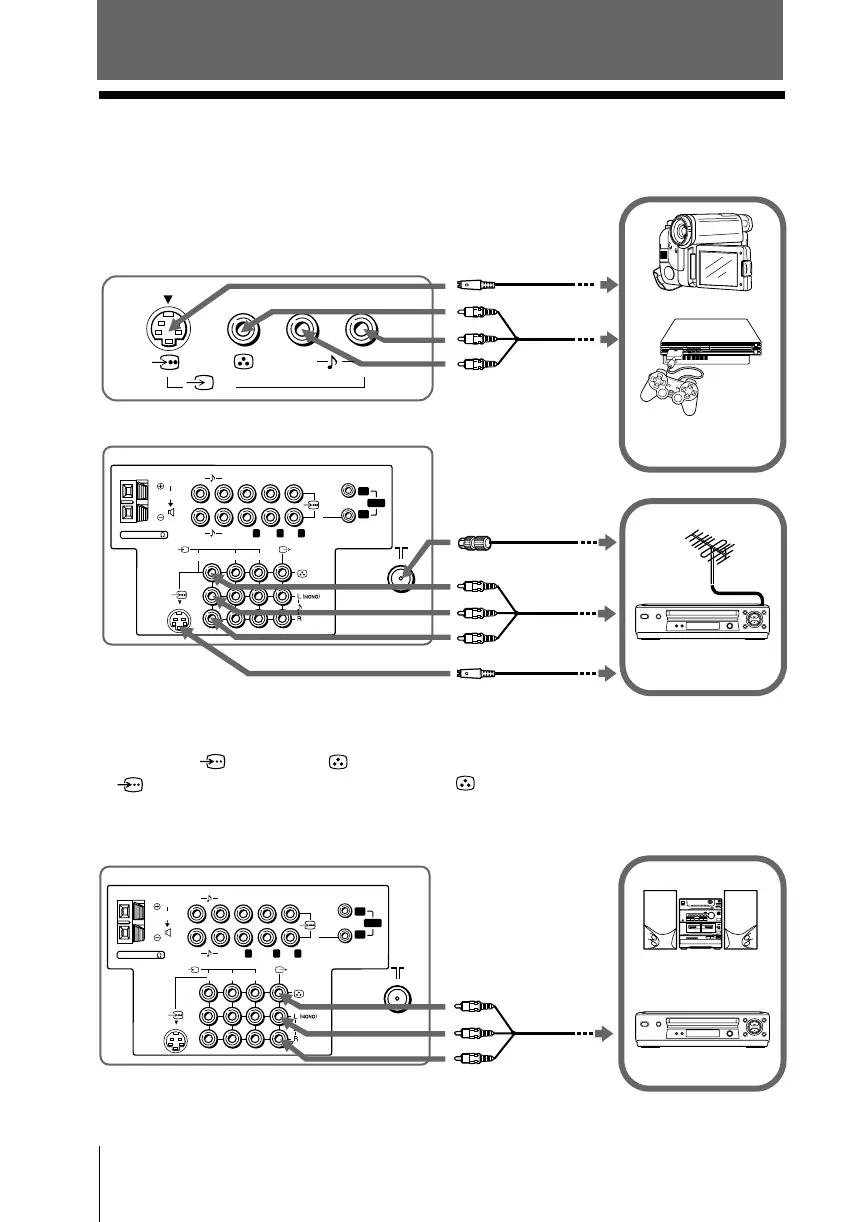
x Connecting optional components
Connecting to the video input terminal ( t )
TV front panel
Video game
equipment
Audio system
1
1
2
23
C
R
P
R
/
C
B
Y
Y
RL
P
B
/
C
R
P
R
/
C
B
P
B
/
RL
RG B
HD
VD
SYNC
4
L(MONO)
R
120W MAX 8
C
Audio/Video
cable
(not supplied)
Antenna cable
(not supplied)
VCR
TV rear panel
VCR
Audio/Video
cable
(not supplied)
Audio/Video
cable
(not supplied)
Camcorder
Notes
• If you connect a VCR to 8 (antenna input), preset the signal output from the VCR to the
program number 0 on the TV (see page 25).
• When both
(S video) and (video) for
t1
or
t4
are connected at the same time,
(S video) is automatically selected. To view (video), disconnect the S video cable.
Connecting to the monitor output terminal ( T )
S Video cable
(not supplied)
S Video cable
(not supplied)
TV rear panel







 To Next Page