9
Overview of Controls
Overview of Controls
Sony KV-DA29M90 Group E6 (GB, CT, CS)_2-515-454-11 (1)
Overview of Controls
1
1
2
23
C
R
P
R
/
C
B
Y
Y
RL
P
B
/
C
R
P
R
/
C
B
P
B
/
RL
RG B
HD
VD
SYNC
4
L(MONO) R
PROG
MENU
(AUTO PROG)
SOUND
MODE
AUTO PROG:Press [MENU] for 5sec
qa
qs
qd
qg
qf
qh
qj
3
2
0
9
4
5
8
7
6
4
L(MONO) R
PROG
MENU
(AUTO PROG)
SOUND
MODE
AUTO PROG:Press [MENU] for 5sec
C
1
120W MAX 8
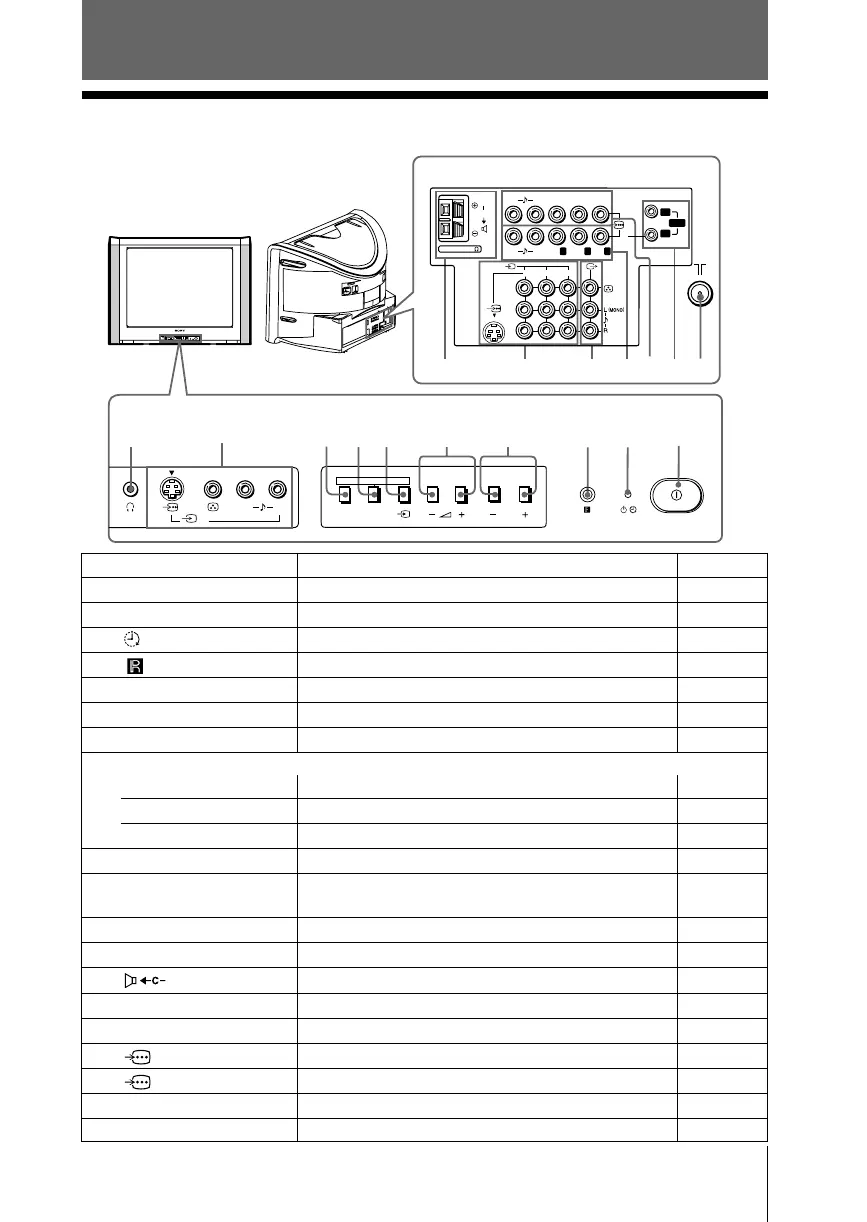
TV front panel
TV rear panel
x TV front and rear panels
Button/Terminal Function Page
1 ! Turn off or turn on the TV. 6
2 1 Standby indicator. 6
2 Wake Up indicator. 10
3 Remote control sensor. –
4 PROG +/– Select program number. –
5 2 +/– Adjust volume. –
6 t Select TV or video input. 28
Menu operations
5 2 +/– Select and adjust items. –
6 t Confirm selected items. –
7 MENU Display or cancel the menu. –
7 (AUTO PROG) Preset channels automatically. 8
8 SOUND MODE Select sound mode options. 12
5-Band Graphic Equalizer display will appear.
9 t4Video input terminal 4. 28
0 i Headphone jack. –
qa Center speaker input terminal. 30
qs t1, t2, t3Video input terminal 1, 2, 3. 28
qd T Monitor output terminal. 28
qf 2 Component video input terminal 2. 29
qg 1 Component video input terminal 1. 29
qh SYNC HD/VD HD/VD input terminal. 29
qj 8 Antenna input terminal. 28







 To Next Page