Help Guide
Wireless Stereo Headset
LinkBuds Open
The headset falls out of your ears/An earache occurs
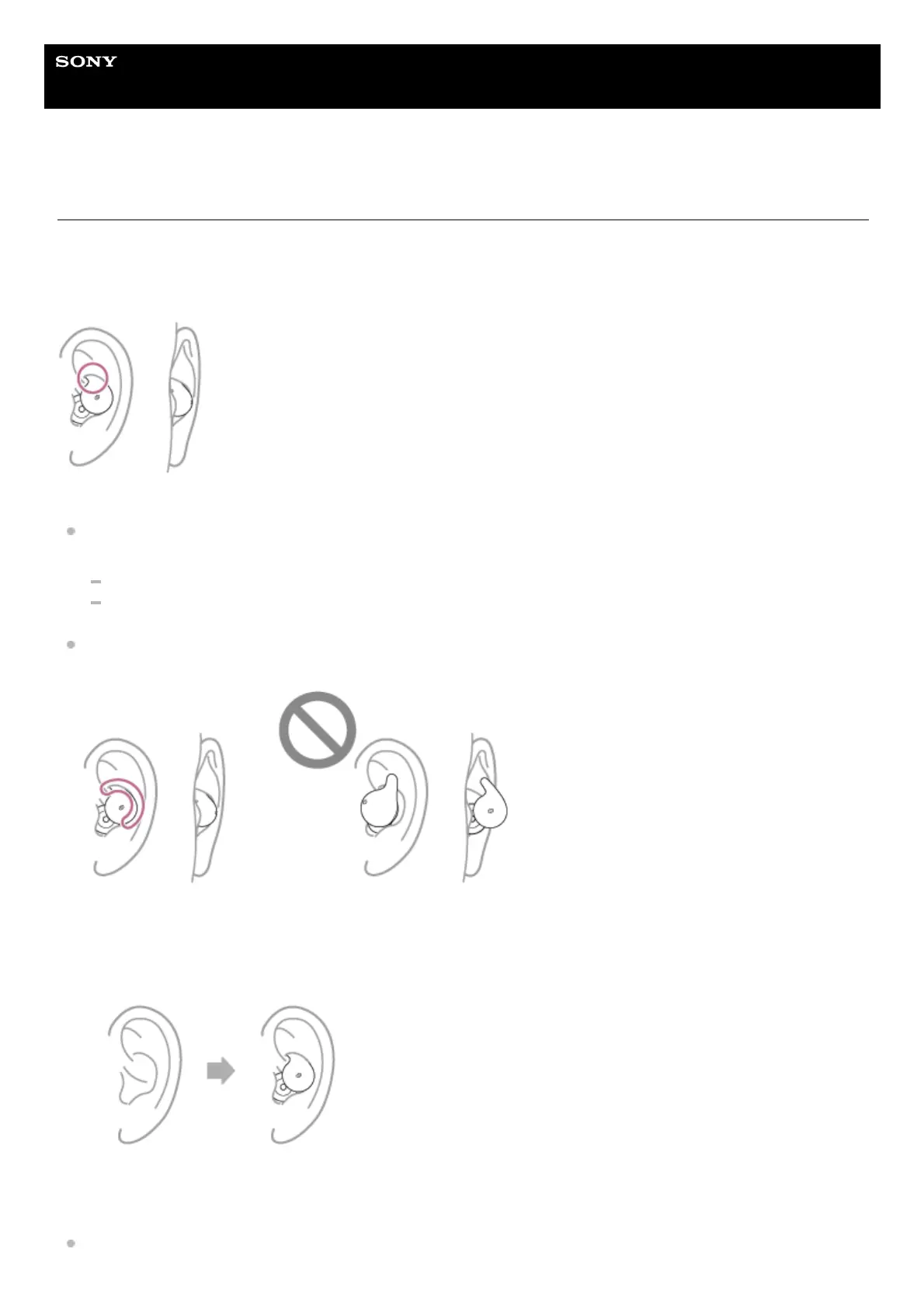
When the headset unit is being worn correctly
The upper part of the fitting supporter is tucked into the ear groove, and the headset unit fits firmly in the ear. The
headset unit does not stick out when viewed from the side.
The headset unit comes off the ear
If the headset units easily come off your ears, follow the steps below to check that you are wearing the headset units
properly.
Record how the headset units are worn in your ears using the video function of your smartphone or other devices.
Check the wearing condition with the “Sony | Sound Connect” app.
Make sure that the fitting supporter is properly inserted and fits securely in your ear. If the fitting supporter is not in
place correctly and sticks out from your ear, the headset unit can easily come off the ear.
Follow the steps below to put on the headset units.
You are experiencing outer ear or ear canal pain
Put the headset unit into your ear again so that it covers your ear canal.
Twist the headset unit and secure the fitting supporter into the top of the ear groove.1.
Shake your head lightly and check that the headset unit does not come off or move in your ear.2.



 To Next Page