Help Guide
Wireless Stereo Headset
LinkBuds Open
Maintenance
Perform regular maintenance by following the procedures below.
Clean the headset.
Cleaning the headset units
Dust and dirt on the exterior of the headset and fitting supporter can be wiped off with pure water type wet wipes.
Do not use wet wipes containing alcohol, thinner, benzene, etc. as they may damage the finish on the surface of the
headset or cause other damages.
Use a soft dry cloth to wipe off any water that gets on the headset units.
Do not allow the headset to remain with water droplets attached in a cold environment as the water may freeze.
Cleaning the IR sensors
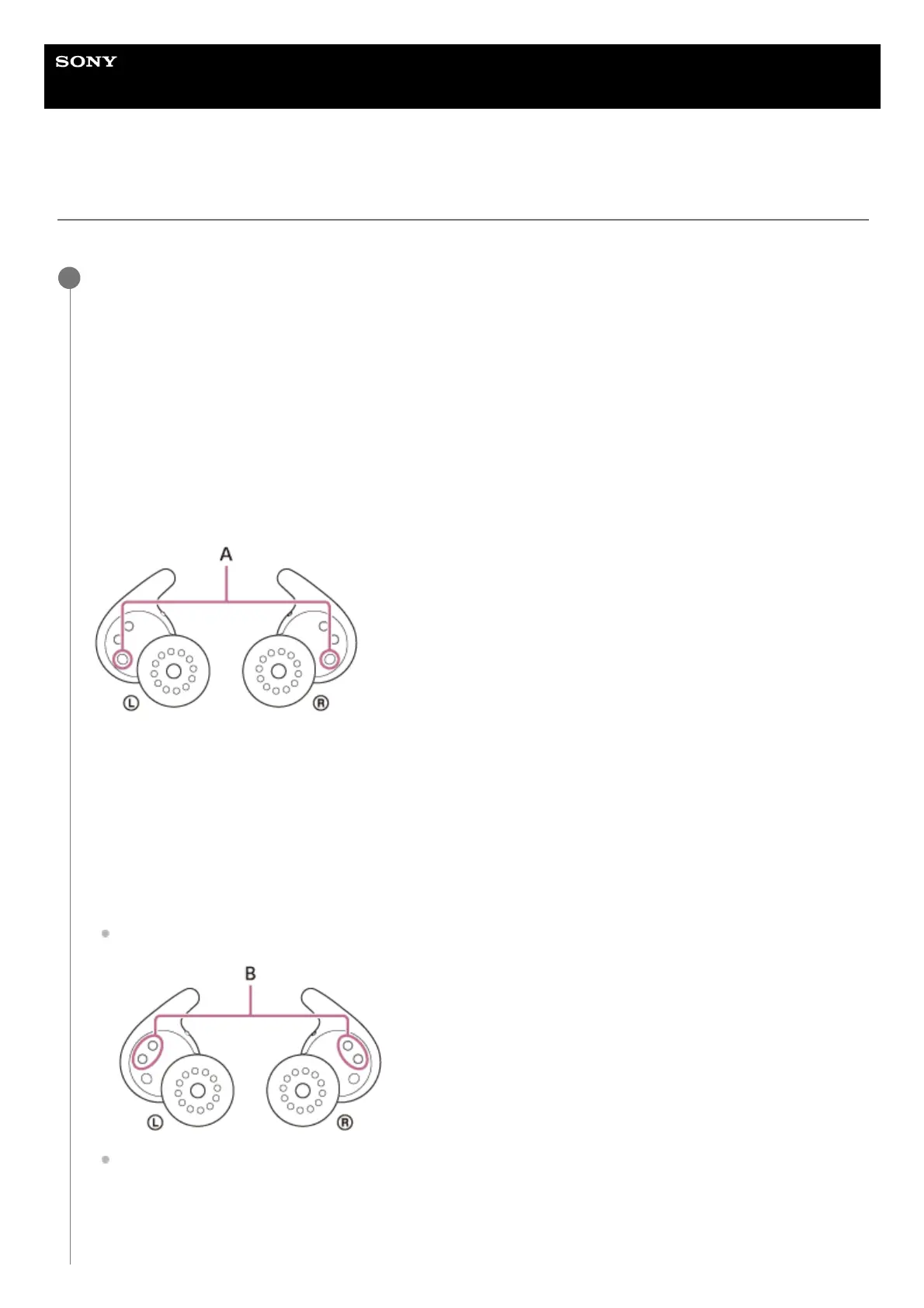
If the IR sensors (A) are dirty, wearing of the headset may not be detected and the headset may not work properly.
Wipe off any dirt on the IR sensors (A) with a soft dry cloth, etc.
Cleaning the charging ports
If foreign matter or moisture, such as sweat, etc., is left on the ports (B) of the headset or the ports (C) of the
charging case, charging port corrosion may occur and prevent charging.
When you have finished using the headset, make sure to gently clean the charging ports with a soft dry cloth or
cotton swab.
When the headset cannot be charged, it may help to try thoroughly cleaning the charging ports.
Charging ports that needs maintenance
Headset
Charging case
1



 To Next Page