Help Guide
Wireless Stereo Headset
LinkBuds Open
About wide area tap
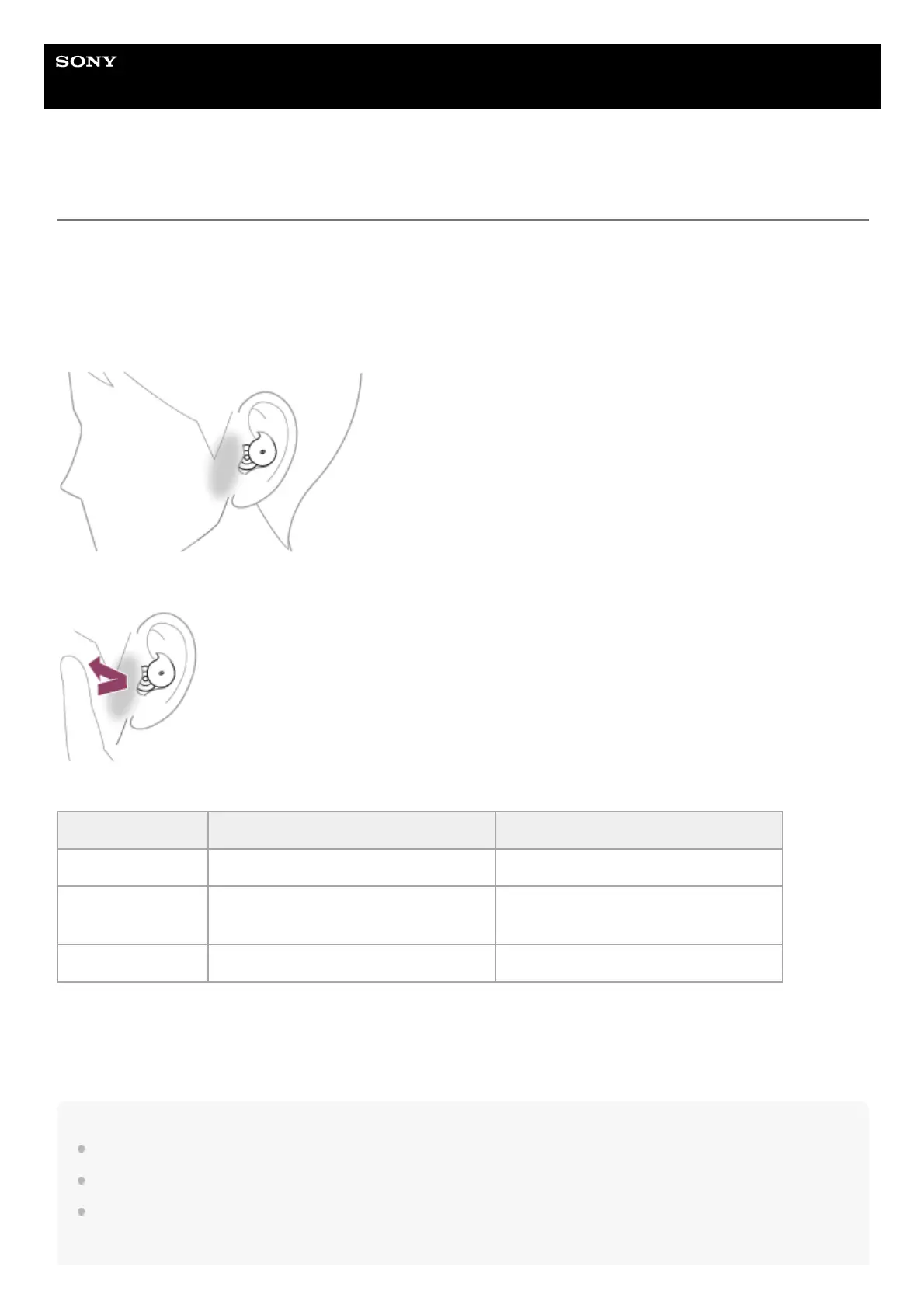
Wide area tap is a function that detects vibration around the ears with the acceleration sensors that are built into the
headset and determines the tap operations.
By tapping not only the headset unit but also the areas around the ears where the headset is worn, you can perform
various operations such as music playback or phone calls.
The range in which the headset can detect tap operations is from around the tragus to the lower side and sideburn.
When tapping, use your index finger to perform a harder tap within the tap detection area.
Some available operations
About the instruction manual video
Watch the video to find out how to use wide area tap (audio explanation is not available).
https://rd1.sony.net/help/mdr/mov0074/h_zz/
Hint
In addition to tapping around your ear, tap operations are detected when you tap the headset unit.
If the tap operations cannot be easily detected, tap harder at a position closer to your ear.
When tapping the headset or the area near your ear 2 or 3 times, tap it quickly with an interval of about 0.2 seconds between
taps.
Left Right
Tap twice To play or pause music To play or pause music
Tap 3 times
To receive or end a call
To skip to the beginning of the next track
To receive or end a call
To skip to the beginning of the next track
Tap 5 or more times To lower the volume To increase the volume



 To Next Page