Help Guide
Wireless Stereo Headset
LinkBuds Open
Turning off the headset
When the headset is left removed
When the headset is not being worn in your ears for about 15 minutes after being removed from the charging case, the
headset turns off automatically.
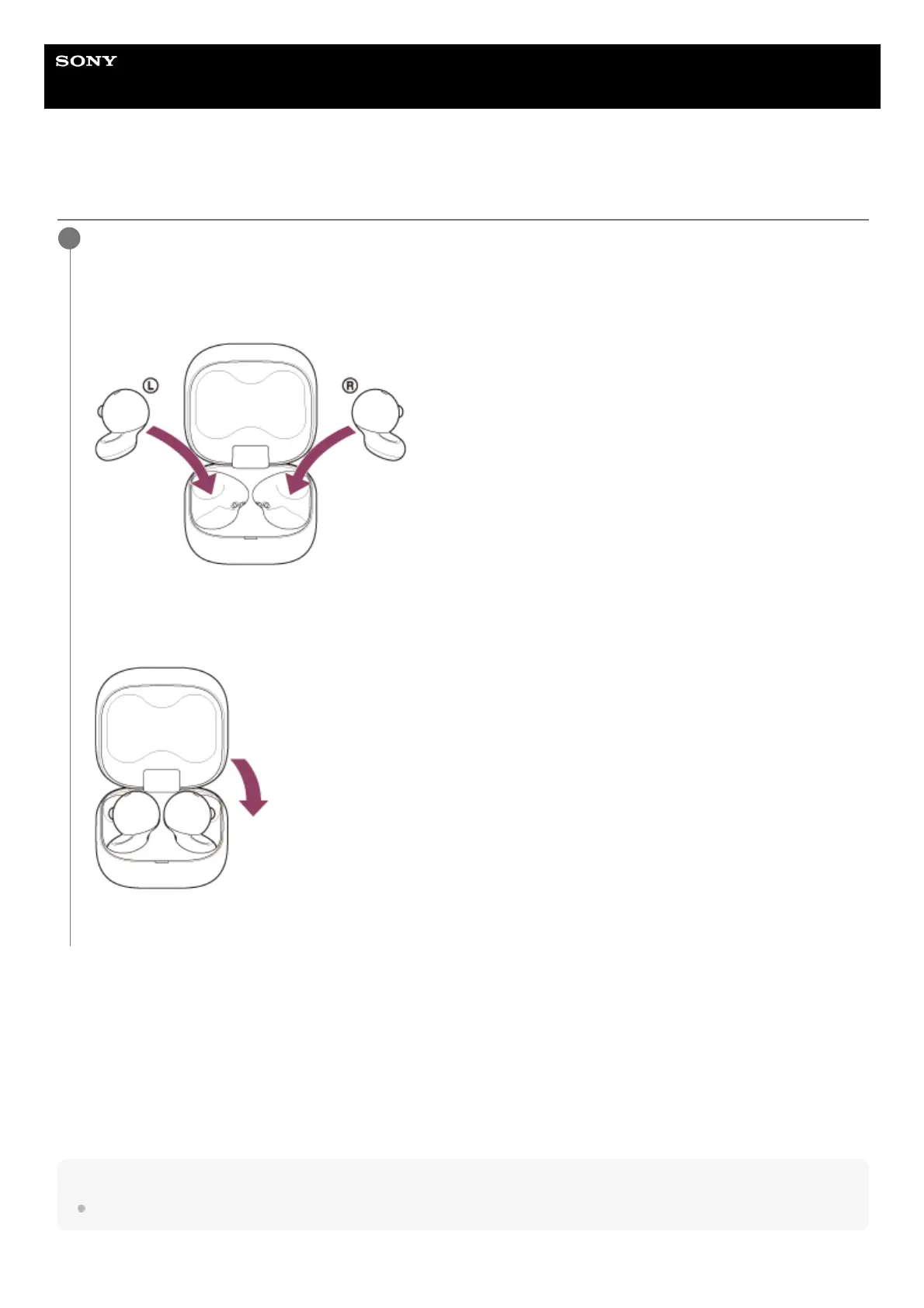
To turn off the power before the headset turns off automatically, set the headset units into the charging case, and close
the charging case lid.
You can use the “Sony | Sound Connect” app to change the setting of the headset so that it will not be turned off
automatically.
Hint
You can also turn off the headset with the “Sony | Sound Connect” app.
Set the headset units into the charging case.
Put the left headset unit (the headset unit with the tactile dot) back into the left hole of the charging case, and put
the right headset unit back into the right hole of the charging case. Each headset unit will be set to the correct
position in the charging case by the built-in magnet.
When the rechargeable battery of the charging case still has power, the indicator (orange or green) on the charging
case lights up for about 3 seconds.
The charging starts on the headset. Close the charging case lid.
The headset turns off.
1



 To Next Page