5
MC-S50
Operational description of Test mode
1. Audio Block Function Check
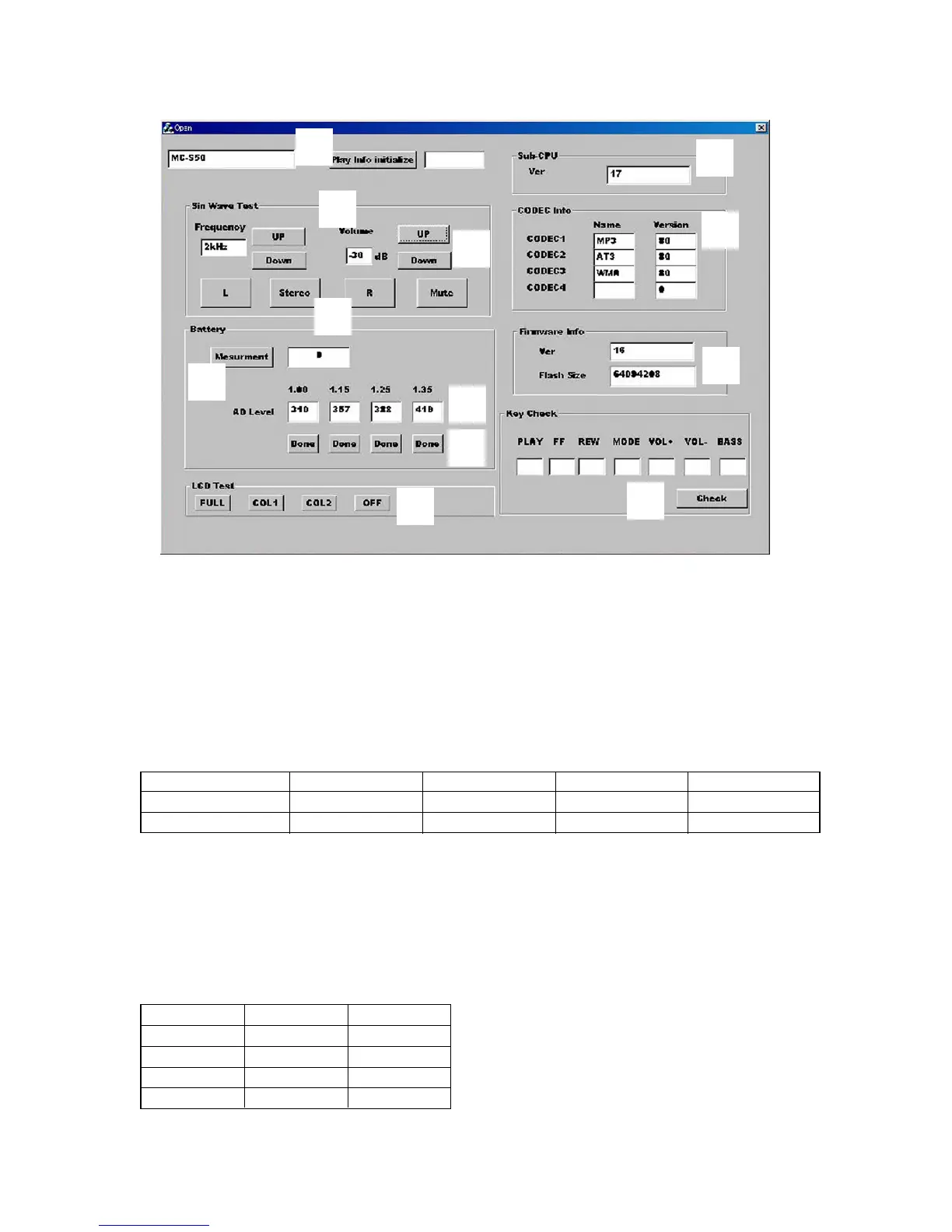
Clicking the UP or Down button in block 2 of the screen allows you to check with various output frequencies. Also, clicking the UP or
Down button in block 3 can check variations of volume. Clicking the L, Stereo, R, or Mute button in block 4 can change audio output
status.
2. Battery Threshold Value Reading and Measurement
Connect an exclusive USB cable to the set, and available battery threshold values (converted values corresponding to voltage values)
written to the set at the shipment will be displayed at 5. (See Table 1-3)
These threshold values are inherent values of the set, but if they were readjusted during the board repair, newly set threshold values
(converted values corresponding to voltage values) are displayed.
Table 1-3.
Condition OFF Scale 1→2 Scale 2→3 Scale 3→4
Voltage set value 1.00 V 1.15 V 1.25 V 1.35 V
Converted value (ref.) 320 368 400 432
Note: The threshold values (converted values corresponding to voltage values) are different every set.
3. LCD Test
Clicking FULL (full lit), COL1 (column 1), COL2 (column 2), or OFF (full off) in block 8 results in all ON, column 1 ON, column 2 ON,
or all OFF of the LCD on the set respectively.
4. CODEC Info Check
The CODEC programs and their versions written to the set can be checked. (block 9)
The CODEC programs written to the set at the shipment are “MP3”, “ATRAC3”, and “WMA” and their versions are as listed below.
(Versions will vary if updated)
Program No. Name Version
CODEC1 MP3 96
CODEC2 AT3 96
CODEC3 WMA 96
CODEC4 blank 0
qd
2
3
4
6
5
8
qs
0
9
qa
7



 To Next Page