Chapter 12 Setup Menus
Chapter 12 Setup Menus 12-11
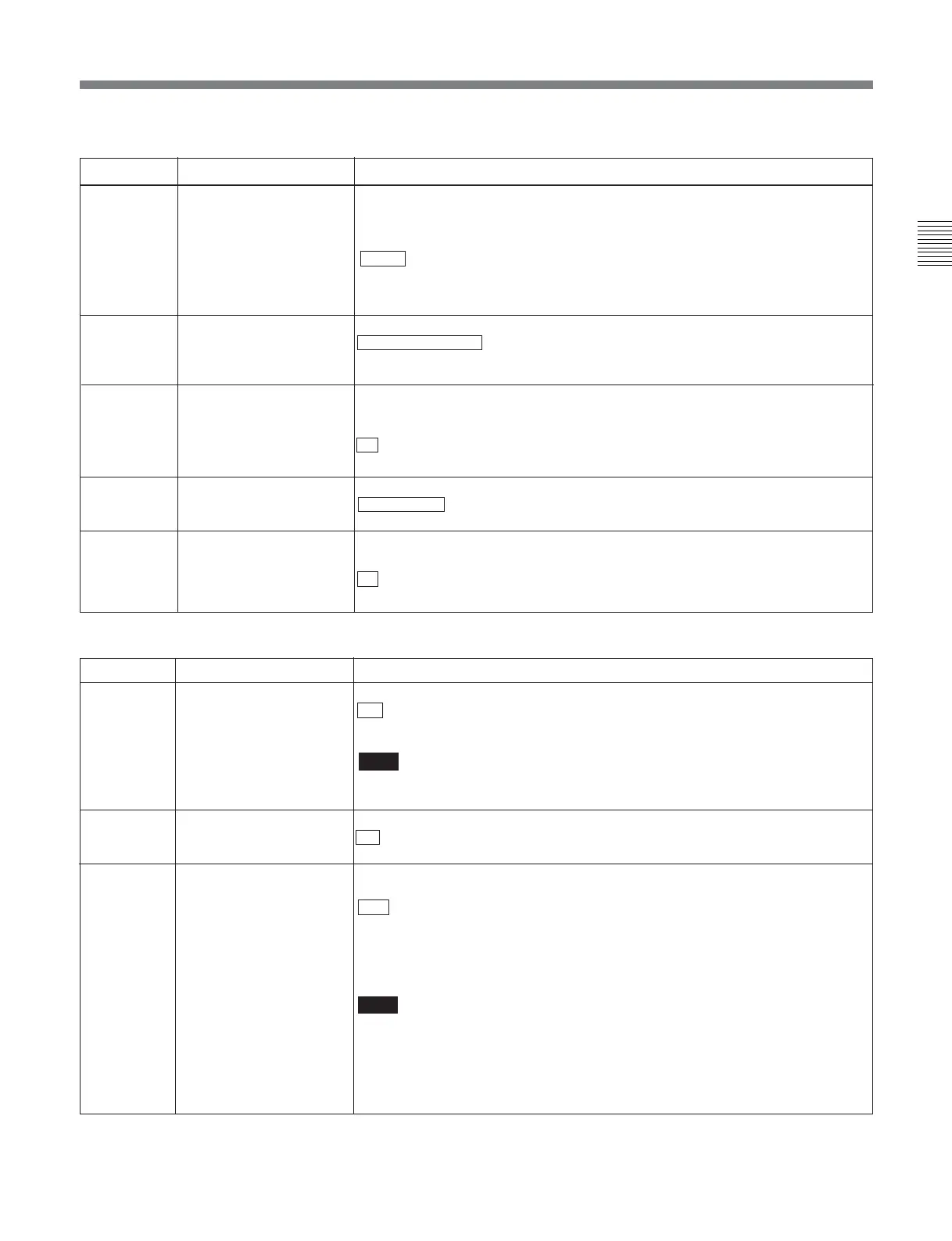
Menu items in the range 100 to 199, relating to the control panels (Continued)
Menu items in the range 200 to 249, relating to the remote control interface
Item number
Item name
Settings
133
TELE-FILE CONTROL
MODE
Selects the device used for data modification operations in the Tele-File menu.
CONTROL PANEL : Operate with the control panel of this unit.
REMOTE: Operate with remote devices connected to connectors such as
REMOTE1, REMOTE2, and RS-232C.
134 TELE-FILE MENU AUTO
POPUP
Selects whether to open the Tele-File menu automatically when a cassette with a
Tele-File label is loaded. However, this is valid only when the function menu is
HOME, HOME2, or page 1 to 6.
off : Do not open the Tele-File menu automatically.
on: Open the Tele-File menu automatically.
135 TELE-FILE THREAD
COUNTER CLEAR MODE
Selects whether to clear the thread counter when formatting a Tele-File.
NOT CLEAR : Do not clear the thread counter.
WHEN FORMAT: Clear the thread counter.
136
TELE-FILE IN OUT INPUT
CONTINUE
Selects whether to continuously input log (IN and OUT point) data in the Tele-File
menu screen.
off : Do not continuously input log (IN and OUT point) data.
on: Continuously input log (IN and OUT point) data.
132
AUDIO PB VOLUME Select whether each of the audio PB controls on the lower control panel is
effective to control the audio playback level on each channel or the CH8/ALL CH
control alone functions as a master control to control the audio playback level on
all channels together.
EACH : Each PB control is effective to control each channel.
ALL: The CH8/ALL CH control alone functions as a master control.
When “ALL” is selected, the ALL CH indicator to the right of the CH8/ALL CH
control lights up.
201
PARA RUN
202
CF FLAG (valid only in
625-line mode)
Select the mode for locking to the color framing sent from the remote controller.
8F : Eight-field locking mode
4F/8F: Four- or eight-field locking mode
211 REMOTE1 PORT Select how to use the REMOTE 1-IN(9P) and REMOTE 1-OUT(9P) connectors
on the connector panel.
I&O : Both the IN and OUT connectors are effective whether in local or remote
mode.
IN: Only the IN connector is effective whether in local or remote mode.
OUT: Only the OUT connector is effective whether in local or remote mode.
PANEL: Allows you to select i&o, in, or out using the function menu.
Note
When selecting “PANEL”, first define user-defined function key RMT1 in the
HOME2 page.
On how to define user-defined function keys in the HOME2 page, refer to the
Maintenance Manual Volume 1.
Select whether or not to use synchronized operation for two or more VTRs.
DIS : No synchronized operation
ENA: Use synchronized operation
Note
To use synchronized operation for two or more VTRs, set item 201 to “ENA” on
all of the VTRs.
Item number Item name
Settings








 To Next Page