Chapter 3 Preparations
Chapter 3 Preparations 3-3
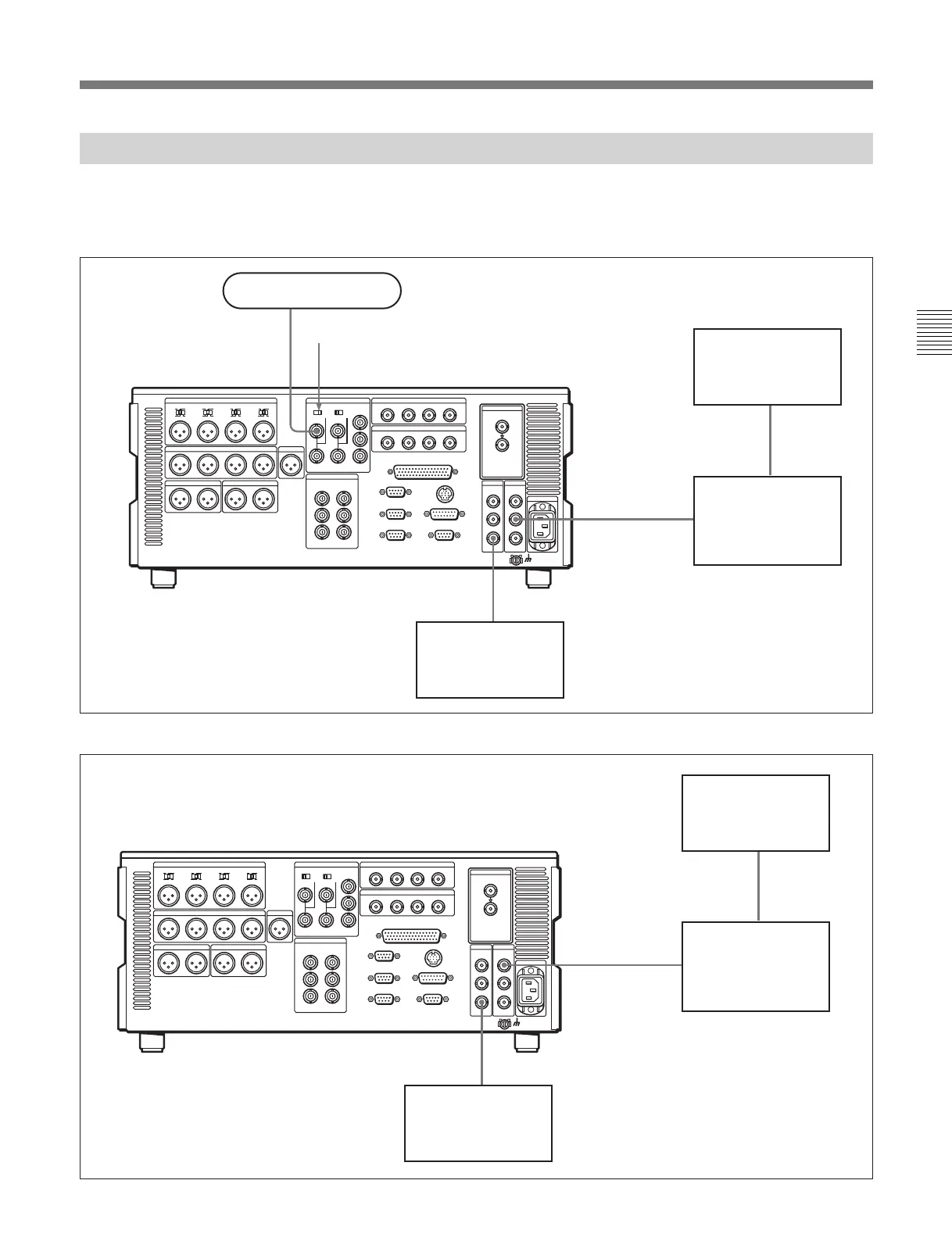
3-1-3 Connections Using the SDTI-CP Interface
The following examples show the connections with
devices that support the SDTI-CP interface for
dubbing video and audio signals.
• When this unit is used as player
• When this unit is used as recorder
SDI OUTPUT 3
SDTI-CP
OUTPUT
SDTI-CP
INPUT
REF. VIDEO INPUT
Reference signal
75Ω termination switch: ON
MSW-A2000/A2000P/M2000/M2000P/2000/
M2000E/M2000EP
a)
(player)
Video monitor
Video monitor
Data storage unit for
nonlinear editing system
(MAV-555, etc.)
SDI OUTPUT 3
SDTI-CP
INPUT
SDTI-CP
OUTPUT
MSW-A2000/A2000P/M2000/M2000P/2000/
M2000E/M2000EP
a)
(recorder)
Video monitor
Video monitor
Data storage unit for
nonlinear editing system
(MAV-555, etc.)
a) The figure shows the MSW-M2000/
M2000P.
a) The figure shows the MSW-M2000/
M2000P.








 To Next Page