16
Resume playback
You can resume playback from the point
where the playback has been stopped. The
player memorizes the point even after the
power is turned off.
1 During playback, press x to stop.
The player memorizes the point where
playback is stopped.
•DVD/Video CD/Audio CD
“Press Play Key To Continue” appears on
the screen.
2 Press u to start playback.
Playback starts from the point where
playback has been stopped.
•MP3/JPEG
When resume playback is activated,
playback starts from the beginning of the
MP3/JPEG file (track) which you have
stopped playback.
Notes
• To deactivate the resume function, press x again
while playback is stopped. “Press Play Key To
Continue” appears on the screen at this time.
• The resume function will be deactivated when
the disc is ejected.
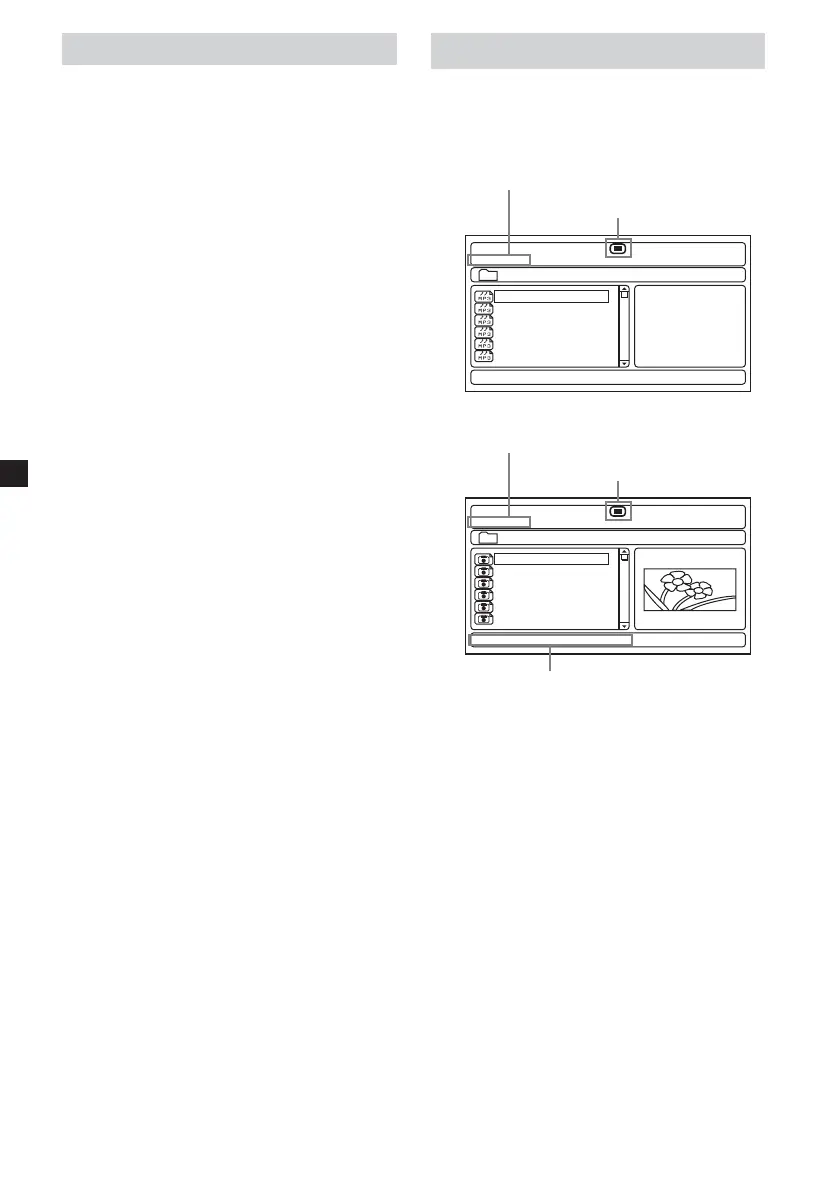
Using MP3/JPG menu
1 Insert a disc containing MP3 or JPEG files.
Screen Example:
•for MP3
00:00
001/016
\Album1
00:00
Track01
Track02
Track03
Track04
Track05
Track06
•for JPEG
00:00
001/016
\Album1
00:00
01 Flower
02 Tree
03 mountain
04 Car
05 Bycicle
06 My Friend
Resolution 1152 X 765
Current file number/Total file number
Current status
Current file number/Total file number
Current status
Resolution of current file















 To Next Page