17
2 Press u.
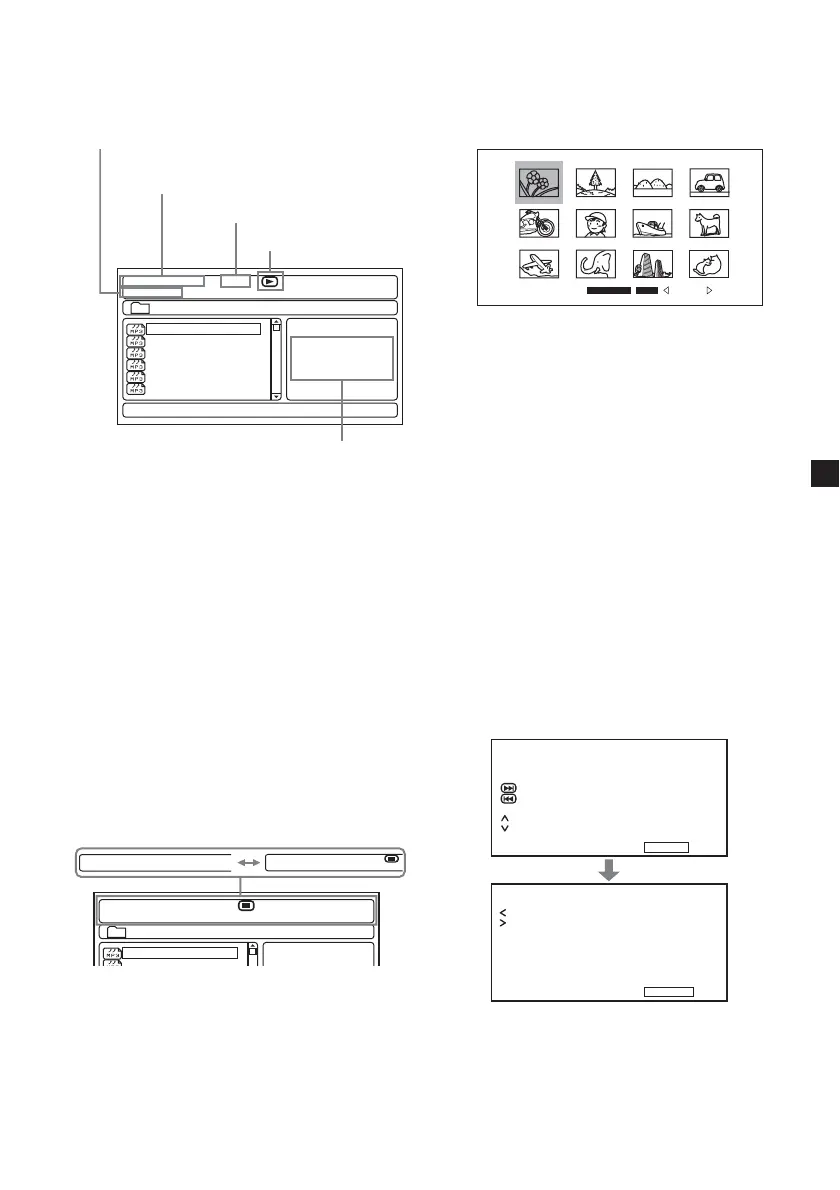
Playback starts and the MP3/JPEG menu
appears on the screen.
Screen example for MP3:
00:05
001/016
\Album1
03:56 128k
Track01
Track01
Various
Best Selection
Track02
Track03
Track04
Track05
Track06
* This player supports ID3 tag of MP3 files
version 1.0.
To select a folder or a file
While the player is stopped, use M/m buttons
to select the folder or a file, then press
(ENTER).
When you press (ENTER) after selecting a
folder, files inside the folder appear.
To select the display mode
Press (PROGRAM). For MP3, press
(PROGRAM) while in stop mode.
Each time you press (PROGRAM), the screen
will change to folder mode or file list mode. In
the file list mode, you can see all the files in the
disc.
Also if you press (DSPL), you can change the
display mode to the current status.
00:00
001/016
\Album1
00:00
Track01
00:00
001/016
00:00
Folder
Folder
00:00
001/016
00:00
Using the thumbnail mode of JPEG
disc
1 Press x while the JPEG image is
displayed.
Images of files appear in 12 subscreens.
Slide Show Menu Prev Next
2 Select the image you want to view by
pressing M/m/</, buttons and press
(ENTER).
A JPEG image is displayed on the screen.
To go to the next or previous JPEG image
list, press M/m/</, to select “g Prev” or
“Next G”, then press (ENTER).
To view the images as a slideshow, press
M/m/</, to select Slide Show, then press
(ENTER). The slideshow starts from the
selected image.
To return to the MP3/JPG menu, press
(MENU).
To view the remote key functions
You can view the remote key functions in
thumbnail mode.
Press M/m/</, to select “Menu”, then
press (ENTER).
Key Function
Program Transition Effect
Stop Thumbnail Mode
Next Picture
Previous Picture
Play Picture Mode
Invert
Mirror
Continue
Key Function
Contrarolate
Rotate Clockwise
Exit Help
Current file number/Total file number
Elapsed playing time/Total playing
time of current file
Bit rate
Current status
ID3 tag information*
continue to next page t















 To Next Page