– 10 –
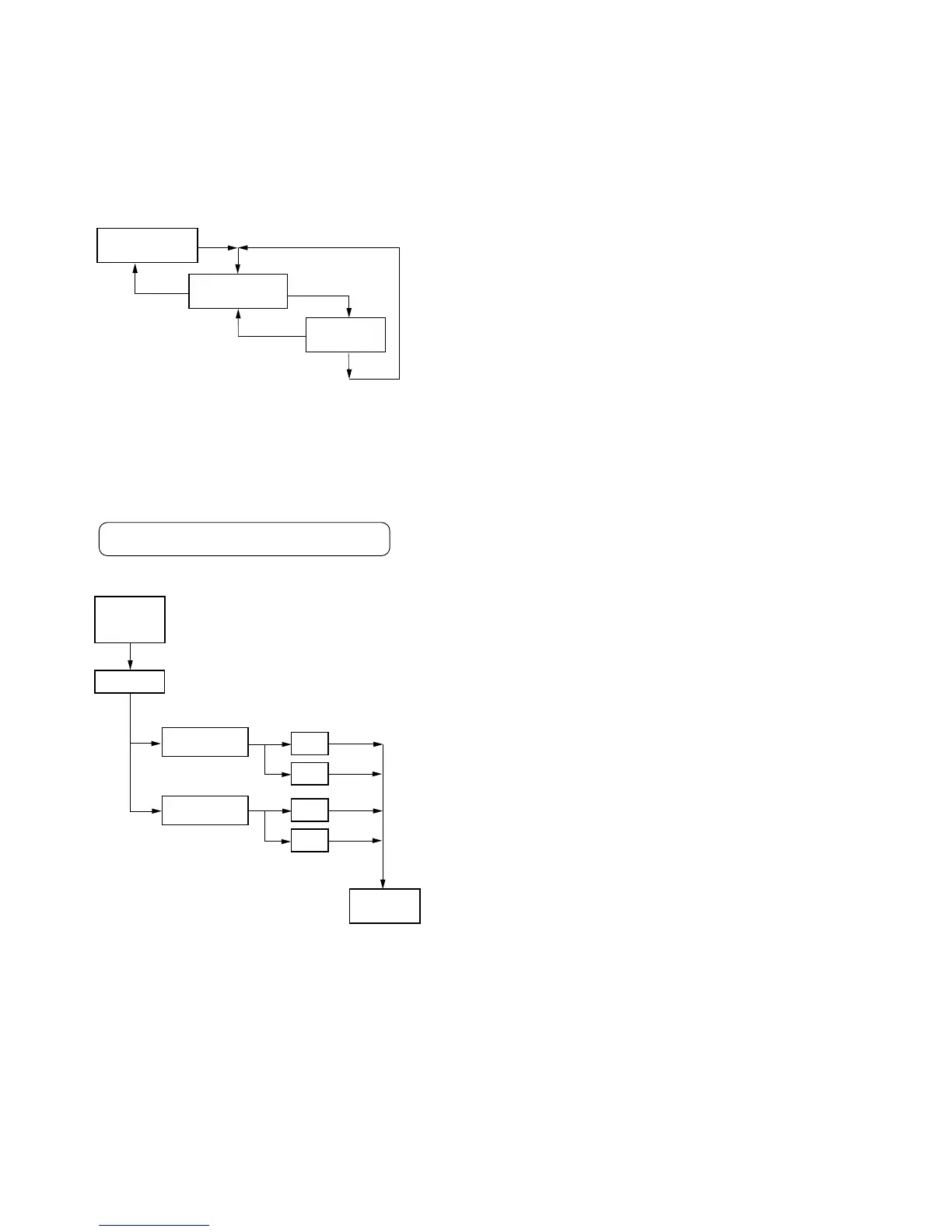
Power Mode
• Enter the test mode and press the VOLUME – key. Then, press
the ( key and the VOLUME – key in this turn to enter power
mode.
• When entering another mode, refer to the configuration of test
mode.
1. Structure of Power Mode
Overall Adjustment Mode
• Enter the test mode and press the VOLUME + key to enter over-
all adjustment mode.
• When entering another mode, refer to the configuration of test
mode.
• When the overall adjustment mode is entered, the LCD on the
remote commander display the following :
1. Structure of Overall Adjustment Mode
040 Auto?
Power mode
3 0 0
UNREG check
31 0
Power OFF
3 1 1
p key
p key
” key
” key
” key
Start ?
CD automatic
adjustment
MO automatic
adjustment
OK
NG
OK
NG
Overall
adjustment
mode
Auto?
Adjustment
mode
Manu ?
p key
p key
p key
p key
” key (to discriminate between CD and MO)
” key



 To Next Page