43
3 Press <MENU, (flip the lever towards > or .)
repeatedly until “ :Erase” flashes in the display, and then
press ENTER (ENTER).
“All Erase?” and “PushENTER” appear alternately in the
display.
To cancel erasing, press T MARK (T MARK).
4 Press ENTER (ENTER) again.
“TOC Edit” flashes in the display, and all the tracks will be
erased.
When erasing is complete, “BLANKDISC” appears in the
display.
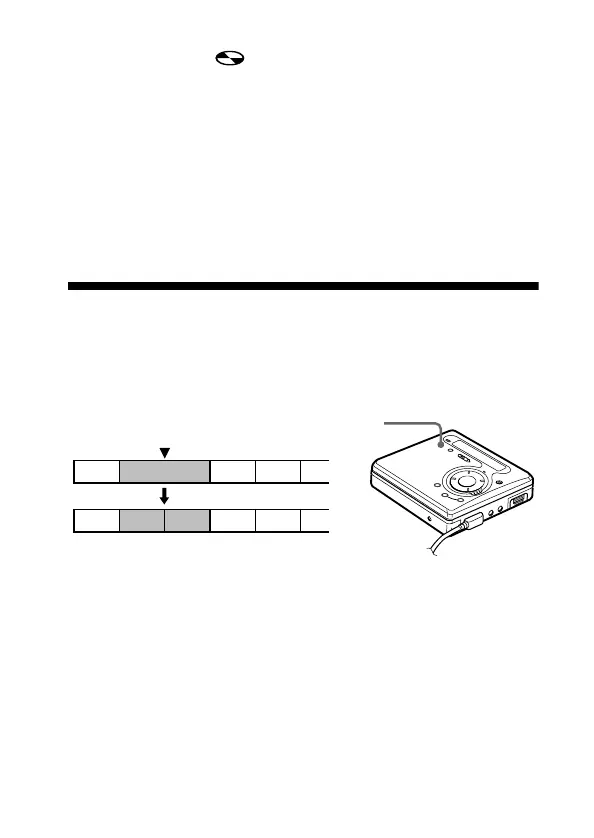
Adding a track mark
You can add track marks so that the part after the new track mark is
counted as a new track.
The track numbers will increase as follows.
1 While playing or pausing an MD, press T MARK on the recorder
at the point you want to mark.
“MARK ON” appears in the display, and a track mark is added.
The track number will increase by one.
To add track marks while recording
Press T MARK on the recorder at the point you want to add a track
mark.
1 3 42
231 4 5
Add a track mark
Track numbers increase
T MARK


 To Next Page
 Loading...








