Getting Started
19
Hookups
filename[010get.fm] model name1[SLV-N81] model name2[SLV-N71]
[3-065-551-11 (1)]
Hookup 3 : VCR setup
Before you start…
• Turn on the VCR and the TV.
• Press TV/VIDEO to display the VIDEO indicator in the VCR’s display window.
1
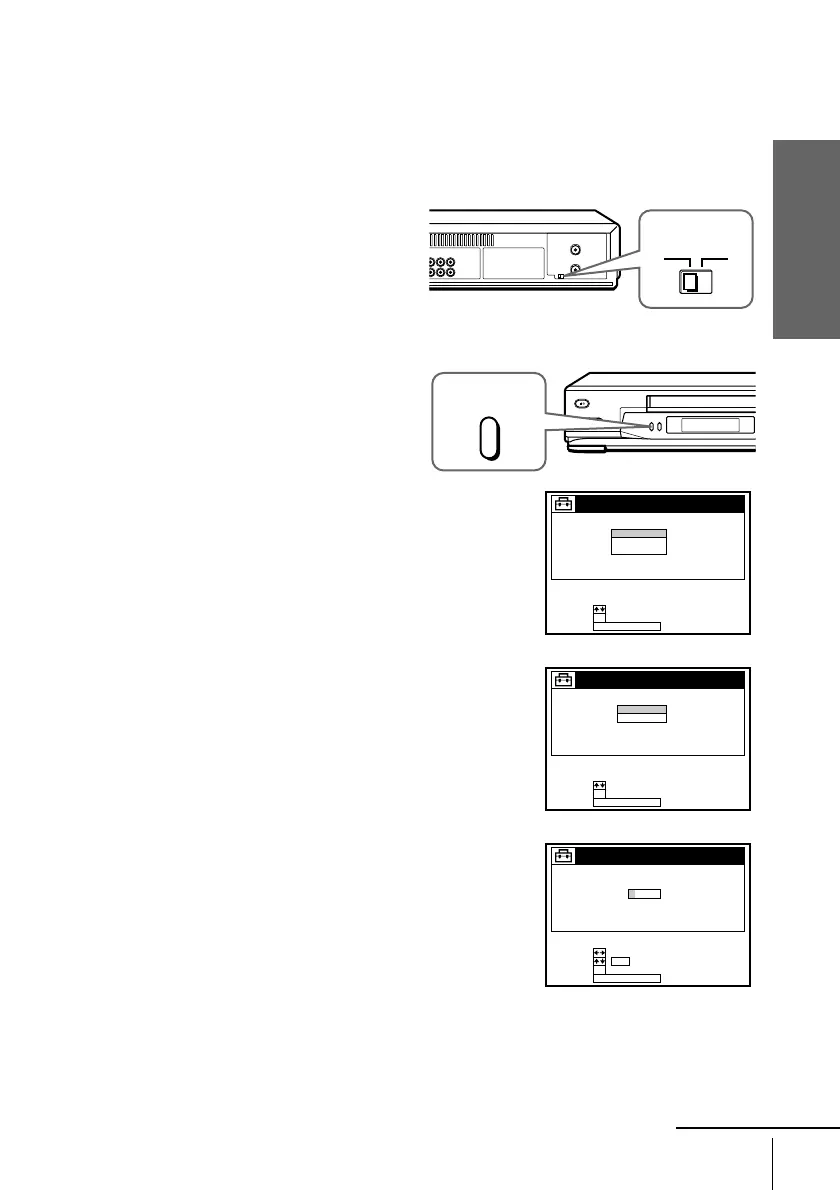
SettheRFUNITswitchtoCH3
or CH4, whichever channel is not
used in your area. If both are
used, set the switch to either
channel. For details, see page 96.
If you made A/V connections
(from page 10), you do not need
to adjust the RF UNIT switch.
2
Press EASY SET UP on the VCR.
1 The LANGUAGE menu appears. Change the
on-screen display language to Spanish
(ESPAÑOL) or French (FRANÇAIS) if
desired, and press OK. For details, see page
27.
2 The CLOCK SET menu appears. Select
AUTO and press OK. For details, see page
29.
3 (For SLV-N81 only)
The SMART CHANNEL MAPPING menu
appears. Press M/m/</, to enter the ZIP/
POSTAL CODE in your area and press OK.
(You can also use the number buttons to enter
the ZIP/POSTAL CODE.)
CH3
RF UNIT
CH4
EASY
SET UP
SET UP
LANGUAGE
NEXT :
SELECT :
OK
EASY SET UPCANCEL :
ENGLISH
ESPAÑOL
FRANÇAIS
NEXT :
SELECT :
OK
AUTO
MANUAL
SET UP
CLOCK SET
EASY SET UPCANCEL :
NEXT :
SET :
OK
0–9
SELECT :
ZIP / POSTAL CODE
––––3
SET UP
SMART CHANNEL MAPPING
EASY SET UPCANCEL :
continued








 To Next Page