Getting Started
33
Setting the clock
filename[010get.fm] model name1[SLV-N81] model name2[SLV-N71]
[3-065-551-11 (1)]
Using Manual Clock Set
Before you start…
• TurnontheVCRandtheTV.
• Set the TV to the VCR channel (channel 3
or 4). If your TV is connected to the VCR
using A/V connections, set the TV to video
input.
• Press TV/VIDEO to display the VIDEO
indicator in the VCR’s display window.
1
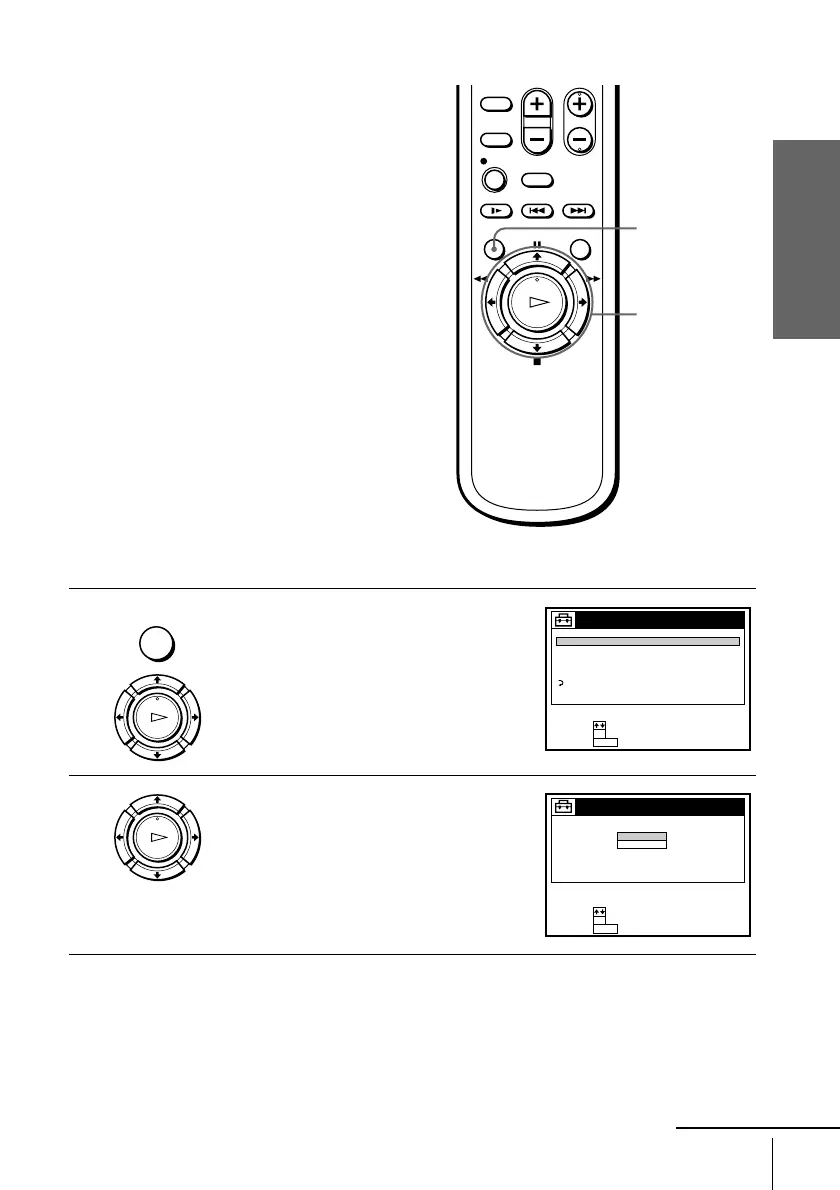
Press MENU, then press M/m to highlight
SETTINGS and press OK.
When using the EASY SET UP procedure,
skip steps 1 and 2.
2
Press M/m to highlight CLOCK SET, then
press OK.
MENU
M/m/</,
OK
MENU
OK
PLAY
SETTINGS
TUNER PRESET
SET VCR Plus+ sys. CH
CABLE BOX CONTROL
CLOCK SET
LANGUAGE
RETURN
SET :
SELECT :
OK
MENUQUIT :
OK
PLAY
AUTO
MANUAL
CLOCK SET
SET :
SELECT :
OK
MENUQUIT :
continued








 To Next Page