97
General setup information
filename[010ADDI.fm] model name1[SLV-N81] model name2[SLV-N71]
[3-065-551-11 (1)]
Additional Information
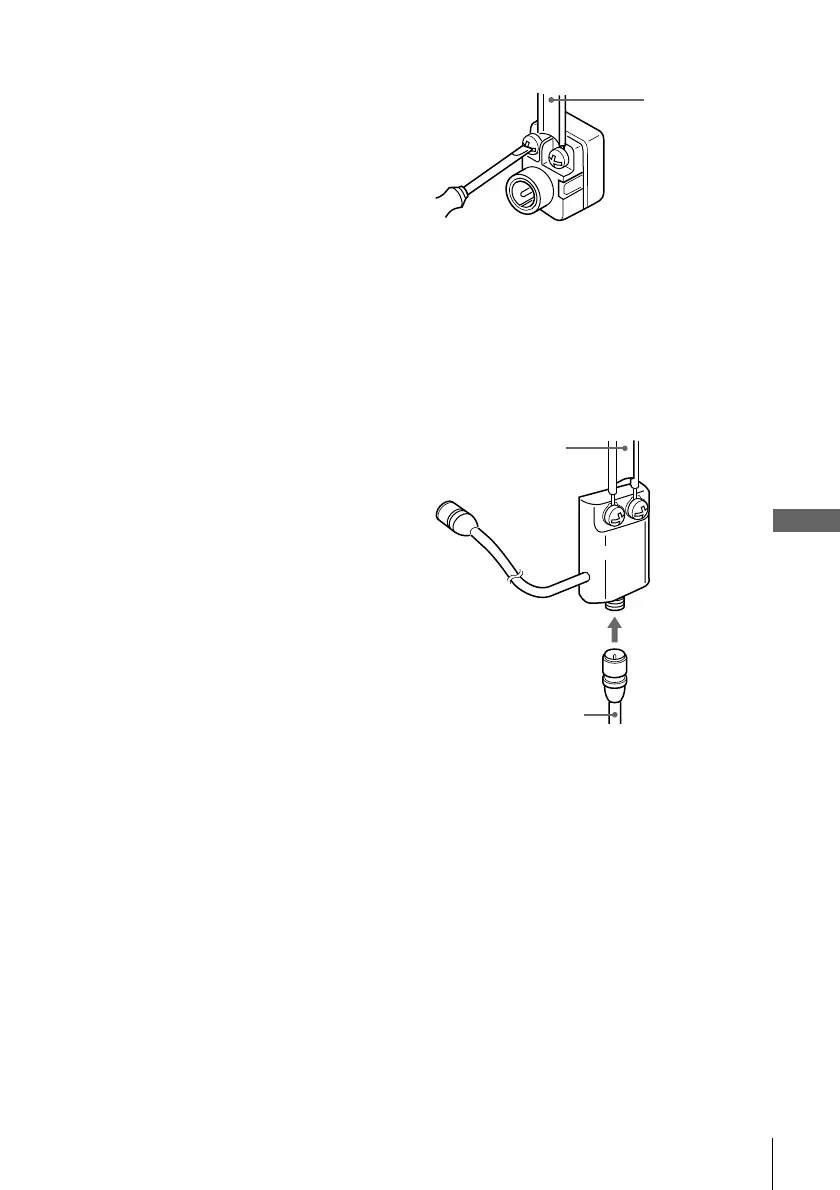
Attaching the external antenna connector
Attaching a UHF/VHF band mixer
When using a 300-ohm twin lead cable for a
VHF/UHF antenna, use the EAC-32 antenna
connector (not supplied) to connect the
antenna to the VCR.
1
Loosen the screws on the antenna connector.
2
Wind the twin leads around the screws on the antenna connector.
3
Retighten the screws.
When using both a 75-ohm coaxial cable and
a 300-ohm twin lead cable for a VHF/UHF
antenna, use the EAC-66 UHF/VHF band
separator/mixer (not supplied) to connect the
antenna to the VCR.
1
Loosen the screws on the mixer.
2
Wind the twin leads around the screws on the mixer.
3
Retighten the screws.
4
Connect the 75-ohm coaxial cable to the mixer.
300-ohm twin
lead cable
EAC-32 antenna
connector (not
supplied)
300-ohm twin
lead cable
EAC-66
UHF/VHF
band
separator/
mixer (not
supplied)
75-ohm coaxial
cable








 To Next Page