66
Recording TV programs using the Dial Timer
filename[010BAS.FM] model name1[SLV-N81] model name2[SLV-N71]
[3-065-551-11 (1)]
3
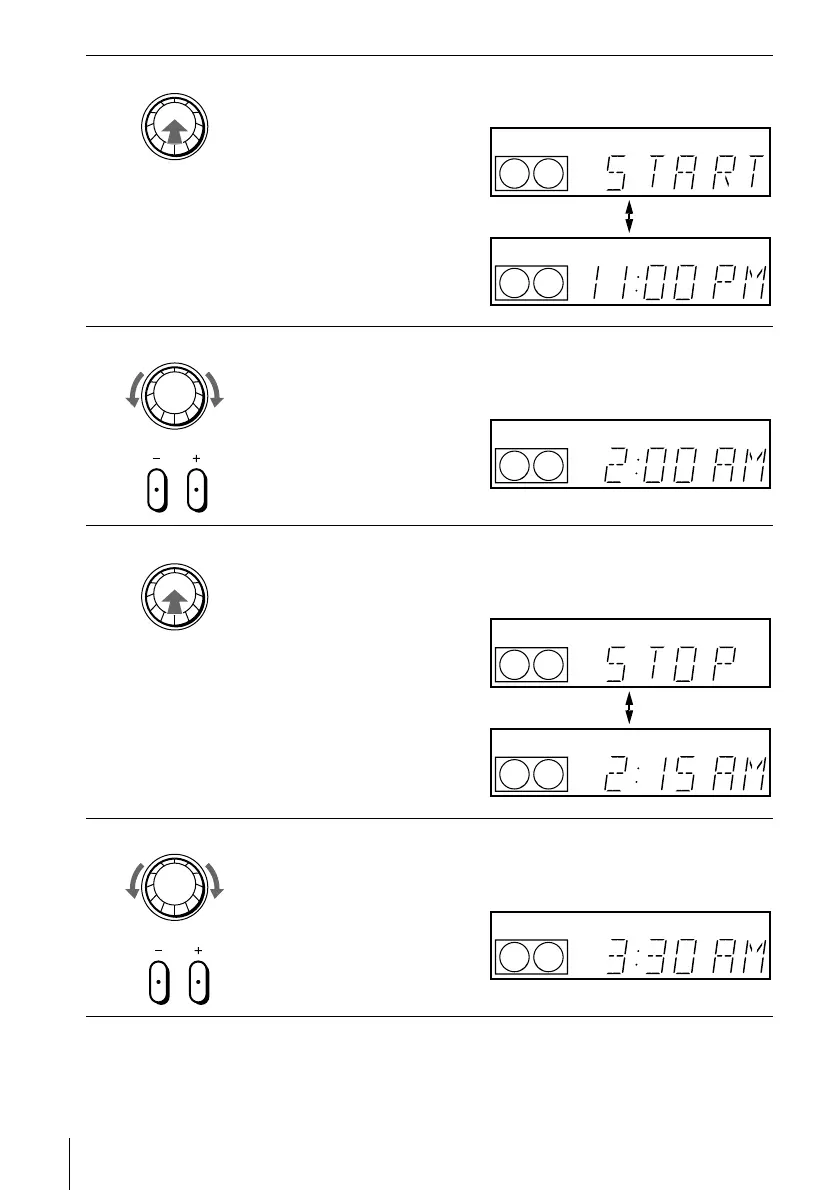
Press DIAL TIMER.
“START” and the current time appear alternately in the display window.
4
Turn DIAL TIMER to set the recording start time.
You can set the recording start time in 15 minute intervals or adjust the time
in one minute intervals by pressing the CHANNEL +/– buttons.
5
Press DIAL TIMER.
“STOP” and the recording stop time appear alternately in the display
window.
6
Turn DIAL TIMER to set the recording stop time.
You can set the recording stop time in 15 minute intervals or adjust the time
in one minute intervals by pressing the CHANNEL +/– buttons.
DIAL TIMER
EP
VIDEO
APC
EP
VIDEO
APC
DIAL TIMER
CHANNEL
EP
VIDEO
APC
DIAL TIMER
EP
VIDEO
APC
EP
VIDEO
APC
DIAL TIMER
CHANNEL
EP
VIDEO
APC








 To Next Page