NW-A605 / A607 / A608.GB.2-661-269-11(1)
51
51
Setting the Date Format
(Date Disp Type)
You can select the date format of the current time (
page 46) display from
among “year/month/day,” “day/month/year” and “month/day/year.”
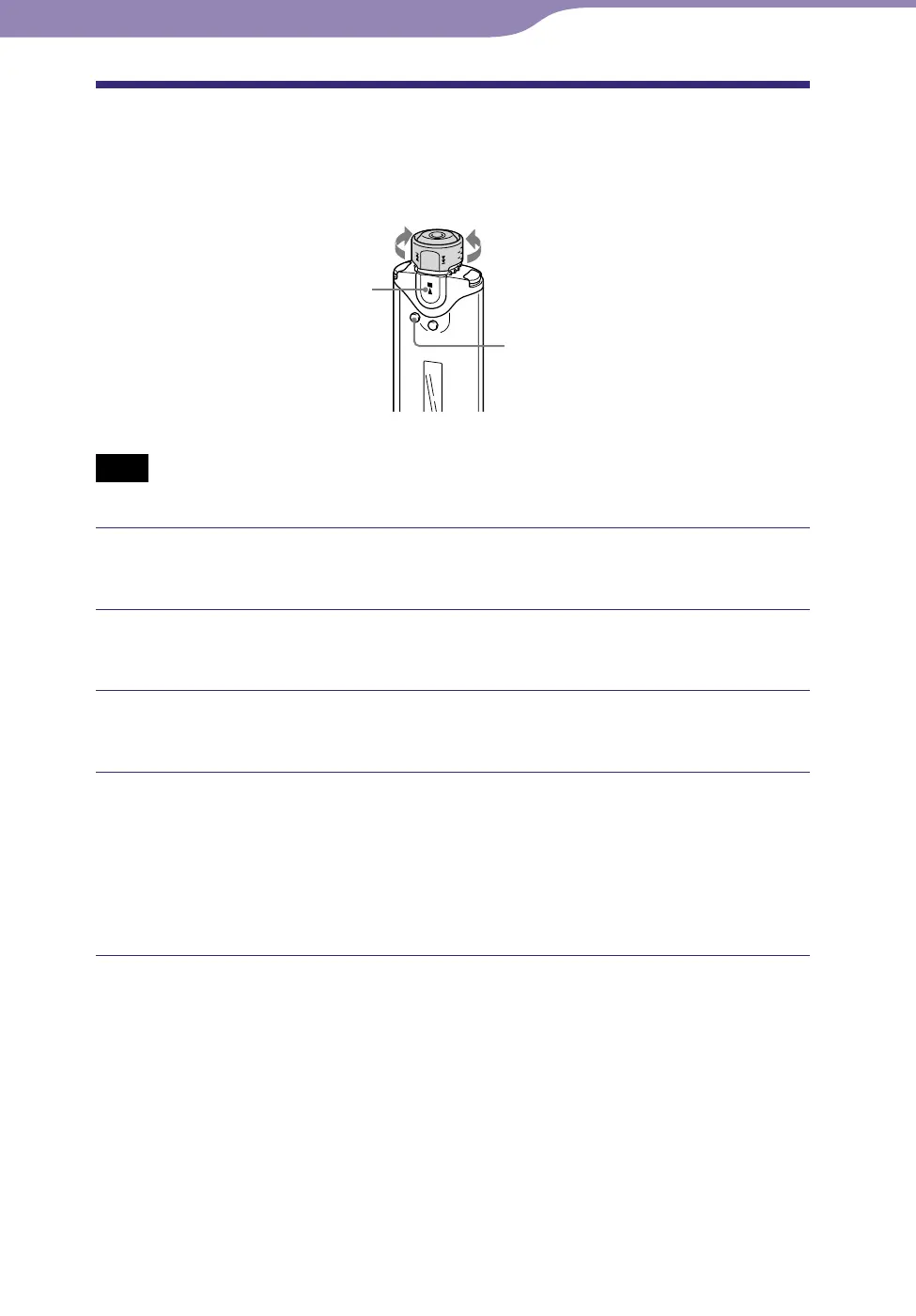
Shuttle switch
SEARCH/MENU
button
button
to to
Note
• Only available when using the Music Library function in stop mode.
Press and hold the SEARCH/MENU button in stop mode until
the Setting menu appears.
Rotate the Shuttle switch to select “Advanced Menu>” and
press the button to confirm.
Rotate the Shuttle switch to select “Date Disp Type>” and
press the button to confirm.
Rotate the Shuttle switch to select the desired setting and
press the button to confirm.
You can select the date format setting from the following.
• Date yy/mm/dd: The date format appears “year/month/day.”
• Date dd/mm/yy: The date format appears “day/month/year.”
• Date mm/dd/yy: The date format appears “month/day/year.”
To cancel the Menu mode
Press the SEARCH/MENU button to return the screen to the previous stage.
Press repeatedly to exit menu mode.
Settings



 To Next Page