Part Identification
14
Overview
It functions accordingly when you turn it up or
down, or you push it horizontally.
It is called the “jog dial” in the subsequent
operating instructions.
16. CANCEL button
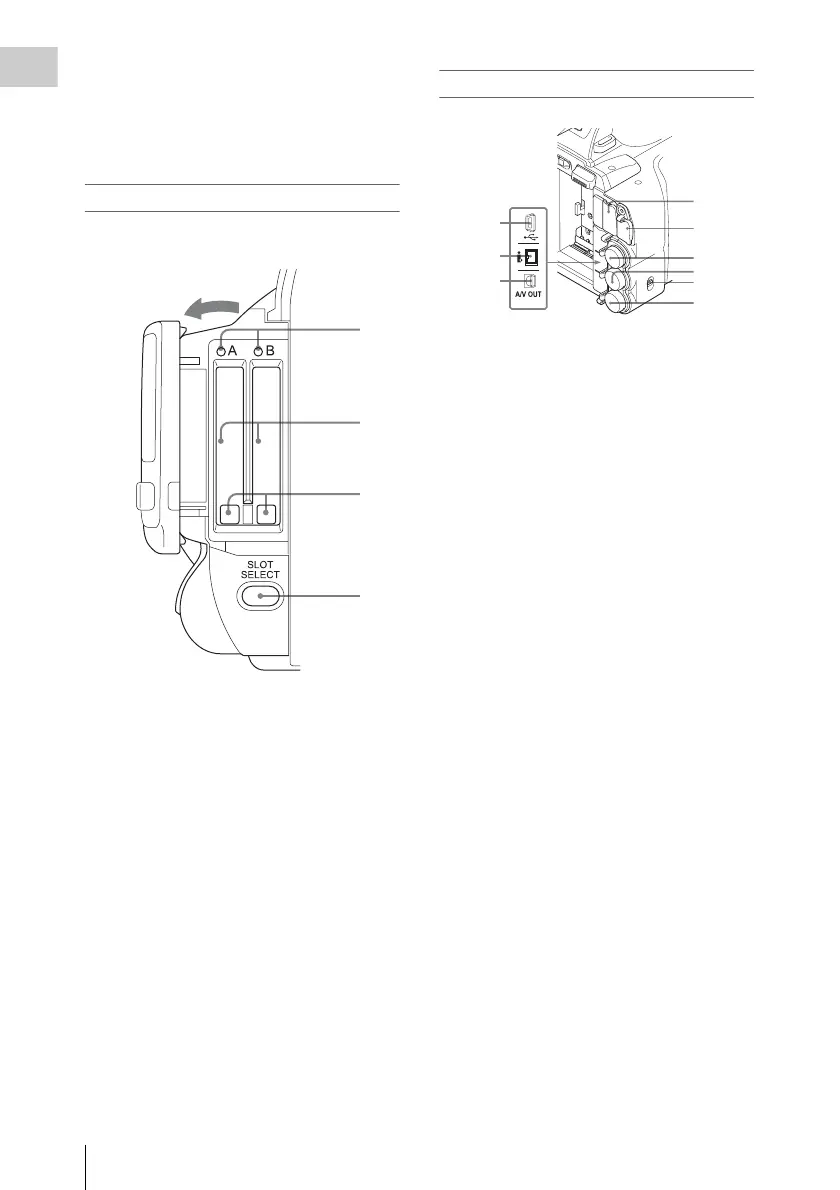
Card slot block
The SxS memory card slots and EJECT buttons
are located behind the cover.
1. ACCESS lamps (page 22)
2. SxS memory card slots (page 22)
3. EJECT (SxS memory card eject) buttons
(page 22)
4. SLOT SELECT (SxS memory card select)
button (page 23)
Rear connector panel
1.USB connector (Mini B)
2.i.LINK (HDV/DV) connector (4-pin, S400
conforming to IEEE1394) (page 97)
3.A/V OUT connector (audio/video multi
output) (page 97)
4.HDMI OUT connector (page 97)
5.External device connector (page 27)
6.SDI OUT connector (BNC type) (page 97)
7.TC IN (timecode input)/TC OUT
(timecode output) connector (BNC type)
(page 102)
8.IN/OUT (input/output change) switch
(page 102)
Set this to IN to select GENLOCK IN, and
set this to OUT to select TC OUT and
VIDEO OUT.
9.GENLOCK IN/VIDEO OUT (analog
video output) connector (BNC type) (page
97, 102)
1
2
3
4
Open the cover
1
2
3
4
5
6
7
8
9



 To Next Page