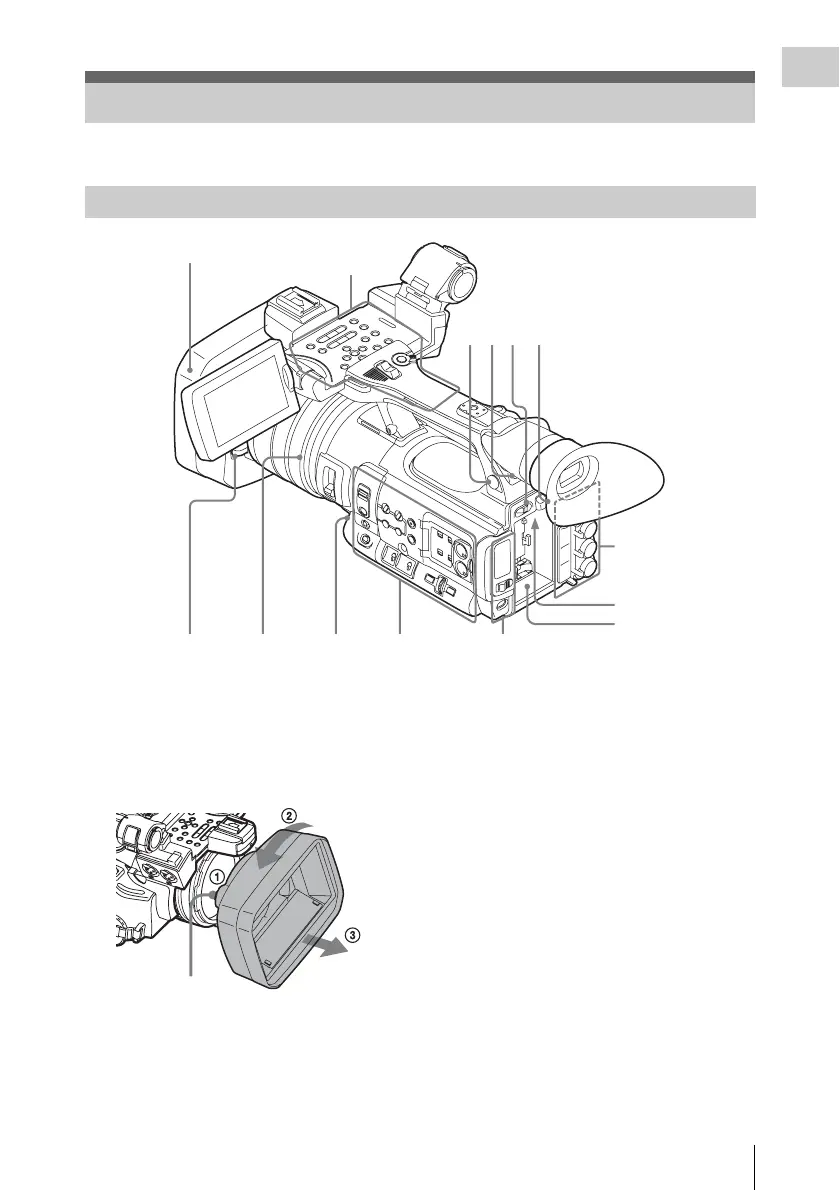
Part Identification
11
Overview
For functions and usage, see the pages in parentheses.
1. Lens hood
Detach
1 While pressing the release button, 2 turn the
hood in the direction of the arrow, 3 then
withdraw it.
Attach
Attach the hood by aligning the marks on the
camcorder and hood, then turn the hood
clockwise.
When attaching the optional wide-
conversion lens, use the lens hood supplied
with the wide-conversion lens.
2.Headphone connector (stereo mini jack)
(page 43)
3.Rear IR remote control receptor
4.Power switch (page 19)
5.BATT RELEASE button (page 18)
6.DC IN connector (page 19)
7.Battery pack receptacle (page 18)
8.WHITE BAL (automatic white balance
adjustment) button (page 37)
9.Lens cap open/close lever (page 34)
Part Identification
Camcorder
Operation panel on the
handle (page 12)
Card slot block (page 14)Side operation panel
(page 13)
Rear connector
panel (page 14)
23
4
5
8
6
7
Lens control block
(page 13)
1
9
Release button



 To Next Page