Note
Depending on the situation, not all icons will be displayed at once.
Tip
When you press the
(Menu) button from the [Home] screen, the time is displayed at the
left side of the status bar for approximately 5 seconds.
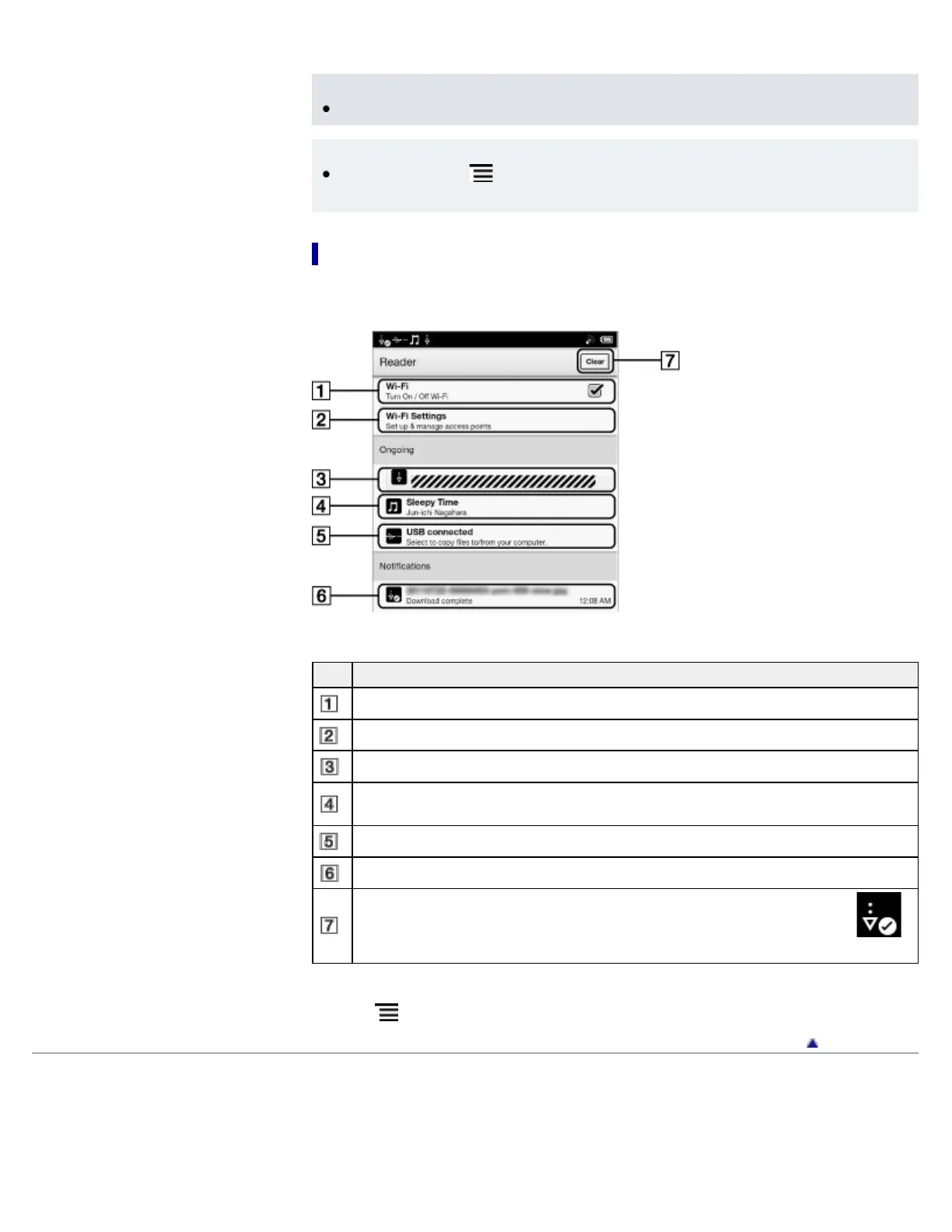
Notification window
Tapping on the status bar reveals the notification window, which contains network-related items
and other current operations.
Item Description
Turn [Wi-Fi] on/off. See Details.
Go to the [Wi-Fi Settings] screen. See Details.
Displays the status of items that are downloading from Reader Store or the Web.
Displayed when an audio track is currently playing. Tap to jump to the audio player. See
Details.
Enter data transfer mode. See Details.
Item for which downloading has completed. Tap to open the item.
Displayed when notifications are displayed. Tap to clear the notification list. The
(Download complete) icon also disappears from the status bar.
Depending on the status of the Reader, other items may also appear in the notification window.
Press the (Menu) button to close the notification window.
Go to page top
Copyright 2011 Sony Corporation














 To Next Page