EasyManua.ls Logo

Sony PS-FL1 - Turntable Control Locations and Functions; Turntable Assembly Setup and Operation; Initial Setup Procedures; Opening and Closing the Module

Sony PS-FL1
39 pages
Print Icon
To Next Page IconTo Next Page
To Previous Page IconTo Previous Page
Loading...
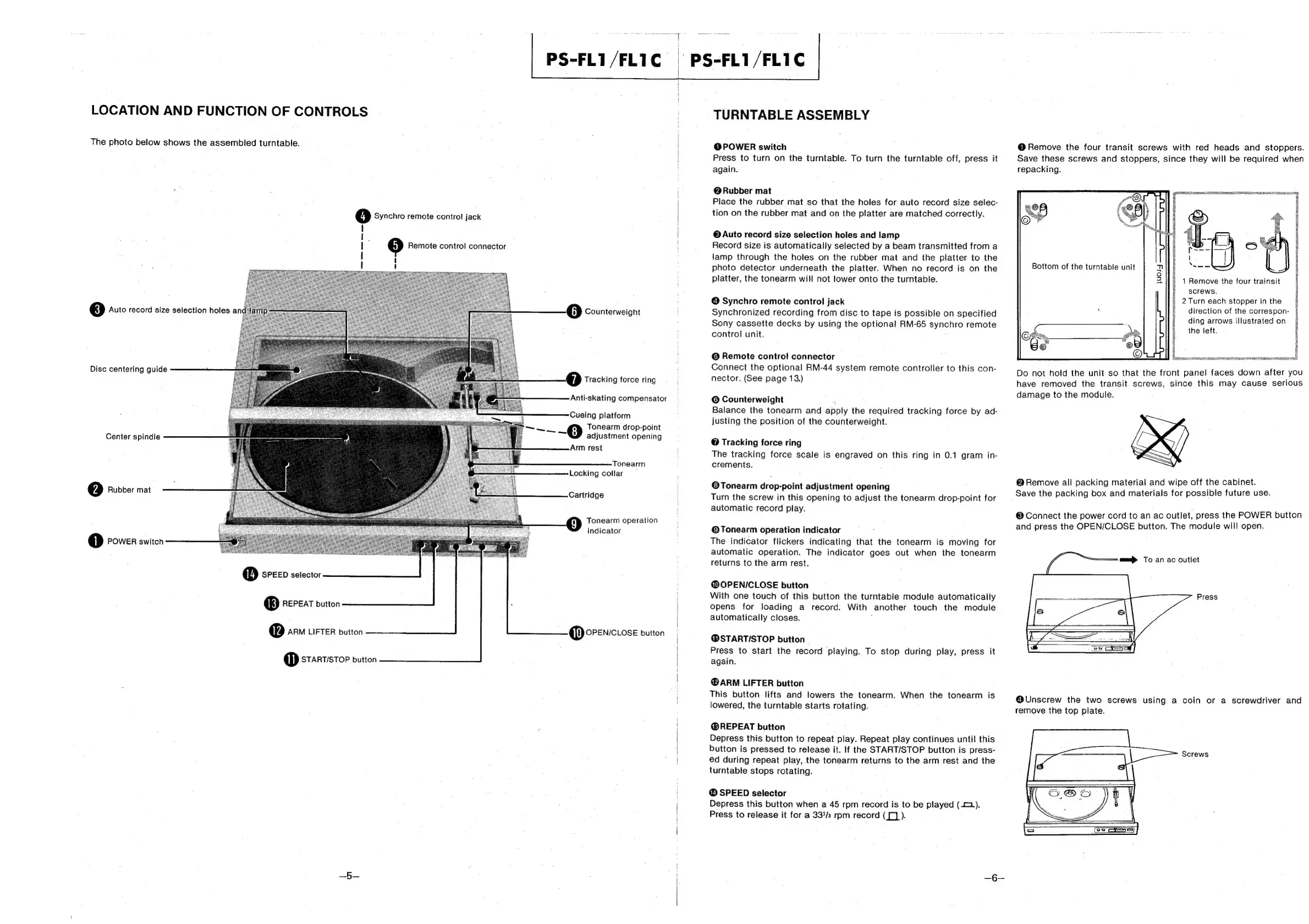
LOCATION
AND
FUNCTION
OF
CONTROLS
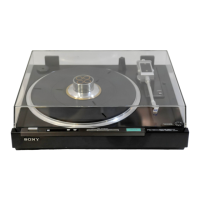
The
photo
below
shows
the
assembled
turntable.
©
Auto
record
size
selection
holes
a
Disc
centering
guide
Center
spindle
2)
Rubber
mat
0
POWER
switch
@
SPEED
selector
®
REPEAT
button
@
an
LFTER
button
@
STARTISTOP
button
=
5
Remote
control
connector
4)
Synchro
remote
control
jack
I
J
|
I
I
PS-FL1/FL1C
-
PS-FL1/FLIC
@
Counterweight
YM
Tracking
force
ring
Anti-skating
compensator
Cueing
platform
ae
o
Tonearm
drop-point
adjustment
opening
Arm
rest
Tonearm
Locking
collar
Cartridge
Tonearm
operation
>
indicator
@
OPENICLOSE
button
TURNTABLE
ASSEMBLY
@POWER
switch
Press
to
turn
on
the
turntable.
To
turn
the
turntable
off,
press
it
again.
@Rubber
mat
Place
the
rubber
mat
so
that
the
holes
for
auto
record
size
selec-
tion
on
the
rubber
mat
and
on
the
platter
are
matched
correctly.
@
Auto
record
size
selection
holes
and
lamp
Record
size
is
automatically
selected
by
a
beam
transmitted
from
a
lamp
through
the
holes
on
the
rubber
mat
and
the
platter
to
the
photo
detector
underneath
the
platter.
When
no
record
is
on
the
platter,
the
tonearm
will
not
lower
onto
the
turntable.
@
Synchro
remote
control
jack
Synchronized
recording
from
disc
to
tape
is
possible
on
specified
Sony
cassette
decks
by
using
the
optional
RM-65
synchro
remote
control
unit.
©
Remote
control
connector
Connect
the
optional
RM-44
system
remote
controller
to
this
con-
nector.
(See
page
13.)
©
Counterweight
:
Balance
the
tonearm
and
apply
the
required
tracking
force
by
ad-
justing
the
position
of
the
counterweight.
@
Tracking
force
ring
The
tracking
force
scale
is
engraved
on
this
ring
in
0.1
gram
in-
crements.
@Tonearm
drop-point
adjustment
opening
Turn
the
screw
in
this
opening
to
adjust
the
tonearm
drop-point
for
automatic
record
play.
©Tonearm
operation
indicator
The
indicator
flickers
indicating
that
the
tonearm
is
moving
for
automatic
operation.
The
indicator
goes
out
when
the
tonearm
returns
to
the
arm
rest.
@OPENICLOSE
button
With
one
touch
of
this
button
the
turntable
module
automatically
opens
for
loading
a
record.
With
another
touch
the
module
automatically
closes.
;
@STARTI/STOP
button
Press
to
start
the
record
playing.
To
stop
during
play,
press
it
again.
@ARM
LIFTER
button
This
button
lifts
and
lowers
the
tonearm.
When
the
tonearm
is
lowered,
the
turntable
starts
rotating.
@®REPEAT
button
Depress
this
button
to
repeat
play.
Repeat
play
continues
until
this
button
is
pressed
to
release
it.
If
the
START/STOP
button
is
press-
ed
during
repeat
play,
the
tonearm
returns
to
the
arm
rest
and
the
turntable
stops
rotating.
@
SPEED
selector
Depress
this
button
when
a
45
rpm
record
is
to
be
played
(2).
Press
to
release
it
for
a
33/3
rpm
record
([)
).
@
Remove
the
four
transit
screws
with
red
heads
and
stoppers.
Save
these
screws
and
stoppers,
since
they
will
be
required
when
repacking.
weer
Bottom
of
the
turntable
unit
1
Remove
the
four
trainsit
screws.
2
Turn
each
stopper
in
the
direction
of
the
correspon-
ding
arrows
illustrated
on
the
left.
2
|
e
,
i
S
e
*
i
e
3
2
:
s
:
%
:
s
#
g
:
=
ghee
aetenatntemaontasmetart
ee
4
ES
SSS
SILER
RICE
ROR
oe
Do
not
hold
the
unit
so
that
the
front
panel faces
down
after
you
have
removed
the
transit
screws,
since
this
may
cause
serious
damage
to
the
module.
@
Remove
all
packing
material
and
wipe
off
the
cabinet.
Save
the
packing
box
and
materials
for
possible
future
use.
®
Connect
the
power
cord
to
an
ac
outlet,
press
the
POWER
button
and
press
the
OPEN/CLOSE
button.
The
module
will
open.
a>
To
an ac
outlet
Press
@Unscrew
the
two
screws
using
a
coin
or
a
screwdriver
and
remove
the
top
plate.
Screws

Other manuals for Sony PS-FL1

Related product manuals