EasyManua.ls Logo

Sony PS-FL1 - Tonearm Adjustment Procedures; Tonearm Balance Adjustment; Tracking Force Adjustment; Anti-Skating Compensation

Sony PS-FL1
39 pages
Print Icon
To Next Page IconTo Next Page
To Previous Page IconTo Previous Page
Loading...
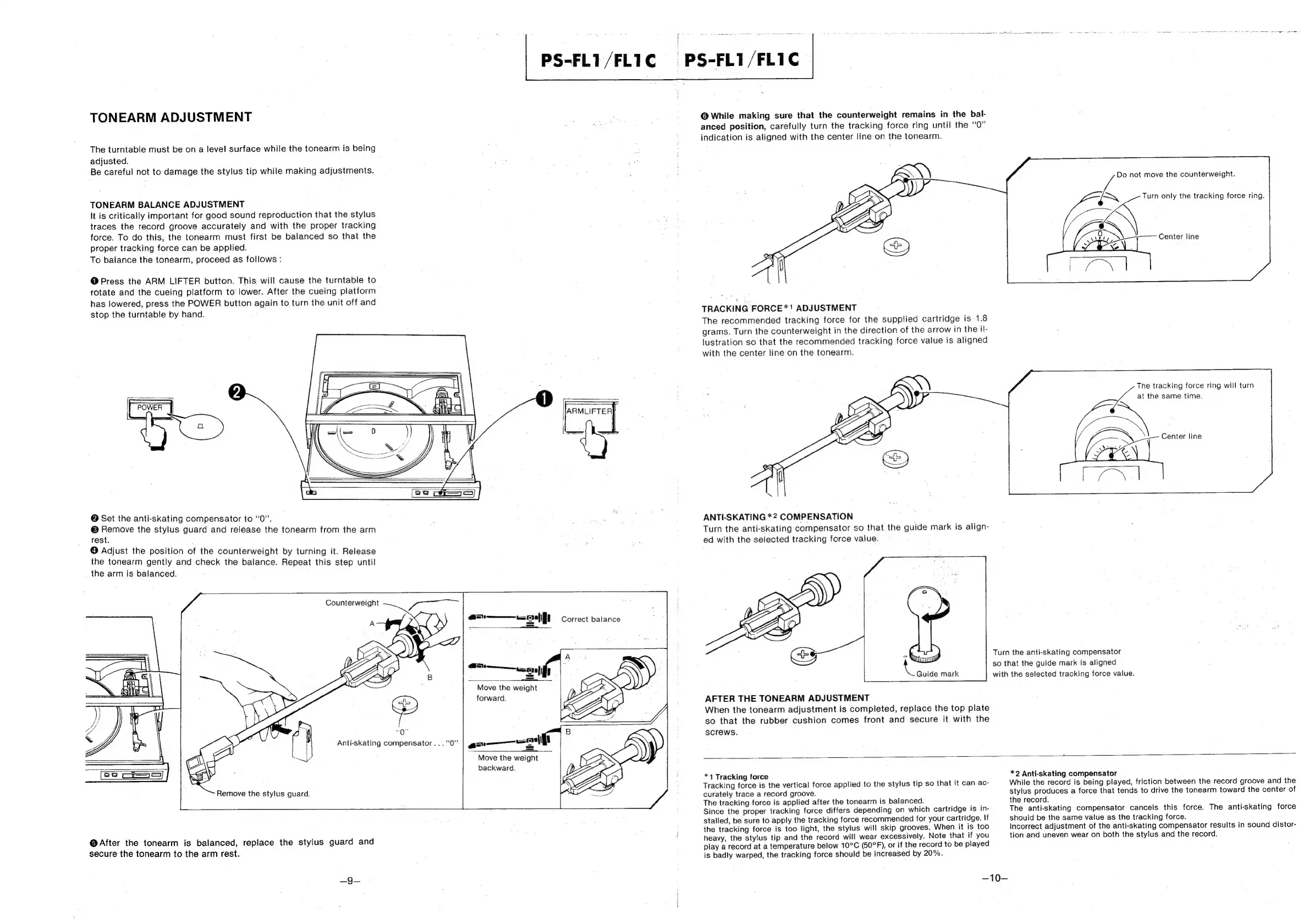
TONEARM
ADJUSTMENT
The
turntable
must
be
on
a
level
surface
while
the
tonearm
is
being
adjusted.
Be
careful
not
to
damage
the
stylus
tip
while
making
adjustments.
TONEARM
BALANCE
ADJUSTMENT
It
is
critically
important
for
good
sound
reproduction
that
the
stylus
traces
the
record
groove
accurately
and
with
the
proper
tracking
force.
To
do
this,
the
tonearm
must
first
be
balanced
so
that
the
proper
tracking
force
can
be
applied.
To
balance
the
tonearm,
proceed
as
follows
:
@
Press
the
ARM
LIFTER
button.
This,
will
cause
the
turntable
to
rotate
and
the
cueing
platform
to’
lower.
After
the
cueing
platform
has
lowered,
press
the
POWER
button
again
to
turn
the
unit
off
and
stop
the
turntable
by
hand.
man
Q
@
Set
the
anti-skating
compensator
to
“0”.
@
Remove
the
stylus
guard
and
release
the
tonearm
from
the
arm
rest.
@
Adjust
the
position
of
the
counterweight
by
turning
it.
Release
the
tonearm
gently
and
check
the
balance.
Repeat
this
step
until
the
arm
is
balanced.
PS-FL1/FLIC
PS-FL1/FL1C
Counterweight
Remove
the
stylus
guard.
Anti-skating
compensator...
“Q”
ee,
ead
a
self
Correct
balance
a
A
Qa...
en)
f
:
Move
the
weight
forward.
Move
the
weight
backward.
@After
the
tonearm
is
balanced,
replace
the
stylus
guard
and
secure
the
tonearm
to
the
arm
rest.
_9—
@
While
making
sure
that
the
counterweight
remains
in
the
bal-
anced
position,
carefully
turn
the
tracking
force
ring
until
the “0”
indication
is
aligned
with
the
center
line
on
the
tonearm.
TRACKING
FORCE*1!
ADJUSTMENT
The
recommended
tracking
force
for
the
supplied
cartridge
is
1.8
grams.
Turn
the
counterweight
in
the
direction
of
the
arrow
in
the
il-
lustration
so
that
the
recommended
tracking
force
value
is
aligned
with
the
center
tine
on
the
tonearm.
ANTI-SKATING
*2
COMPENSATION
Turn
the
anti-skating
compensator
so
that
the
guide
mark
is
align-
ed
with
the
selected
tracking
force
value.
aN
Se
|
&
in
AFTER
THE
TONEARM
ADJUSTMENT
When
the
tonearm
adjustment
is
completed,
replace
the
top
plate
so
that
the
rubber
cushion
comes
front
and
secure
it
with
the
screws.
Do
not
move
the
counterweight.
Turn
only
the
tracking
force
ring.
Center
line
The
tracking
force
ring
will
turn
at
the
same
time.
Center
line
Turn
the
anti-skating
compensator
so
that
the
guide
mark
is
aligned
Guide
mark
with
the
selected
tracking
force
value.
*4
Tracking
force
Tracking
force
is
the
vertical
force
applied
to
the
stylus
tip
so
that
it
can.
ac-
curately
trace
a
record
groove.
The
tracking
force
is
applied
after
the
tonearm
is
balanced.
Since
the
proper
tracking
force
differs
depending
on
which
cartridge
is
in-
stalled,
be
sure
to
apply
the
tracking
force
recommended
for
your
cartridge.
If
the
tracking
force
is
too
light,
the
stylus
will
skip
grooves.
When
it
is
too
heavy,
the
stylus
tip
and
the
record
will
wear
excessively.
Note
that
if
you
play
a
record
at
a
temperature
below
10°C
(50°F),
or
if
the
record
to
be
piayed
is
badly
warped,
the
tracking
force
should
be
increased
by
20%.
*2
Anti-skating
compensator
While
the
record
is
being
played,
friction
between
the
record
groove
and
the
stylus
produces
a
force
that
tends
to
drive
the
tonearm
toward
the
center
of
the
record.
|
The
anti-skating
compensator
cancels
this
force.
The
anti-skating
force
should
be
the
same
value
as
the
tracking
force.
incorrect
adjustment
of
the
anti-skating
compensator
results
in
sound
distor-
tion
and
uneven
wear
on
both
the
stylus
and
the
record.
—10—

Other manuals for Sony PS-FL1

Related product manuals