EasyManua.ls Logo

Sony PS-FL1 - Auto Record Size Selection; Record Handling Tips; Synchronized Playback Operations; Connection and Preparation for Synchro Play

Sony PS-FL1
39 pages
Print Icon
To Next Page IconTo Next Page
To Previous Page IconTo Previous Page
Loading...
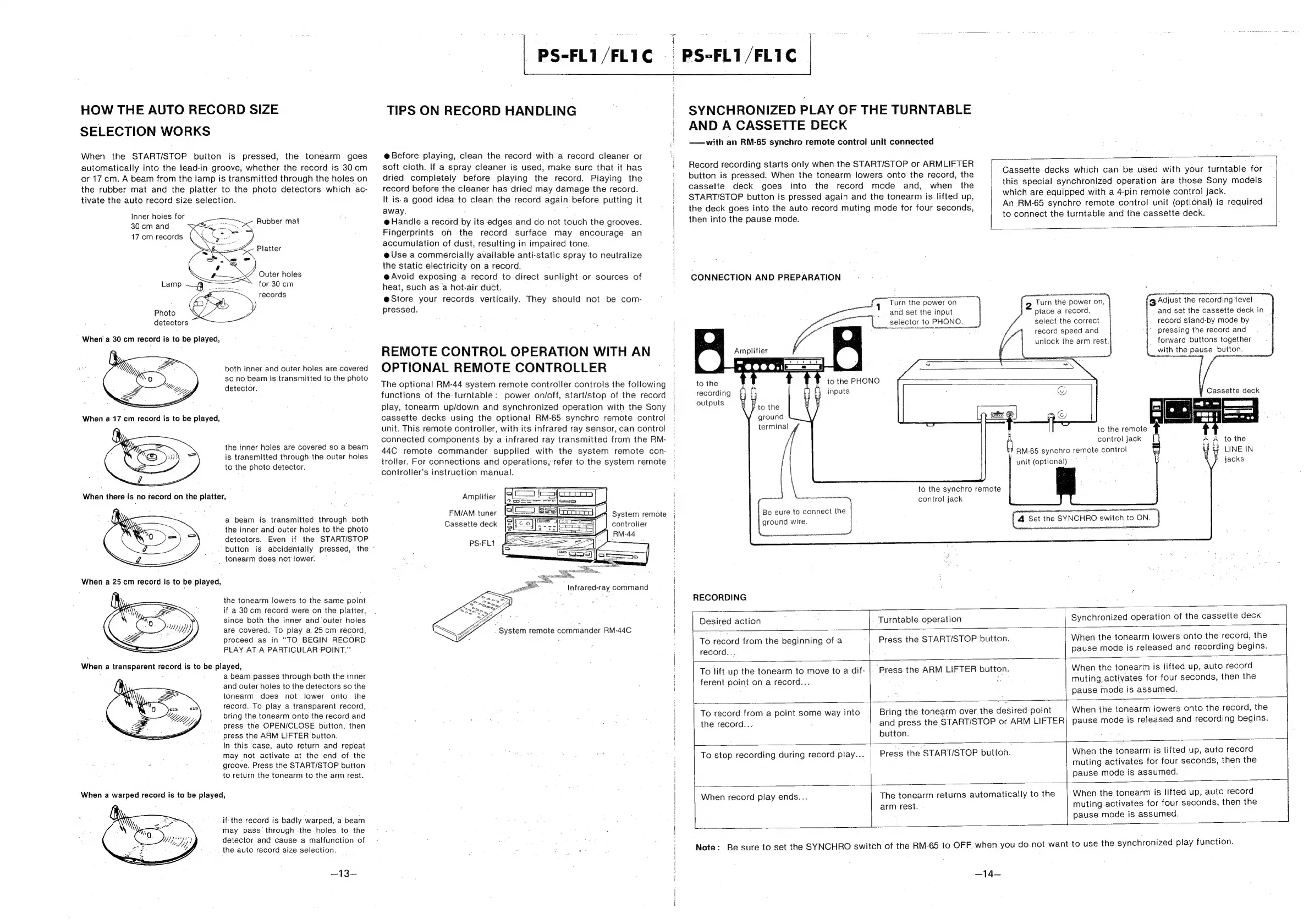
HOW
THE
AUTO
RECORD
SIZE
SELECTION
WORKS
When
the
START/STOP
button
is
pressed,
the
tonearm
goes
automatically
into
the
lead-in
groove,
whether
the
record
is
30cm
or
17
cm.
A
beam
from
the
lamp
is
transmitted
through
the
holes
on
the
rubber
mat
and
the
platter
to
the
photo
detectors
which
ac-
tivate
the
auto
record
size
selection.
inner
holes
for
30
cm
and
17
cm
records
Rubber
mat
Platter
Outer
holes
;
Lamp
:
pee
for
30
cm
records
¢
2
Photo
detectors
When
a
30
cm
record
is
to
be
played,
both
inner
and
outer
holes
are
covered
so no
beam
is
transmitted
to
the
photo
detector.
the
inner
holes
are
covered
so
a
beam
is
transmitted
through
the
outer
holes
to
the
photo
detector.
a
beam
is
transmitted
through
both
the
inner
and
outer
holes
to
the
photo
detectors.
Even
if
the
START/STOP
button
_
tonearm
does
not
lower.
the
tonearm
lowers
to
the
same
point
if
a
30
cm
record
were
on
the
platter,
since
both
the
inner
and
outer
holes
are
covered.
To
play
a
25cm
record,
proceed
as
in
“TO
BEGIN
RECORD
PLAY
AT
A
PARTICULAR
POINT.”
When
a
transparent
record
is
to
be
played,
a
beam
passes
through
both
the
inner
and
outer
holes
to
the
detectors
so
the
tonearm
does
not
lower
onto
the
record.
To
play
a
transparent
record,
bring
the
tonearm
onto
the
record
and
press
the
OPEN/CLOSE
button,
then
press
the
ARM
LIFTER
button.
In
this
‘case,
auto
return
and
repeat
may
not
activate
at
the
end
of
the
groove.
Press
the
START/STOP
button
to
return
the
tonearm
to
the
arm
rest.
sa
cr)
“yy
When
a
warped
record
is
to
be
played,
if
the
record
is
badly
warped,
a
beam
may
pass
through
-the
holes
to
‘the
detector
and
cause
a
malfunction
of
the
auto
record
size
selection.
—13—
is
accidentally
pressed,”
the
©
_PS-FL1/FLIC
|
ssontewd
PS-FL1/FL1C
TIPS
ON
RECORD
HANDLING
@Before
playing,
clean
the
record
with
a
record
cleaner
or
soft
cloth.
If
a
spray
cleaner
is
used,
make
sure
that
it
has
dried
completely
before
playing
the
record.
Playing
the
record
before
the
cleaner
has
dried
may
damage
the
record.
It
is-a
good
idea
to
clean
the
record
again
before
putting
it
away.
:
@Handle
a
record
by
its
edges
and
do
not
touch
the
grooves.
Fingerprints
on
the
record
surface
may
encourage
an
accumulation
of
dust,
resulting
in
impaired
tone.
e@
Use
a
commercially
available
anti-static
spray
to
neutralize
the
static
electricity
on
a
record.
@
Avoid
exposing
a
record
to
direct
sunlight
or
sources
of
heat,
such
as
a
hot-air
duct.
@Store
your
records
vertically.
They
should
not
be
com-
pressed.
REMOTE
CONTROL
OPERATION
WITH
AN
OPTIONAL
REMOTE
CONTROLLER
The
optional
RM-44
system
remote
controller
controis
the
following
functions
of
the
turntable:
power
on/off,
start/stop
of
the
record
play,
tonearm
up/down
and
synchronized
operation
with
the
Sony
cassette
decks
using
the
optional
RM-65
synchro
remote
control
unit.
This
remote
controller,
with
its
infrared
ray
sensor,
can
control
connected
components
by
a-infrared
ray
transmitted
from
the
RM-
44C
remote
commander
supplied
with
the
system
remote
con-
troller.
For
connections
and
operations,
refer
to
the
system
remote
controller’s
instruction
manual.
Amplifier
FM/AM
tuner
Cassette
deck
System
remote
controller
PS-FL1
SYNCHRONIZED
PLAY
OF
THE
TURNTABLE
AND
A
CASSETTE
DECK
—with
an
RM-65
synchro
remote
control
unit
connected
Record
recording
starts
only
when
the
START/STOP
or
ARMLIFTER
button
is
pressed.
When
the
tonearm
lowers
onto
the
record,
the
cassette
deck
goes
into
the
record
mode
and,
when
the
START/STOP
button
is
pressed
again
and
the
tonearm
is.
lifted
up,
the
deck
goes
into
the
auto
record
muting
mode
for
four
seconds,
then
into
the
pause
mode.
CONNECTION
AND
PREPARATION
Turn
the
power
on
and
set
the
input
selector
to
PHONO.
Amplifier
Cassette
decks
which
can
be
used
with
your
turntable
for
this
special
synchronized
operation
are
those
Sony
models
which
are
equipped
with
a
4-pin
remote
control
jack.
An
RM-65
synchro
remote
control
unit
(optional)
is
required
to
connect
the
turntable
and
the
cassette
deck.
g
Adjust
the
recording
‘level
-
and
set
the
cassette
deck
in
record
stand-by
mode
by
pressing
the
record
and
forward
buttons
together
with
the
pause
button.
2
Turn
the
power
on,
place
a
record,
select
the
correct
record
speed
and
unlock
the
arm
rest.j
&
eo
Tecce.aanmm
to
the
PHONO
to
the
recording
£
inputs
outputs
terminal
co
to
the
synchro
remote
en
control
jack
Be
sure
to
connect
the
ground
wire.
RECORDING
©
Cassette
deck
Palos
to
the
remote
control
jack
/
2
to
the
RM-65
synchro
remote
control
t
LINE
IN
jacks
unit
(optional)
("4
Set
the
SYNCHRO
switch,
to
ON.
Desired
action
Turntable
operation
Synchronized
operation
of
the
cassette
deck
record...
Press
the
START/STOP
button.
When
the
tonearm
lowers
onto
the
record,
the
pause
mode
is
released
and
recording
begins.
To
lift
up
the
tonearm
to
move
to
a
dif-
|
|
To
record
from
the
beginning
ofa
|
ferent
point
on
a
record...
‘Press
the
ARM
LIFTER
button.
When
the
tonearm
is
lifted
up,
auto
record
muting
activates
for
four
seconds,
then
the
pause
mode
is
assumed.
To
record
from
a
point
some
way
into
the
record...
.
button.
Bring
the
tonearm
over
the
desired
point
and
press
the
START/STOP
or
ARM
LIFTER
When
the
tonearm
lowers
onto
the
record,
the
pause
mode
is
released
and
recording
begins.
To
stop
recording
during
record
play...
Press
the
START/STOP
button.
When
the
tonearm
is
lifted
up,
auto
record
muting
activates
for
four
seconds,
then
the
pause
mode
is
assumed.
{
When
record
play
ends...
arm
rest.
The
tonearm
returns
automatically
to
the
When
the
tonearm
is
lifted
up,
auto
record
muting
activates
for
four
seconds,
then
the
pause
mode
is
assumed.
Note:
Be
sure
to
set
the
SYNCHRO
switch
of
the
RM-65
to
OFF
when
you
do
not
want
to
use
the
synchronized
play
function.
—14—

Other manuals for Sony PS-FL1

Related product manuals