EasyManua.ls Logo

Sony PS-FL1 - Connections and Cable Management; Preparation for Connections; Connecting Audio and Ground Wires; Record Playing Operations

Sony PS-FL1
39 pages
Print Icon
To Next Page IconTo Next Page
To Previous Page IconTo Previous Page
Loading...
PS-FL1/FLIC
PS-FL1/FLIC
AUTO
PLAY
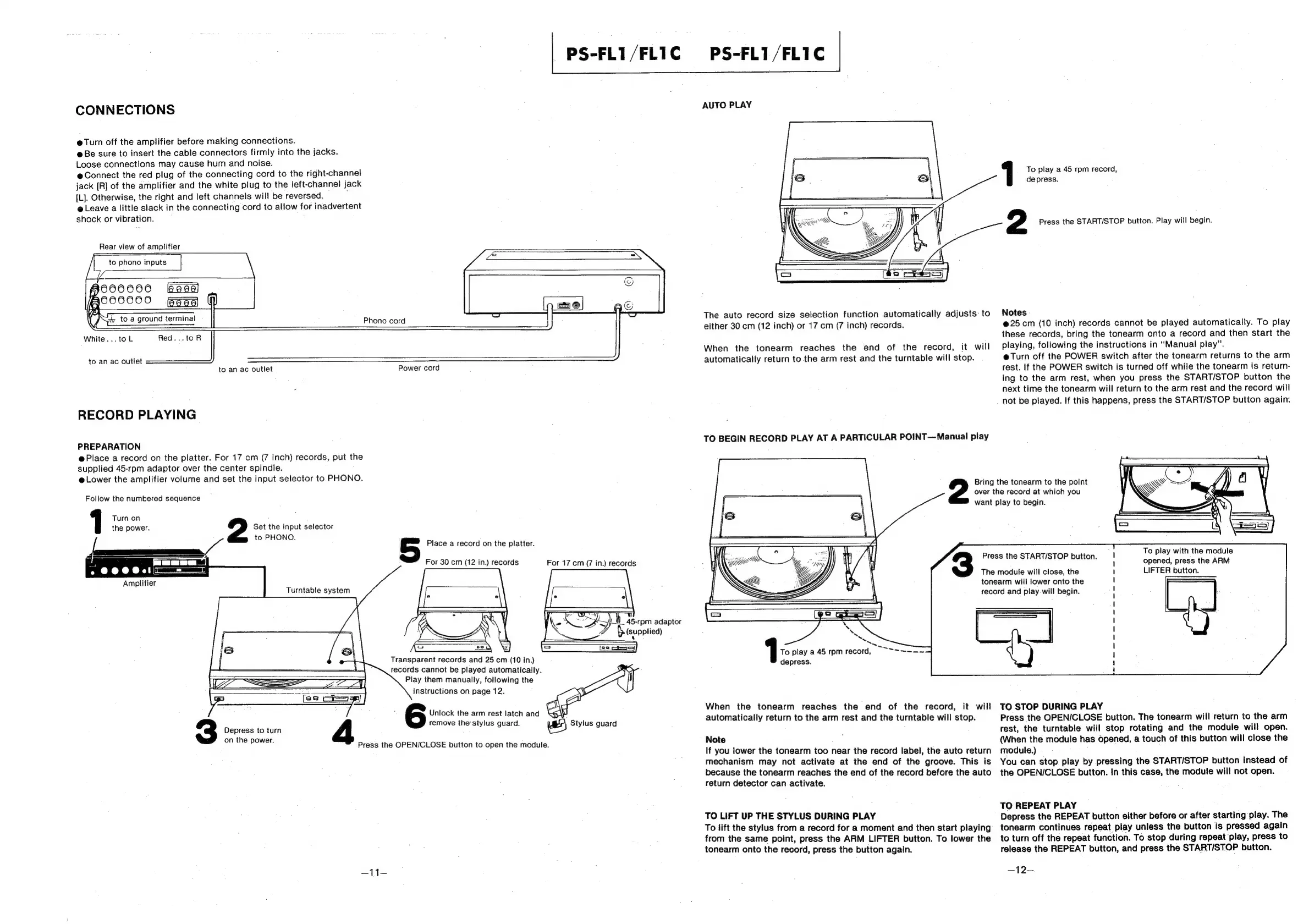
CONNECTIONS
@
Turn
off
the
amplifier
before
making
connections.
@
Be
sure
to
insert
the
cable
connectors
firmly
into
the
jacks.
Loose
connections
may
cause
hum
and
noise.
e@Connect
the
red
plug
of
the
connecting
cord
to
the
right-channel
jack
[R]
of
the
amplifier
and
the
white
plug
to
the
left-channel
jack
[L].
Otherwise,
the
right
and
left
channels
will
be
reversed.
,
e
Leave
a
little
slack
in
the
connecting
cord
to
allow
for
inadvertent
shock
or
vibration.
To
play
a
45
rpm
record,
depress.
2
Press
the
START/STOP
button.
Play
will
begin.
Rear
view
of
amplifier
The
auto
record
size
selection
function
automatically
adjusts
to
Notes
either
30
cm
(12
inch)
or
17
cm
(7
inch)
records.
@25
cm
(10
inch)
records
cannot
be
played
automatically.
To
play
these
records,
bring
the
tonearm
onto
a
record
and
then
start
the
When
the
tonearm
reaches
the
end
of
the
record,
it
will
Playing,
following
the
instructions
in
“Manual
play”.
=
a
i
Phono
cord
=
j
White...
to
ie
|
to
an
ac
outlet
automatically
return
to
the
arm
rest
and
the
turntable
will
stop.
e@Turn
off
the
POWER
switch
after
the
tonearm
returns
to
the
arm
to
an
ac
outlet
Power
cord
rest.
If
the
POWER
switch
is
turned
off
while
the
tonearm
is
return-
ing
to
the
arm
rest,
when
you
press
the
START/STOP
button
the
next
time
the
tonearm
will
return
to
the
arm
rest
and
the
record
will
not
be
played.
If
this
happens,
press
the
START/STOP
button
again.
RECORD
PLAYING
TO
BEGIN
RECORD
PLAY
AT
A
PARTICULAR
POINT—Manual
play
PREPARATION
@
Place
a
record
on
the
platter.
For
17
cm
(7
inch)
records,
put
the
supplied
45-rpm
adaptor
over
the
center
spindle.
@
Lower
the
amplifier
volume
and
set
the
input
selector
to
PHONO.
:
Bring
the
tonearm
to
the
point
Follow
the
numbered
sequence
————
over
the
record
at
which
you
j
\
want
play
to
begin.
Turn
on
the
power.
2
Set
the
input
selector
to
PHONO
_
le
&
Place
a
record
on
the
platter.
;
ts
(\ee
ee
Press
the
START/STOP
button.
bade
caa
allele
eae
For
30
cm
(12
in.)
records
For
17
cm
(7
in.)
records
opened,
press
the
ARM
The
module
will
close,
the
LIFTER
button.
tonearm
will
lower
onto
the
record
and
play
will
begin.
Amplifier
Turntable
system
45-rpm
adaptor
pleuppIied)
To
play
a
45
rpm
record,
Transparent
records
and
25
cm
(10
in.)
depress.
records
cannot
be
played
automatically.
Play
them
manually,
following
the
instructions
on
page
12.
;
Unica
Ane
Acaieaeiaisivand
When
the
tonearm
reaches
the
end
of
the
record,
it
will
TO
STOP
DURING
PLAY
remove
the'stylus
guard.
rs)
Siviue
quard
automatically
return
to
the
arm
rest
and
the
turntable
will
stop.
Press
the
OPEN/CLOSE
button.
The
tonearm
will
return
to
the
arm
3
Depress
totum
4
rest,
the
turntable
will
stop
rotating
and
the
module
will
open.
on
the
power.
Note
:
(When
the
module
has
opened,
a
touch
of
this
button
will
close
the
Press
the
OPEN/CLOSE
button
to
open
the
module.
If
you
lower
the
tonearm
too
near
the
record
label,
the
auto
return
module.)
mechanism
may
not
activate
at
the
end
of
the
groove.
This
is
You
can
stop
play
by
pressing
the
START/STOP
button
instead
of
because
the
tonearm
reaches
the
end
of
the
record
before
the
auto
the
OPEN/CLOSE
button.
In
this
case,
the
module
will
not
open.
return
detector
can
activate.
3
,
TO
REPEAT
PLAY
TO
LIFT
UP
THE
STYLUS
DURING
PLAY
Depress
the
REPEAT
button
either
before
or
after
starting
play.
The
To
iift
the
stylus
from
a
record
for
a
moment
and
then
start
playing
tonearm
continues
repeat
play
unless
the
button
is
pressed
again
from
the
same
point,
press
the
ARM
LIFTER
button.
To
lower
the
to
turn
off
the
repeat
function.
To
stop
during
repeat
play,
press
to
tonearm
onto
the
record,
press
the
button
again.
release
the
REPEAT
button,
and
press
the
START/STOP
button.
—-11—
—12—

Other manuals for Sony PS-FL1

Related product manuals